MyLanViewer Network/IP Scanner version 6.7.9 has been released, offering enhanced capabilities for scanning IP addresses, MAC addresses, and shared folders across both wired and wireless networks. This robust tool is designed to help users identify and manage devices connected to their local network.
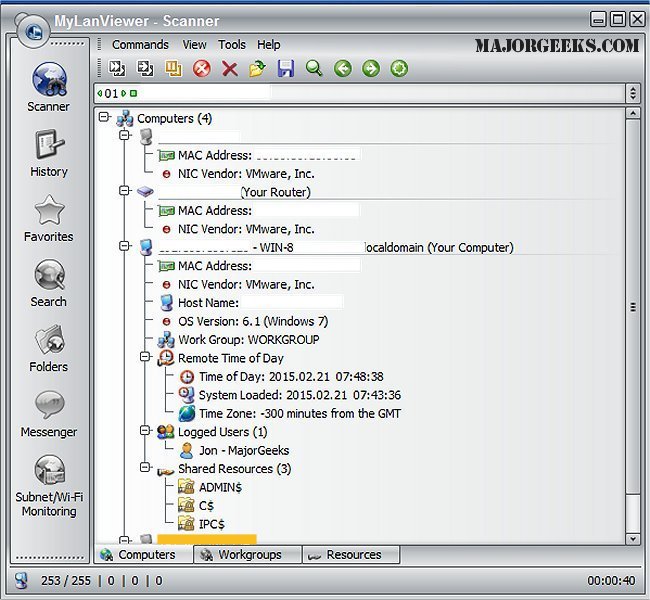
The application features a user-friendly interface that presents network computers in a buddy-list style display, showcasing essential details such as computer names, IP addresses, MAC addresses, network interface card (NIC) vendors, operating system versions, logged-in users, and shared folders. In addition to these features, MyLanViewer allows for remote management functions, including remote shutdown, wake-on-LAN, locking workstations, logging off users, and managing power states (sleep, hibernate, reboot, and shutdown).
MyLanViewer also excels in monitoring IP addresses and can send notifications when the status of connected devices changes. Users can access shared folders, terminate user sessions, disable shared folders, and view netstat information. Furthermore, the software has the ability to detect unauthorized DHCP servers and monitor all devices on the subnet, including hidden ones, alerting users when new devices connect to their Wi-Fi network.
With its ease of installation and intuitive design, MyLanViewer Network/IP Scanner is an invaluable tool for network administrators and home users alike who wish to maintain control and oversight of their network environments.
In summary, MyLanViewer Network/IP Scanner 6.7.9 is a comprehensive network management solution that not only simplifies the process of identifying and interacting with networked devices but also enhances security and administrative control over shared resources. Its continuous updates ensure it remains relevant in an ever-evolving technological landscape
The application features a user-friendly interface that presents network computers in a buddy-list style display, showcasing essential details such as computer names, IP addresses, MAC addresses, network interface card (NIC) vendors, operating system versions, logged-in users, and shared folders. In addition to these features, MyLanViewer allows for remote management functions, including remote shutdown, wake-on-LAN, locking workstations, logging off users, and managing power states (sleep, hibernate, reboot, and shutdown).
MyLanViewer also excels in monitoring IP addresses and can send notifications when the status of connected devices changes. Users can access shared folders, terminate user sessions, disable shared folders, and view netstat information. Furthermore, the software has the ability to detect unauthorized DHCP servers and monitor all devices on the subnet, including hidden ones, alerting users when new devices connect to their Wi-Fi network.
With its ease of installation and intuitive design, MyLanViewer Network/IP Scanner is an invaluable tool for network administrators and home users alike who wish to maintain control and oversight of their network environments.
In summary, MyLanViewer Network/IP Scanner 6.7.9 is a comprehensive network management solution that not only simplifies the process of identifying and interacting with networked devices but also enhances security and administrative control over shared resources. Its continuous updates ensure it remains relevant in an ever-evolving technological landscape
MyLanViewer Network/IP Scanner 6.7.9 released
MyLanViewer Network/IP Scanner is a powerful Netbios and LAN/Network IP address scanner that assists in locating IP addresses, MAC addresses, and shared folders of computers on your wired or wireless (Wi-Fi) network.