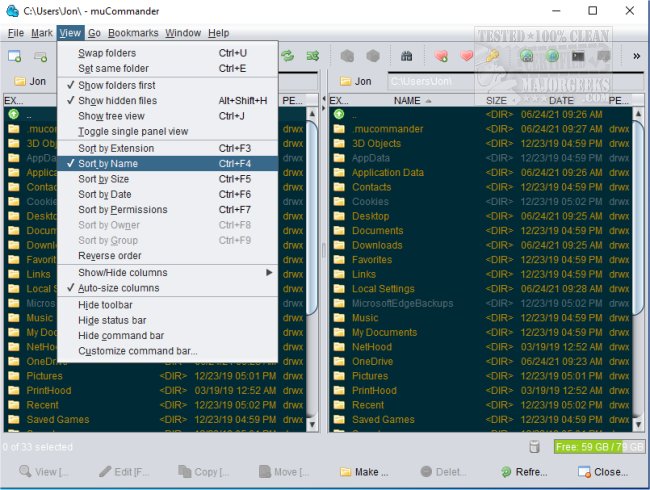
muCommander 1.6.1 has been released, enhancing its reputation as a versatile cross-platform file manager that features a dual-pane interface. This application streamlines file management tasks such as copying, moving, and batch renaming files, all within a user-friendly modern interface. Key functionalities include support for multiple tabs, universal bookmarks, and a credential manager that enhances user experience. Users can also customize keyboard shortcuts for added convenience.
One of muCommander's standout features is its ability to access a virtual filesystem, which supports a wide array of local and remote storage solutions, including FTP, SFTP, SMB, NFS, HTTP, Amazon S3, Hadoop HDFS, and Bonjour. This makes it a compelling choice for users who need to manage files across various platforms and file formats.
In addition to its robust file management capabilities, muCommander supports cloud storage services like Dropbox and Google Drive, as well as various archive formats including ZIP, RAR, 7z, TAR, GZip, BZip2, and ISO/NRG. The application also allows for a fully customizable user interface, with configurable toolbars and themes, and is available in multiple languages, making it accessible to a global audience.
For those seeking a powerful file manager with extensive features, muCommander could be the ideal solution. Its comprehensive support for different filesystems, credential management, and customizable interface positions it as a top choice for both casual users and professionals.
As file management needs continue to evolve, applications like muCommander that offer flexibility and rich features are essential. Future updates could further enhance its functionality, potentially incorporating AI-driven features for smarter file organization or improved collaboration tools for teams working across various platforms. Users looking for efficient file management solutions should consider exploring muCommander for their needs
One of muCommander's standout features is its ability to access a virtual filesystem, which supports a wide array of local and remote storage solutions, including FTP, SFTP, SMB, NFS, HTTP, Amazon S3, Hadoop HDFS, and Bonjour. This makes it a compelling choice for users who need to manage files across various platforms and file formats.
In addition to its robust file management capabilities, muCommander supports cloud storage services like Dropbox and Google Drive, as well as various archive formats including ZIP, RAR, 7z, TAR, GZip, BZip2, and ISO/NRG. The application also allows for a fully customizable user interface, with configurable toolbars and themes, and is available in multiple languages, making it accessible to a global audience.
For those seeking a powerful file manager with extensive features, muCommander could be the ideal solution. Its comprehensive support for different filesystems, credential management, and customizable interface positions it as a top choice for both casual users and professionals.
As file management needs continue to evolve, applications like muCommander that offer flexibility and rich features are essential. Future updates could further enhance its functionality, potentially incorporating AI-driven features for smarter file organization or improved collaboration tools for teams working across various platforms. Users looking for efficient file management solutions should consider exploring muCommander for their needs
muCommander 1.6.1 released
muCommander is a cross-platform file manager with a dual-pane interface.