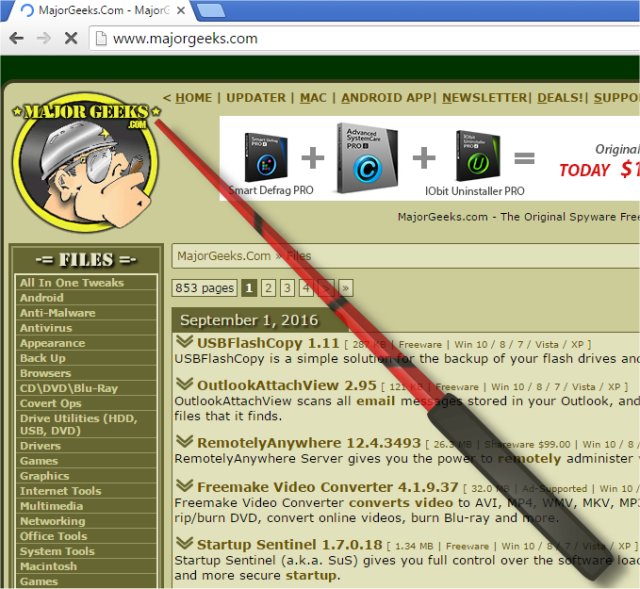
PointerStick version 7.22 has been released, enhancing its functionality as a portable tool designed for Windows Desktop that simulates a virtual pointer stick. This tool is particularly beneficial for presentations, as it allows users to effectively highlight the current mouse position, thereby improving the emphasis on the topic being discussed. The virtual pointer stick is especially useful when presenting with projectors and large LED/LCD screens.
Key features of PointerStick include:
- A very small program size, ensuring minimal resource usage
- Low CPU consumption for efficient performance
- Adjustable size of the pointer stick to suit user preferences
- Multiple textures (bitmaps) for the pointing stick to customize appearance
- Optional alpha transparency for visual flexibility
- Ability to deactivate the pointer stick using mouse or keyboard input
- Optional translation capabilities to cater to multilingual users
- Portability, allowing it to be used on different devices without installation
- Multilingual support for diverse user bases
In addition to PointerStick, users may find related tools helpful, such as options for enabling mouse pointer trails, troubleshooting mouse cursor issues, and software for managing Logitech devices. The ongoing enhancements to PointerStick demonstrate a commitment to improving user experience during presentations, making it an invaluable tool for educators, trainers, and business professionals alike.
As technology advances, future versions of PointerStick could potentially incorporate more interactive features, such as integration with presentation software or real-time analytics on audience engagement, further enriching the presentation experience
Key features of PointerStick include:
- A very small program size, ensuring minimal resource usage
- Low CPU consumption for efficient performance
- Adjustable size of the pointer stick to suit user preferences
- Multiple textures (bitmaps) for the pointing stick to customize appearance
- Optional alpha transparency for visual flexibility
- Ability to deactivate the pointer stick using mouse or keyboard input
- Optional translation capabilities to cater to multilingual users
- Portability, allowing it to be used on different devices without installation
- Multilingual support for diverse user bases
In addition to PointerStick, users may find related tools helpful, such as options for enabling mouse pointer trails, troubleshooting mouse cursor issues, and software for managing Logitech devices. The ongoing enhancements to PointerStick demonstrate a commitment to improving user experience during presentations, making it an invaluable tool for educators, trainers, and business professionals alike.
As technology advances, future versions of PointerStick could potentially incorporate more interactive features, such as integration with presentation software or real-time analytics on audience engagement, further enriching the presentation experience
PointerStick 7.22 released
PointerStick is a portable tool that presents on the Windows Desktop a virtual pointer stick, for example, for presentations to highlight the current mouse position and the emphasis on your topic will be better.