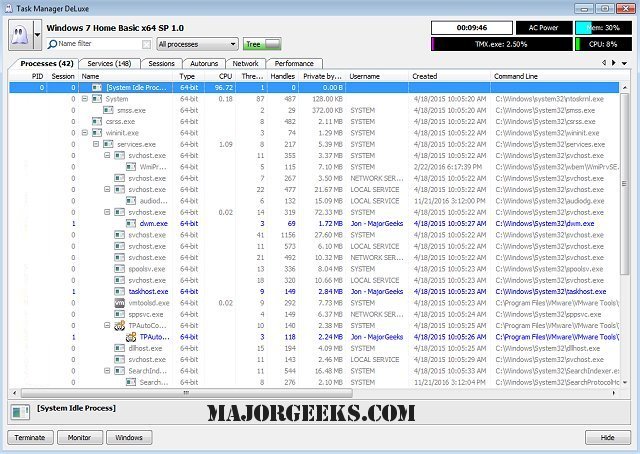
MiTeC Task Manager Deluxe 4.12.0 has been released, presenting a free, lightweight, and portable alternative to the standard Windows Task Manager. While the native Task Manager caters well to casual users with its straightforward interface, it falls short in terms of advanced features that MiTeC Task Manager Deluxe provides.
This enhanced tool allows for custom filtering, detailed error monitoring, and a comprehensive management of services and their dependencies. Unlike the basic functionalities offered by Windows Task Manager for managing running processes, MiTeC Task Manager Deluxe enables users to track processes, threads, and network activity in a more detailed manner. It includes extensive information on process modules, handles, and I/O statistics, which are crucial for diagnosing performance issues effectively.
Additionally, MiTeC Task Manager Deluxe features tools for managing autorun programs, monitoring active user sessions, and taking system snapshots to facilitate the analysis of changes over time. The application’s portability means it does not require installation, leaving no trace on the system, making it convenient for users who need to troubleshoot on different machines. The AutoRefresh feature helps keep the data current by automatically refreshing the display at specified intervals.
Furthermore, the session viewer includes an automatic session journal that logs every login, logout, lock, and status change, which is particularly useful for monitoring user activity on terminal servers. MiTeC Task Manager Deluxe allows users to browse and administer various domains, including processes, windows, services, sessions, autoruns, environment variables, and system performance data.
In conclusion, MiTeC Task Manager Deluxe is an invaluable tool for advanced users and IT professionals looking for comprehensive system management capabilities. Its rich feature set not only enhances the user experience compared to the standard Task Manager but also provides essential functionalities for effective system monitoring and troubleshooting
This enhanced tool allows for custom filtering, detailed error monitoring, and a comprehensive management of services and their dependencies. Unlike the basic functionalities offered by Windows Task Manager for managing running processes, MiTeC Task Manager Deluxe enables users to track processes, threads, and network activity in a more detailed manner. It includes extensive information on process modules, handles, and I/O statistics, which are crucial for diagnosing performance issues effectively.
Additionally, MiTeC Task Manager Deluxe features tools for managing autorun programs, monitoring active user sessions, and taking system snapshots to facilitate the analysis of changes over time. The application’s portability means it does not require installation, leaving no trace on the system, making it convenient for users who need to troubleshoot on different machines. The AutoRefresh feature helps keep the data current by automatically refreshing the display at specified intervals.
Furthermore, the session viewer includes an automatic session journal that logs every login, logout, lock, and status change, which is particularly useful for monitoring user activity on terminal servers. MiTeC Task Manager Deluxe allows users to browse and administer various domains, including processes, windows, services, sessions, autoruns, environment variables, and system performance data.
In conclusion, MiTeC Task Manager Deluxe is an invaluable tool for advanced users and IT professionals looking for comprehensive system management capabilities. Its rich feature set not only enhances the user experience compared to the standard Task Manager but also provides essential functionalities for effective system monitoring and troubleshooting
MiTeC Task Manager Deluxe 4.12.0 released
MiTeC Task Manager Deluxe provides a free, lightweight, portable package that will enhance the features available in the standard Windows Task Manager.