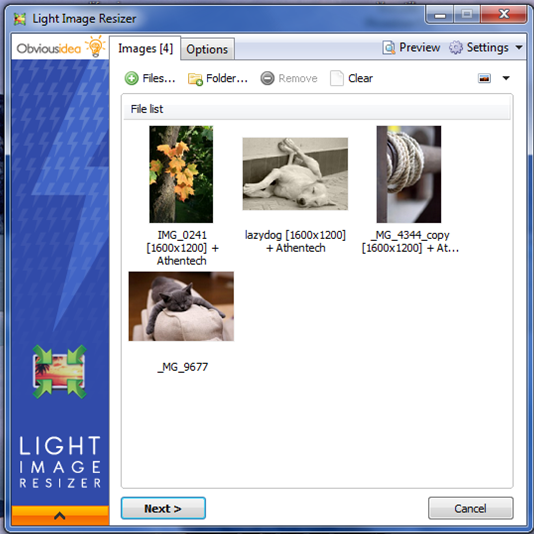
Light Image Resizer 7.6.2.170 has been released, offering users a powerful tool for efficiently resizing and converting images across various formats. This versatile software utilizes advanced multi-core resizing technology, enabling quick and precise image processing while maintaining high quality. The user-friendly interface simplifies tasks such as creating, renaming, and organizing images, making it easy for users to manage their photo collections.
Key features include the ability to add watermarks to protect intellectual property, select specific output resolutions, and create duplicates of original files to preserve them. Users can also compress images to reduce file sizes, which is particularly beneficial for sharing or storing photos. Light Image Resizer supports both individual photo editing and batch processing, allowing users to resize multiple images simultaneously with ease.
Additional capabilities include HTML-like text formatting for watermarks, sepia conversion, border additions, and a live preview feature to visualize the final output before processing. The software also supports RAW file formats and enables quick access through Windows shell integration.
In terms of output options, users can attach resized photos to emails or create PDFs from images, while popular predefined profiles streamline the process for common resolutions. The Digital Picture Frame Wizard is another notable feature, allowing users to optimize images for digital frames.
Overall, Light Image Resizer caters to both casual users and professionals, ensuring efficient image processing while maintaining quality. As technology continues to evolve, future updates may introduce enhanced features, improved performance, and expanded format support, further solidifying Light Image Resizer's position as a top choice for image management
Key features include the ability to add watermarks to protect intellectual property, select specific output resolutions, and create duplicates of original files to preserve them. Users can also compress images to reduce file sizes, which is particularly beneficial for sharing or storing photos. Light Image Resizer supports both individual photo editing and batch processing, allowing users to resize multiple images simultaneously with ease.
Additional capabilities include HTML-like text formatting for watermarks, sepia conversion, border additions, and a live preview feature to visualize the final output before processing. The software also supports RAW file formats and enables quick access through Windows shell integration.
In terms of output options, users can attach resized photos to emails or create PDFs from images, while popular predefined profiles streamline the process for common resolutions. The Digital Picture Frame Wizard is another notable feature, allowing users to optimize images for digital frames.
Overall, Light Image Resizer caters to both casual users and professionals, ensuring efficient image processing while maintaining quality. As technology continues to evolve, future updates may introduce enhanced features, improved performance, and expanded format support, further solidifying Light Image Resizer's position as a top choice for image management
Light Image Resizer 7.6.2.170 released
Light Image Resizer gives you the power to resize pictures or convert them into different formats easily and accurately.