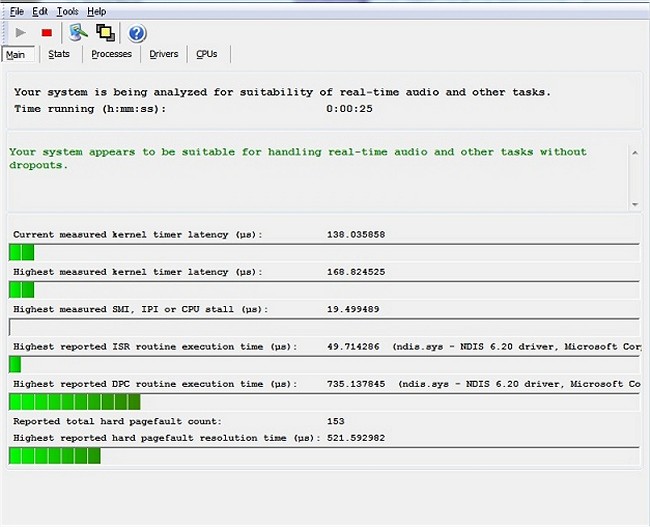
LatencyMon is a powerful diagnostic tool designed for Windows systems to evaluate their capability for real-time audio processing. Whether you're a tech enthusiast seeking pristine audio quality or a gamer frustrated by audio glitches, LatencyMon serves as your essential troubleshooting companion. This free and lightweight software not only assesses your system's performance but also identifies specific problems that hinder smooth audio playback and provides actionable solutions.
At its essence, LatencyMon acts as an audio auditor for Windows, a platform not originally optimized for real-time audio tasks. It addresses issues like music skipping, crackling voiceovers, or disruptions during video calls that often stem from buffer underruns or high audio latency. By analyzing kernel timer latencies, deferred procedure call (DPC) execution times, interrupted service routines (ISR), and memory page faults, LatencyMon effectively identifies the processes, drivers, or services that are causing audio delays.
LatencyMon is remarkably easy to use. After installation, simply click the “Start” button and allow it to run for approximately 10 seconds. You’ll receive a comprehensive yet easy-to-understand report detailing which drivers and processes are responsible for audio delays. The tool offers recommendations for optimization, updates, or disabling problematic components, essentially providing a diagnostic report that guides you through the troubleshooting process.
1. Real-Time Audio Testing: Assess your system's readiness for music production, live streaming, gaming, or professional video conferencing.
2. Driver Diagnostics: Identify and isolate any troublesome drivers or processes affecting audio playback.
3. Compatibility: Works seamlessly with multiple versions of Windows, including Windows 7 through Windows 11.
4. Lightweight and Efficient: Quick installation and fast scanning capabilities make it a practical choice.
5. ISR and DPC Monitoring: Provides detailed insights into execution times, enabling you to take informed actions.
LatencyMon isn’t just for audiophiles or sound professionals; it's beneficial for anyone experiencing choppy audio during media playback or online activities. Whether you're a gamer, content creator, professional, media enthusiast, or DIY tinkerer, LatencyMon can enhance your audio experience. It’s particularly useful for those who have recently updated drivers, adjusted device firmware, or connected new peripherals, offering essential insights for optimization.
LatencyMon stands out as a critical tool for anyone invested in achieving seamless real-time audio performance. It caters to a diverse audience, from casual users encountering Spotify hiccups to advanced producers fine-tuning their setups. With its user-friendly interface and in-depth diagnostics, LatencyMon demystifies audio-related latency issues, empowering users to make informed decisions about their systems. So, if you're tired of audio disruptions, consider giving LatencyMon a try—smooth, stutter-free audio is just a diagnostic report away.
Additionally, exploring similar tools or guides on diagnosing sound delays and audio latency in Windows 10 and 11 can further refine your audio experience
What LatencyMon Does
At its essence, LatencyMon acts as an audio auditor for Windows, a platform not originally optimized for real-time audio tasks. It addresses issues like music skipping, crackling voiceovers, or disruptions during video calls that often stem from buffer underruns or high audio latency. By analyzing kernel timer latencies, deferred procedure call (DPC) execution times, interrupted service routines (ISR), and memory page faults, LatencyMon effectively identifies the processes, drivers, or services that are causing audio delays.
A User-Friendly Tool for Complex Challenges
LatencyMon is remarkably easy to use. After installation, simply click the “Start” button and allow it to run for approximately 10 seconds. You’ll receive a comprehensive yet easy-to-understand report detailing which drivers and processes are responsible for audio delays. The tool offers recommendations for optimization, updates, or disabling problematic components, essentially providing a diagnostic report that guides you through the troubleshooting process.
Key Benefits of LatencyMon
1. Real-Time Audio Testing: Assess your system's readiness for music production, live streaming, gaming, or professional video conferencing.
2. Driver Diagnostics: Identify and isolate any troublesome drivers or processes affecting audio playback.
3. Compatibility: Works seamlessly with multiple versions of Windows, including Windows 7 through Windows 11.
4. Lightweight and Efficient: Quick installation and fast scanning capabilities make it a practical choice.
5. ISR and DPC Monitoring: Provides detailed insights into execution times, enabling you to take informed actions.
Who Can Benefit from LatencyMon?
LatencyMon isn’t just for audiophiles or sound professionals; it's beneficial for anyone experiencing choppy audio during media playback or online activities. Whether you're a gamer, content creator, professional, media enthusiast, or DIY tinkerer, LatencyMon can enhance your audio experience. It’s particularly useful for those who have recently updated drivers, adjusted device firmware, or connected new peripherals, offering essential insights for optimization.
Conclusion
LatencyMon stands out as a critical tool for anyone invested in achieving seamless real-time audio performance. It caters to a diverse audience, from casual users encountering Spotify hiccups to advanced producers fine-tuning their setups. With its user-friendly interface and in-depth diagnostics, LatencyMon demystifies audio-related latency issues, empowering users to make informed decisions about their systems. So, if you're tired of audio disruptions, consider giving LatencyMon a try—smooth, stutter-free audio is just a diagnostic report away.
Additionally, exploring similar tools or guides on diagnosing sound delays and audio latency in Windows 10 and 11 can further refine your audio experience
LatencyMon 7.40 released
LatencyMon checks if a system running Windows is suitable for processing real-time audio and other tasks.