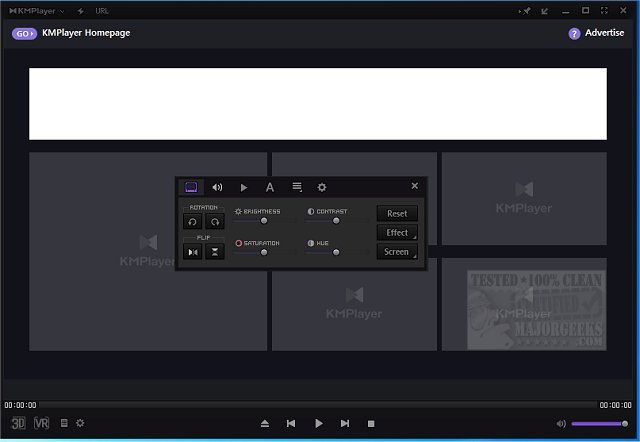
KMPlayer has released its latest version, 2026.7.24.12 / 4.2.3.38, enhancing its reputation as a versatile multimedia player that supports an extensive range of audio and video formats. This player is designed to handle everything from standard-definition video files to ultra-high-definition 4K and 8K films, ensuring seamless playback and a high degree of customization for users.
Key features of KMPlayer include:
- Comprehensive Format Support: The player accommodates a wide variety of formats, including MP4, AVI, MKV, MOV, FLV, and WMV, as well as Blu-ray and DVD playback. It is capable of playing niche formats and even damaged files.
- High-Quality Playback: Users can enjoy crisp visuals and smooth playback in resolutions up to 8K UHD.
- Extensive Customization Options: KMPlayer allows users to modify playback speed, synchronize audio tracks, apply video filters, and adjust subtitles.
- Advanced Audio & Video Controls: Users can fine-tune visuals and audio settings, and customize remote interface keys for home theater setups.
- Screen Capture & Recording: The player supports capturing audio, video, and screenshots directly during playback, catering to content creators and media enthusiasts.
- Dynamic Interface: Users can personalize the interface with various skins and layouts.
- Smart Tools: Built-in features include subtitle management, file sharing, and remote playback capabilities through UPNP, FTP, and cloud services.
Unique extras offered by KMPlayer are:
- 3D Playback & Conversion: The ability to play and convert standard videos into 3D content.
- Virtual Reality Support: This feature enhances the viewing experience for VR videos.
- Advanced Filter & Codec Management: Users can load, manage, and customize codecs and filters for an optimal viewing experience.
The overall verdict on KMPlayer is that it serves as a powerful multimedia player with extensive features, making it suitable for both casual viewers and media enthusiasts alike. While its rich functionality may present a learning curve for some users, the ability to create a personalized and immersive media experience is well worth the effort. Though the ad-supported interface may not appeal to everyone, the performance and features of KMPlayer make it a strong contender among multimedia players.
In summary, KMPlayer stands out in the crowded media player landscape due to its versatility and comprehensive features, catering to a wide range of user preferences. As it continues to evolve, it remains a top choice for those seeking a customizable and powerful multimedia experience. For those exploring alternatives, similar options include VLC Media Player and various audio enhancement guides for Windows 10 and 11 users
Key features of KMPlayer include:
- Comprehensive Format Support: The player accommodates a wide variety of formats, including MP4, AVI, MKV, MOV, FLV, and WMV, as well as Blu-ray and DVD playback. It is capable of playing niche formats and even damaged files.
- High-Quality Playback: Users can enjoy crisp visuals and smooth playback in resolutions up to 8K UHD.
- Extensive Customization Options: KMPlayer allows users to modify playback speed, synchronize audio tracks, apply video filters, and adjust subtitles.
- Advanced Audio & Video Controls: Users can fine-tune visuals and audio settings, and customize remote interface keys for home theater setups.
- Screen Capture & Recording: The player supports capturing audio, video, and screenshots directly during playback, catering to content creators and media enthusiasts.
- Dynamic Interface: Users can personalize the interface with various skins and layouts.
- Smart Tools: Built-in features include subtitle management, file sharing, and remote playback capabilities through UPNP, FTP, and cloud services.
Unique extras offered by KMPlayer are:
- 3D Playback & Conversion: The ability to play and convert standard videos into 3D content.
- Virtual Reality Support: This feature enhances the viewing experience for VR videos.
- Advanced Filter & Codec Management: Users can load, manage, and customize codecs and filters for an optimal viewing experience.
The overall verdict on KMPlayer is that it serves as a powerful multimedia player with extensive features, making it suitable for both casual viewers and media enthusiasts alike. While its rich functionality may present a learning curve for some users, the ability to create a personalized and immersive media experience is well worth the effort. Though the ad-supported interface may not appeal to everyone, the performance and features of KMPlayer make it a strong contender among multimedia players.
In summary, KMPlayer stands out in the crowded media player landscape due to its versatility and comprehensive features, catering to a wide range of user preferences. As it continues to evolve, it remains a top choice for those seeking a customizable and powerful multimedia experience. For those exploring alternatives, similar options include VLC Media Player and various audio enhancement guides for Windows 10 and 11 users
KMPlayer 2026.7.24.12 / 4.2.3.38 released
KMPlayer is a full-featured movie and audio player that supports various codecs and file formats.