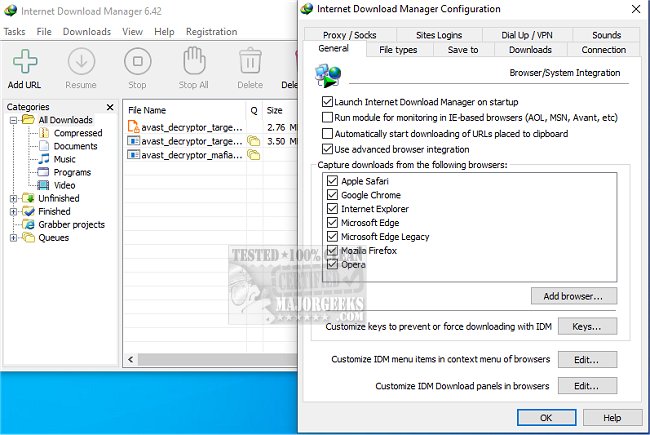
Internet Download Manager (IDM) is a powerful tool designed to enhance download speeds, resume interrupted downloads, and organize files efficiently. The latest version, 6.43 Build 16, builds on IDM's reputation as the ultimate download booster, addressing common frustrations associated with slow or disorganized downloads.
Key Features of Internet Download Manager
1. Lightning-Fast Downloads: IDM utilizes advanced file-segmentation technology to boost download speeds by up to five times. By splitting files into segments and using parallel connections, IDM maximizes bandwidth and circumvents server speed limitations. This approach ensures that users experience minimal latency and improved efficiency.
2. Resume and Recover Broken Downloads: IDM's ability to resume downloads from where they left off is a game-changer. Whether due to internet interruptions or system crashes, users can continue downloads without starting over, saving time and frustration.
3. Easy Browser Integration: The software seamlessly integrates with popular web browsers such as Chrome, Firefox, Edge, and Opera. It automatically detects downloadable files on web pages, providing a convenient "Download" button for instant access to videos and files.
4. Download Streaming Videos and Audio: IDM allows users to capture streaming content from platforms like YouTube and Dailymotion. This feature is particularly useful for downloading tutorials, presentations, or favorite music mixes for offline access.
5. Advanced Download Organization: IDM organizes downloads into categories—documents, music, videos—ensuring users can easily find their files without hassle.
6. Customization for Power Users: For users who crave more control, IDM offers customization options, including download limits, scheduling for off-peak hours, and simultaneous file downloads. Advanced users can even launch downloads via the command line.
7. Security Features: IDM is compatible with antivirus software, automatically scanning downloads to protect users from potential malware threats.
The Verdict: Internet Download Manager transforms slow, unreliable downloads into a streamlined experience. Though the interface could benefit from modern updates, the efficiency and power of IDM make it an invaluable tool for anyone frequently downloading files.
Future Enhancements: Looking ahead, IDM could consider adding features like cloud integration for easier file access across devices, enhanced support for newer streaming services, and an updated user interface to improve user experience. Users can anticipate continued advancements that will further solidify IDM's position as a leading download management solution.
Related Topics:
- Improving Wireless Network Performance
- Troubleshooting Slow Internet on Windows 10 & 11
- Monitoring Internet Upload and Download Speeds
- Understanding Windows Auto-Tuning
- Checking Wi-Fi Security Settings in Window
Key Features of Internet Download Manager
1. Lightning-Fast Downloads: IDM utilizes advanced file-segmentation technology to boost download speeds by up to five times. By splitting files into segments and using parallel connections, IDM maximizes bandwidth and circumvents server speed limitations. This approach ensures that users experience minimal latency and improved efficiency.
2. Resume and Recover Broken Downloads: IDM's ability to resume downloads from where they left off is a game-changer. Whether due to internet interruptions or system crashes, users can continue downloads without starting over, saving time and frustration.
3. Easy Browser Integration: The software seamlessly integrates with popular web browsers such as Chrome, Firefox, Edge, and Opera. It automatically detects downloadable files on web pages, providing a convenient "Download" button for instant access to videos and files.
4. Download Streaming Videos and Audio: IDM allows users to capture streaming content from platforms like YouTube and Dailymotion. This feature is particularly useful for downloading tutorials, presentations, or favorite music mixes for offline access.
5. Advanced Download Organization: IDM organizes downloads into categories—documents, music, videos—ensuring users can easily find their files without hassle.
6. Customization for Power Users: For users who crave more control, IDM offers customization options, including download limits, scheduling for off-peak hours, and simultaneous file downloads. Advanced users can even launch downloads via the command line.
7. Security Features: IDM is compatible with antivirus software, automatically scanning downloads to protect users from potential malware threats.
The Verdict: Internet Download Manager transforms slow, unreliable downloads into a streamlined experience. Though the interface could benefit from modern updates, the efficiency and power of IDM make it an invaluable tool for anyone frequently downloading files.
Future Enhancements: Looking ahead, IDM could consider adding features like cloud integration for easier file access across devices, enhanced support for newer streaming services, and an updated user interface to improve user experience. Users can anticipate continued advancements that will further solidify IDM's position as a leading download management solution.
Related Topics:
- Improving Wireless Network Performance
- Troubleshooting Slow Internet on Windows 10 & 11
- Monitoring Internet Upload and Download Speeds
- Understanding Windows Auto-Tuning
- Checking Wi-Fi Security Settings in Window
Internet Download Manager 6.43 Build 16 released
Internet Download Manager is a tool for drastically increasing your download speeds and resuming/scheduling downloads, including the capability to download any streaming video.
Internet Download Manager 6.43 Build 16 released @ MajorGeeks