FindInside is a robust and free desktop search utility designed to help users efficiently locate detailed information across various document types, moving beyond the limitations of traditional file name searches. This utility is especially useful for those who need to find specific words or phrases within documents, as it supports a wide array of file formats including PDFs, Microsoft Office documents (Word and Excel), plain text files, source code, and more.
Key Features and Functionality
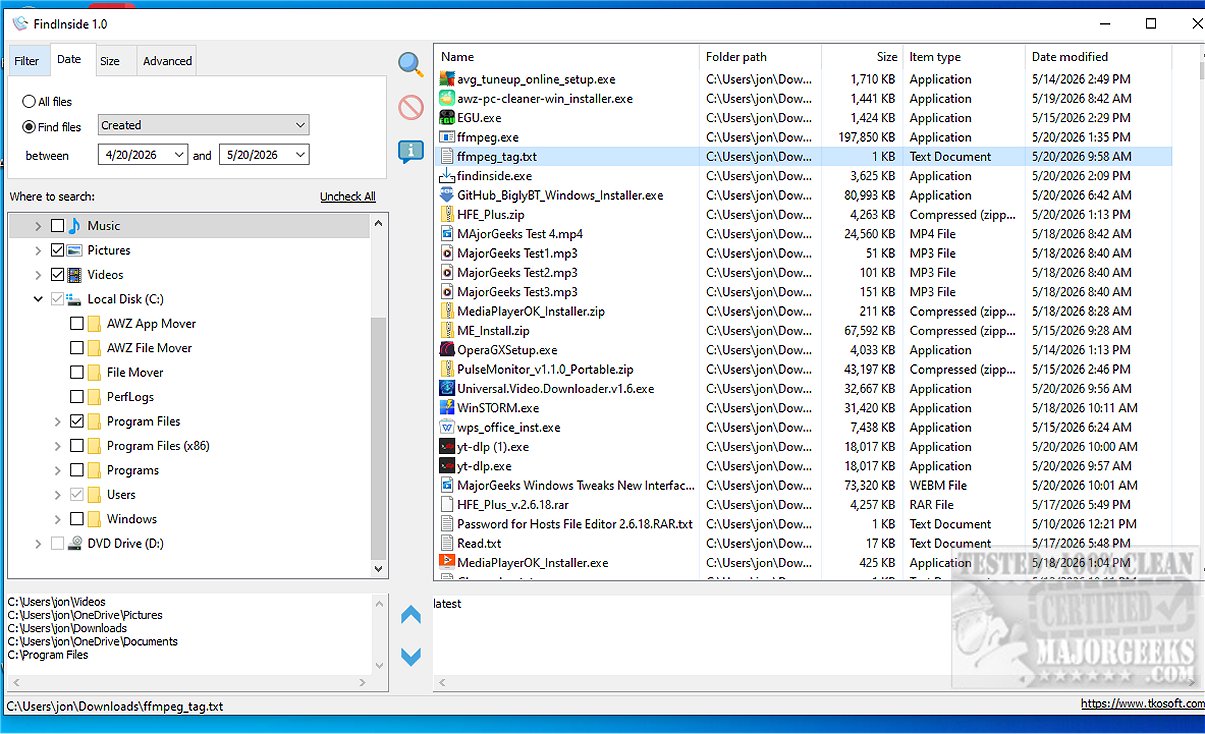
FindInside stands out for its capability to search through mixed document collections, effectively uncovering text that standard Windows search often overlooks. Upon finding a match, the application enhances user experience by displaying the relevant content in a built-in preview area, where the searched phrase is highlighted, allowing users to quickly determine the relevance of the search results.
Some of the notable features include:
- Free software for searching file content on Windows
- Support for various file formats including PDFs, DOCX, text files, logs, and source code
- Document content search, rather than just file name searches
- Built-in text preview with highlighted search phrases
- Navigation options to cycle through multiple matches
- Ability to search within selected folders and subfolders
- Wildcard file name masks and filters for date and file size
- Option to include hidden files in search results
Searching Made Easier
FindInside provides a range of filters to help refine search results. Users can apply file name masks, set date range filters based on file access, creation, or modification dates, and define file size limits to exclude unwanted files. The recursive folder search capability allows for easy exploration of nested directories. The intuitive tree-view interface enables users to select multiple folders, run searches, and manage the process (pause or stop) as needed.
Once the search concludes, results are displayed in an organized list, allowing users to quickly find and access the documents containing the information they seek.
User Experience and Verdict
The latest version of FindInside offers an efficient and user-friendly interface, making it easy for users to locate text within various document formats. The combination of a clear results display and a highlighting feature ensures that users can swiftly identify relevant documents.
In conclusion, FindInside is an invaluable tool for anyone who needs to navigate and locate content within extensive digital document collections. Its powerful search capabilities and user-centric design make it a standout choice for users looking to improve their document searching efficiency.
Related Tools and Tips
- How to Show or Hide Hidden Files, Folders, or Drives
- How to Reset Folder View Settings in Windows 10 & 11
- How to Show or Hide the Search Box or Search Icon in Windows 10 & 11
- How to Change Folder View Template for All Folders in Windows 10 & 11
Explore the efficiency and simplicity of FindInside and enhance your document searching experience today
Key Features and Functionality
FindInside stands out for its capability to search through mixed document collections, effectively uncovering text that standard Windows search often overlooks. Upon finding a match, the application enhances user experience by displaying the relevant content in a built-in preview area, where the searched phrase is highlighted, allowing users to quickly determine the relevance of the search results.
Some of the notable features include:
- Free software for searching file content on Windows
- Support for various file formats including PDFs, DOCX, text files, logs, and source code
- Document content search, rather than just file name searches
- Built-in text preview with highlighted search phrases
- Navigation options to cycle through multiple matches
- Ability to search within selected folders and subfolders
- Wildcard file name masks and filters for date and file size
- Option to include hidden files in search results
Searching Made Easier
FindInside provides a range of filters to help refine search results. Users can apply file name masks, set date range filters based on file access, creation, or modification dates, and define file size limits to exclude unwanted files. The recursive folder search capability allows for easy exploration of nested directories. The intuitive tree-view interface enables users to select multiple folders, run searches, and manage the process (pause or stop) as needed.
Once the search concludes, results are displayed in an organized list, allowing users to quickly find and access the documents containing the information they seek.
User Experience and Verdict
The latest version of FindInside offers an efficient and user-friendly interface, making it easy for users to locate text within various document formats. The combination of a clear results display and a highlighting feature ensures that users can swiftly identify relevant documents.
In conclusion, FindInside is an invaluable tool for anyone who needs to navigate and locate content within extensive digital document collections. Its powerful search capabilities and user-centric design make it a standout choice for users looking to improve their document searching efficiency.
Related Tools and Tips
- How to Show or Hide Hidden Files, Folders, or Drives
- How to Reset Folder View Settings in Windows 10 & 11
- How to Show or Hide the Search Box or Search Icon in Windows 10 & 11
- How to Change Folder View Template for All Folders in Windows 10 & 11
Explore the efficiency and simplicity of FindInside and enhance your document searching experience today
FindInside 2.4 released
FindInside is a powerful free desktop search utility designed for users who need to locate detailed information across various document types, rather than relying solely on file names.