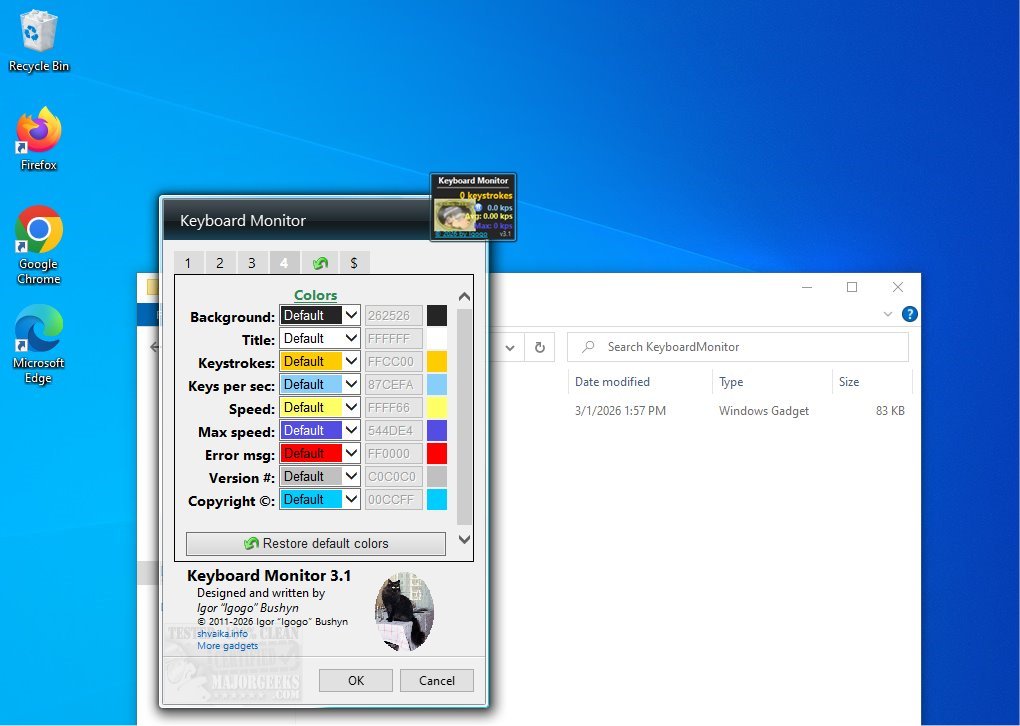
The newly launched Keyboard Monitor 3.5 is a desktop gadget designed to help users evaluate and improve their typing efficiency. This innovative application measures both average and maximum typing speeds while tracking the total number of keystrokes made. By providing these statistics, Keyboard Monitor offers valuable insights into your typing habits, making it an excellent tool for anyone eager to enhance their skills.
Real-Time Keyboard Statistics
Keyboard Monitor operates in real-time, offering continuous feedback on your typing activity. It displays essential metrics, including the total keystrokes and your current, average, and maximum typing speeds, all measured in keystrokes per second (kps). This feature is particularly beneficial for individuals who want to monitor their progress and identify areas for improvement.
User-Friendly Interface
The application features a small and movable interface that can be positioned anywhere on your screen, ensuring visibility regardless of the application in use. Once activated, it automatically begins tracking keyboard activity, providing an uninterrupted stream of data regarding your typing performance.
Extensive Features for Personalization
Keyboard Monitor comes equipped with several useful features that enhance user experience. Users can customize counters and color schemes, pause the current kps display, and choose settings that suit their preferences. For instance, you can decide whether the program should remember counters after a shutdown, instantly reset counters, or save and load specific values.
Moreover, the application allows for extensive customization options, such as adjusting the window's size and opacity, hiding the app's name and copyright notice, and setting a custom keyboard image. Users can also modify background colors for various display elements, offering a personalized touch. All settings can be conveniently reset to factory configurations at any time.
Empowering All Skill Levels
Keyboard Monitor is designed to cater to users of all experience levels, making it an accessible tool for everyone—from seasoned professionals to beginners. Its user-friendly design and comprehensive features enable individuals to harness the benefits of efficient typing, empowering them to enhance their skills with confidence.
In summary, Keyboard Monitor 3.5 is more than just a keystroke tracker; it is a valuable resource for anyone looking to improve their typing abilities. By providing real-time statistics and extensive customization options, it supports users in their journey toward becoming proficient typists.
Related Resources:
- How to Disable the Windows Key on Your Keyboard
- How to Disable the Insert Key in Windows 10/11
- How to Make Your Scroll Lock Key Useful
As typing remains a fundamental skill in the digital age, tools like Keyboard Monitor 3.5 are essential for fostering efficiency and productivity in our daily activities
Real-Time Keyboard Statistics
Keyboard Monitor operates in real-time, offering continuous feedback on your typing activity. It displays essential metrics, including the total keystrokes and your current, average, and maximum typing speeds, all measured in keystrokes per second (kps). This feature is particularly beneficial for individuals who want to monitor their progress and identify areas for improvement.
User-Friendly Interface
The application features a small and movable interface that can be positioned anywhere on your screen, ensuring visibility regardless of the application in use. Once activated, it automatically begins tracking keyboard activity, providing an uninterrupted stream of data regarding your typing performance.
Extensive Features for Personalization
Keyboard Monitor comes equipped with several useful features that enhance user experience. Users can customize counters and color schemes, pause the current kps display, and choose settings that suit their preferences. For instance, you can decide whether the program should remember counters after a shutdown, instantly reset counters, or save and load specific values.
Moreover, the application allows for extensive customization options, such as adjusting the window's size and opacity, hiding the app's name and copyright notice, and setting a custom keyboard image. Users can also modify background colors for various display elements, offering a personalized touch. All settings can be conveniently reset to factory configurations at any time.
Empowering All Skill Levels
Keyboard Monitor is designed to cater to users of all experience levels, making it an accessible tool for everyone—from seasoned professionals to beginners. Its user-friendly design and comprehensive features enable individuals to harness the benefits of efficient typing, empowering them to enhance their skills with confidence.
In summary, Keyboard Monitor 3.5 is more than just a keystroke tracker; it is a valuable resource for anyone looking to improve their typing abilities. By providing real-time statistics and extensive customization options, it supports users in their journey toward becoming proficient typists.
Related Resources:
- How to Disable the Windows Key on Your Keyboard
- How to Disable the Insert Key in Windows 10/11
- How to Make Your Scroll Lock Key Useful
As typing remains a fundamental skill in the digital age, tools like Keyboard Monitor 3.5 are essential for fostering efficiency and productivity in our daily activities
Keyboard Monitor 3.5 released
Keyboard Monitor desktop gadget will assess your typing efficiency by measuring both your average and maximum typing speeds. Additionally, it tracks the total number of keystrokes you have made, providing valuable insights into your typing habits.