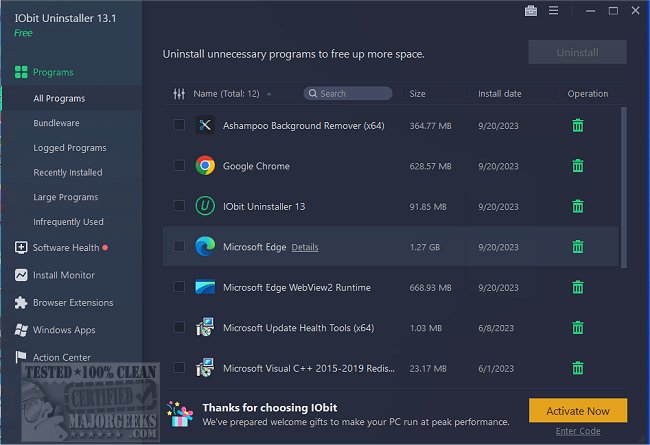
IObit has released version 15.6.0.6 of its Uninstaller software, which provides users with a powerful tool for completely removing unwanted programs, Windows applications, and browser extensions. Unlike the built-in Windows Add or Remove Programs feature, IObit Uninstaller ensures that all remnants—such as files, folders, and registry entries—are eliminated, thereby optimizing system performance.
This uninstaller is particularly effective for dealing with stubborn or broken software that doesn't uninstall properly, as it thoroughly cleans up any associated debris that could slow down your computer. Additionally, IObit Uninstaller is equipped with a real-time installation monitoring feature, which tracks changes made during software installations. This allows users to revert all modifications when uninstalling a program, ensuring no trace is left behind.
Moreover, the tool can remove Windows apps, Universal Windows Platform (UWP) applications, and persistent browser extensions, providing users with comprehensive control over their software environment. Its Software Health feature aids in managing software permissions, blocking unwanted pop-ups, and updating popular applications automatically, which alleviates the need for manual updates.
While IObit Uninstaller offers many advantages, including the detection of bundled software and the ability to completely clean up after uninstalls, it does have some drawbacks. The free version is limited in features, and there may be occasional misidentification of legitimate software as bundled applications, requiring user discretion. Furthermore, the Software Updater doesn't cover all programs.
In conclusion, IObit Uninstaller stands out as an excellent choice for users seeking a clean and efficient PC, making it a valuable tool for both casual users and tech enthusiasts. Its capabilities to eliminate unwanted software and maintain system health contribute significantly to a smoother computing experience.
Extension: Future Enhancements and Alternatives
As software technology evolves, future iterations of IObit Uninstaller could benefit from integrating AI-driven analytics to better distinguish between legitimate applications and bundled software, minimizing user intervention. Furthermore, an enhanced user interface could simplify navigation and improve user experience, particularly for less tech-savvy individuals.
In addition to IObit Uninstaller, users might also explore alternatives such as Revo Uninstaller and Geek Uninstaller, which offer similar functionalities with unique features. Comparing these tools can help users find the one that best suits their specific needs
This uninstaller is particularly effective for dealing with stubborn or broken software that doesn't uninstall properly, as it thoroughly cleans up any associated debris that could slow down your computer. Additionally, IObit Uninstaller is equipped with a real-time installation monitoring feature, which tracks changes made during software installations. This allows users to revert all modifications when uninstalling a program, ensuring no trace is left behind.
Moreover, the tool can remove Windows apps, Universal Windows Platform (UWP) applications, and persistent browser extensions, providing users with comprehensive control over their software environment. Its Software Health feature aids in managing software permissions, blocking unwanted pop-ups, and updating popular applications automatically, which alleviates the need for manual updates.
While IObit Uninstaller offers many advantages, including the detection of bundled software and the ability to completely clean up after uninstalls, it does have some drawbacks. The free version is limited in features, and there may be occasional misidentification of legitimate software as bundled applications, requiring user discretion. Furthermore, the Software Updater doesn't cover all programs.
In conclusion, IObit Uninstaller stands out as an excellent choice for users seeking a clean and efficient PC, making it a valuable tool for both casual users and tech enthusiasts. Its capabilities to eliminate unwanted software and maintain system health contribute significantly to a smoother computing experience.
Extension: Future Enhancements and Alternatives
As software technology evolves, future iterations of IObit Uninstaller could benefit from integrating AI-driven analytics to better distinguish between legitimate applications and bundled software, minimizing user intervention. Furthermore, an enhanced user interface could simplify navigation and improve user experience, particularly for less tech-savvy individuals.
In addition to IObit Uninstaller, users might also explore alternatives such as Revo Uninstaller and Geek Uninstaller, which offer similar functionalities with unique features. Comparing these tools can help users find the one that best suits their specific needs
IObit Uninstaller 15.6.0.6 released
IObit Uninstaller helps you remove unwanted programs, Windows apps, and browser plug-ins/toolbars entirely, even when Windows Add or Remove Programs fails.