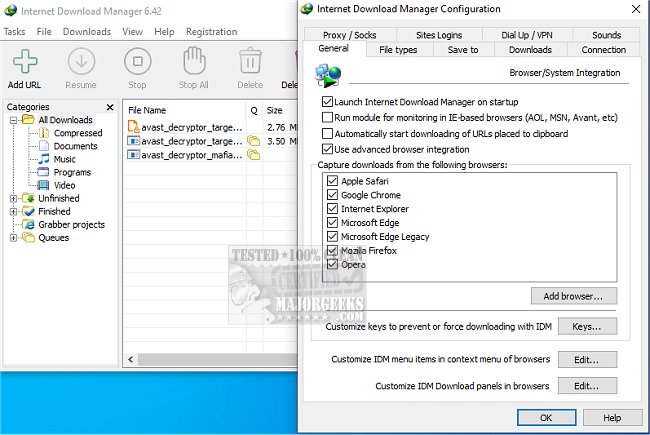
The latest release of Internet Download Manager (IDM) is version 6.43 Build 3, which enhances the experience of downloading files from the internet. IDM is a powerful tool designed to significantly accelerate download speeds, allow users to resume and schedule downloads, and even download streaming videos from various sites.
Why Choose Internet Download Manager?
1. Speed Optimization: IDM utilizes advanced file-segmentation technology to increase download speeds by up to five times. By splitting files into segments and downloading them simultaneously, it maximizes bandwidth and helps bypass server speed limitations, leading to reduced latency and improved efficiency.
2. Resume and Recovery: Unlike conventional download methods that may lose progress due to interruptions, IDM remembers where a download left off, allowing users to pick up right where they stopped in case of disconnections or crashes.
3. Browser Integration: IDM seamlessly integrates with popular browsers such as Chrome, Firefox, Edge, and Opera. It automatically detects downloadable content on web pages and provides a convenient "Download" button for immediate access.
4. Streaming Video and Audio Downloads: Users can easily download streaming videos from platforms like YouTube and Dailymotion. This feature is particularly useful for saving tutorials, presentations, or music mixes for offline viewing.
5. Download Organization: IDM organizes downloaded files into categorized folders—documents, music, videos—ensuring that users can easily locate their files without hassle.
6. Customization for Advanced Users: For those who desire more control, IDM allows users to set download limits, schedule downloads for off-peak hours, and manage the number of simultaneous downloads. It even supports command line operations for tech-savvy users.
7. Security Features: IDM is compatible with antivirus software, providing automatic scans of downloaded files to safeguard against malware threats.
Conclusion: Internet Download Manager transforms the downloading experience by providing faster speeds, reliable recovery options, and convenient video downloading capabilities. Although its interface may benefit from a modern update, the performance enhancements make IDM an essential tool for anyone who frequently downloads files.
Further Exploration: Users looking to improve their download experience may also find interest in related topics such as enhancing wireless network performance, troubleshooting slow internet on Windows, and understanding Windows auto-tuning features. By expanding knowledge in these areas, users can maximize their overall internet efficiency
Why Choose Internet Download Manager?
1. Speed Optimization: IDM utilizes advanced file-segmentation technology to increase download speeds by up to five times. By splitting files into segments and downloading them simultaneously, it maximizes bandwidth and helps bypass server speed limitations, leading to reduced latency and improved efficiency.
2. Resume and Recovery: Unlike conventional download methods that may lose progress due to interruptions, IDM remembers where a download left off, allowing users to pick up right where they stopped in case of disconnections or crashes.
3. Browser Integration: IDM seamlessly integrates with popular browsers such as Chrome, Firefox, Edge, and Opera. It automatically detects downloadable content on web pages and provides a convenient "Download" button for immediate access.
4. Streaming Video and Audio Downloads: Users can easily download streaming videos from platforms like YouTube and Dailymotion. This feature is particularly useful for saving tutorials, presentations, or music mixes for offline viewing.
5. Download Organization: IDM organizes downloaded files into categorized folders—documents, music, videos—ensuring that users can easily locate their files without hassle.
6. Customization for Advanced Users: For those who desire more control, IDM allows users to set download limits, schedule downloads for off-peak hours, and manage the number of simultaneous downloads. It even supports command line operations for tech-savvy users.
7. Security Features: IDM is compatible with antivirus software, providing automatic scans of downloaded files to safeguard against malware threats.
Conclusion: Internet Download Manager transforms the downloading experience by providing faster speeds, reliable recovery options, and convenient video downloading capabilities. Although its interface may benefit from a modern update, the performance enhancements make IDM an essential tool for anyone who frequently downloads files.
Further Exploration: Users looking to improve their download experience may also find interest in related topics such as enhancing wireless network performance, troubleshooting slow internet on Windows, and understanding Windows auto-tuning features. By expanding knowledge in these areas, users can maximize their overall internet efficiency
Internet Download Manager 6.43 Build 3 released
Internet Download Manager is a tool for drastically increasing your download speeds and resuming/scheduling downloads, including the capability to download any streaming video.
Internet Download Manager 6.43 Build 3 released @ MajorGeeks