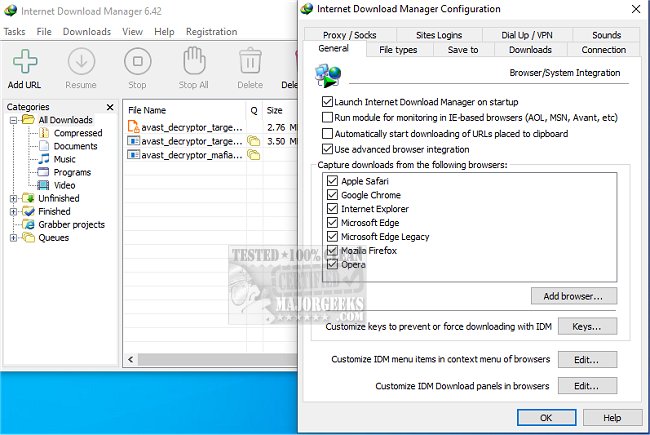
Internet Download Manager (IDM) has unveiled its latest version, 6.42 Build 64, which promises to enhance your downloading experience significantly. This application is designed to increase download speeds, facilitate resumable and scheduled downloads, and capture streaming video content effortlessly.
Why Choose Internet Download Manager?
1. Lightning-Fast Downloads: IDM employs advanced file-segmentation technology to boost download speeds by up to five times. By splitting files into multiple segments that download simultaneously through parallel connections, IDM maximizes bandwidth utilization and mitigates server speed limits. This method reduces latency and enhances overall download efficiency, making it especially beneficial for larger files.
2. Resume and Recover Broken Downloads: Unlike standard download processes, IDM has the capability to resume broken downloads seamlessly, allowing users to pick up right where they left off, whether due to internet disruptions, system crashes, or unexpected restarts.
3. Easy Browser Integration: The tool integrates smoothly with popular web browsers such as Chrome, Firefox, Edge, and Opera. It automatically detects downloadable content on web pages and provides a convenient “Download” button for instant file retrieval without the hassle of copying and pasting URLs.
4. Stream Downloading: IDM allows users to download streaming videos and audio from various platforms, including YouTube and Dailymotion. Whether it's educational content or entertainment, IDM makes it easy to save your favorite media for offline access.
5. Advanced Download Organization: To streamline file management, IDM categorizes downloads automatically into distinct folders such as documents, music, and videos, ensuring that users can locate their files quickly and easily.
6. Customization for Power Users: For those who want more control over their downloading experience, IDM offers extensive customization options, including setting download limits, scheduling downloads during off-peak hours, and managing simultaneous downloads. Advanced users can even initiate downloads via command line.
7. Security Features: IDM enhances your security by working in conjunction with antivirus software to scan downloads for potential malware, providing peace of mind when retrieving files from the internet.
Geek Verdict: Internet Download Manager is a robust tool that transforms slow and erratic downloads into a swift and organized process. While its user interface may benefit from an update, the functionality and performance it offers make it an invaluable asset for users who frequently download files, whether for work or leisure.
Future Considerations: As the digital landscape evolves, IDM may consider enhancing its user interface to improve accessibility and user experience. Moreover, increasing compatibility with emerging web technologies and platforms could further solidify its position as a leading download manager.
In summary, IDM is a game-changer for anyone looking to optimize their downloading habits, offering a faster, more reliable, and organized downloading experience. Whether you are a casual user or a power downloader, IDM is worth exploring for its myriad of features designed to enhance your productivity online
Why Choose Internet Download Manager?
1. Lightning-Fast Downloads: IDM employs advanced file-segmentation technology to boost download speeds by up to five times. By splitting files into multiple segments that download simultaneously through parallel connections, IDM maximizes bandwidth utilization and mitigates server speed limits. This method reduces latency and enhances overall download efficiency, making it especially beneficial for larger files.
2. Resume and Recover Broken Downloads: Unlike standard download processes, IDM has the capability to resume broken downloads seamlessly, allowing users to pick up right where they left off, whether due to internet disruptions, system crashes, or unexpected restarts.
3. Easy Browser Integration: The tool integrates smoothly with popular web browsers such as Chrome, Firefox, Edge, and Opera. It automatically detects downloadable content on web pages and provides a convenient “Download” button for instant file retrieval without the hassle of copying and pasting URLs.
4. Stream Downloading: IDM allows users to download streaming videos and audio from various platforms, including YouTube and Dailymotion. Whether it's educational content or entertainment, IDM makes it easy to save your favorite media for offline access.
5. Advanced Download Organization: To streamline file management, IDM categorizes downloads automatically into distinct folders such as documents, music, and videos, ensuring that users can locate their files quickly and easily.
6. Customization for Power Users: For those who want more control over their downloading experience, IDM offers extensive customization options, including setting download limits, scheduling downloads during off-peak hours, and managing simultaneous downloads. Advanced users can even initiate downloads via command line.
7. Security Features: IDM enhances your security by working in conjunction with antivirus software to scan downloads for potential malware, providing peace of mind when retrieving files from the internet.
Geek Verdict: Internet Download Manager is a robust tool that transforms slow and erratic downloads into a swift and organized process. While its user interface may benefit from an update, the functionality and performance it offers make it an invaluable asset for users who frequently download files, whether for work or leisure.
Future Considerations: As the digital landscape evolves, IDM may consider enhancing its user interface to improve accessibility and user experience. Moreover, increasing compatibility with emerging web technologies and platforms could further solidify its position as a leading download manager.
In summary, IDM is a game-changer for anyone looking to optimize their downloading habits, offering a faster, more reliable, and organized downloading experience. Whether you are a casual user or a power downloader, IDM is worth exploring for its myriad of features designed to enhance your productivity online
Internet Download Manager 6.42 Build 64 released
Internet Download Manager is a tool for drastically increasing your download speeds and resuming/scheduling downloads, including the capability to download any streaming video.
Internet Download Manager 6.42 Build 64 released @ MajorGeeks