ImageConverter 1.6.3 has been launched, providing an intuitive solution for quickly changing image formats with just one click. Designed with ease of use in mind, this application caters to users of all skill levels, making image conversion accessible to everyone.
Why Choose ImageConverter?
The primary appeal of ImageConverter lies in its user-centric design, allowing users to simply drag and drop images into its interface. Once images are uploaded, users can customize various settings, including output format, resolution, and optional filters or enhancements. This streamlined process enables quick conversions tailored to specific needs.
Setting Up ImageConverter
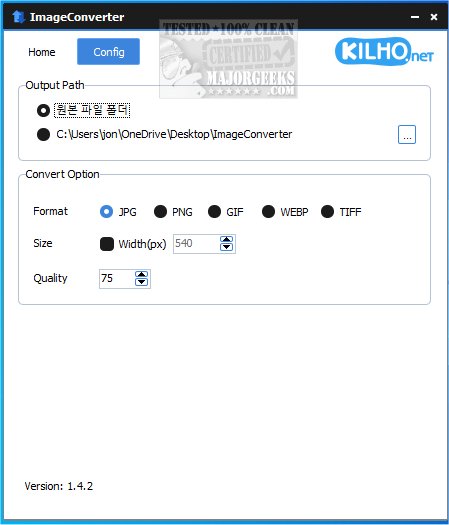
Users can define their output path for saved files, with the option to create a new folder on the desktop for easy access, which is often the preferred choice. This feature ensures that managing converted files is hassle-free.
Resizer Functionality
In addition to format conversion, ImageConverter includes a resizing feature, allowing users to specify desired dimensions. This is particularly useful for optimizing images for web use or various devices while maintaining quality.
Multi-Format Support
ImageConverter supports a broad range of graphic formats, such as PDF, SVG, AI, PSD, PNG, JPG, GIF, WEBP, and TGA. Its ability to handle WEBP files, a popular format for web images, addresses a common need, as many applications struggle with this format. By facilitating conversions to more universally accepted formats, ImageConverter proves to be an essential tool for effective graphic file management.
Geek Verdict
ImageConverter is an invaluable application for anyone engaged in image editing or manipulation. Its straightforward interface eliminates the complexity often associated with image conversion software, making it suitable for both novices and seasoned professionals. Whether resizing, cropping, or changing formats, the app enhances productivity and allows users to focus on their creative endeavors without the distraction of complicated features.
Future Enhancements
Looking ahead, there could be opportunities for further enhancements, such as integrating batch processing for multiple files, advanced editing capabilities, or cloud storage integration for ease of access across devices. These additions would further position ImageConverter as a comprehensive solution for graphic file management, catering to the evolving needs of its users.
Overall, ImageConverter is set to become an essential tool among those who frequently work with images, offering a blend of functionality and simplicity that meets the demands of modern digital workflows
Why Choose ImageConverter?
The primary appeal of ImageConverter lies in its user-centric design, allowing users to simply drag and drop images into its interface. Once images are uploaded, users can customize various settings, including output format, resolution, and optional filters or enhancements. This streamlined process enables quick conversions tailored to specific needs.
Setting Up ImageConverter
Users can define their output path for saved files, with the option to create a new folder on the desktop for easy access, which is often the preferred choice. This feature ensures that managing converted files is hassle-free.
Resizer Functionality
In addition to format conversion, ImageConverter includes a resizing feature, allowing users to specify desired dimensions. This is particularly useful for optimizing images for web use or various devices while maintaining quality.
Multi-Format Support
ImageConverter supports a broad range of graphic formats, such as PDF, SVG, AI, PSD, PNG, JPG, GIF, WEBP, and TGA. Its ability to handle WEBP files, a popular format for web images, addresses a common need, as many applications struggle with this format. By facilitating conversions to more universally accepted formats, ImageConverter proves to be an essential tool for effective graphic file management.
Geek Verdict
ImageConverter is an invaluable application for anyone engaged in image editing or manipulation. Its straightforward interface eliminates the complexity often associated with image conversion software, making it suitable for both novices and seasoned professionals. Whether resizing, cropping, or changing formats, the app enhances productivity and allows users to focus on their creative endeavors without the distraction of complicated features.
Future Enhancements
Looking ahead, there could be opportunities for further enhancements, such as integrating batch processing for multiple files, advanced editing capabilities, or cloud storage integration for ease of access across devices. These additions would further position ImageConverter as a comprehensive solution for graphic file management, catering to the evolving needs of its users.
Overall, ImageConverter is set to become an essential tool among those who frequently work with images, offering a blend of functionality and simplicity that meets the demands of modern digital workflows
ImageConverter 1.6.3 released
ImageConverter lets you change image formats in one click; it is designed to be a user-friendly image conversion app.