ImageConverter 1.6.0 has been released, offering a user-friendly solution for image format conversion. Designed for simplicity, this app allows users of all skill levels to convert image formats effortlessly with just one click.
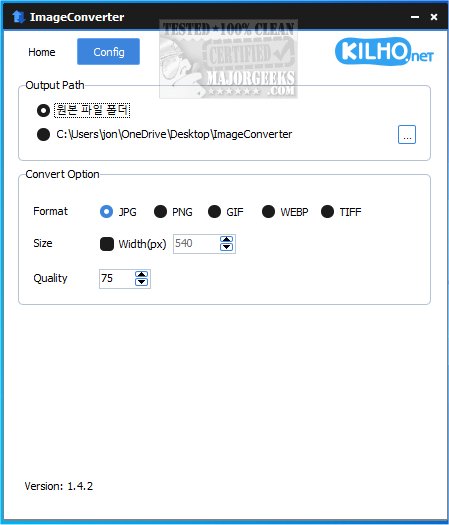
To use ImageConverter, users can easily drag and drop their images into the application. Once uploaded, they can access a variety of configuration options to customize the output format, resolution, and apply enhancements. The app also allows users to specify their output path for saved files, with a default option for creating a new folder on the desktop for easy access.
In addition to converting image formats, ImageConverter features a resizing tool that enables users to adjust image dimensions, making it ideal for web optimization and ensuring quality across different devices. The app supports a wide range of graphic formats, including PDF, SVG, AI, PSD, PNG, JPG, GIF, WEBP, and TGA. Its support for WEBP files, which are commonly used on the internet, addresses compatibility issues that users may face when dealing with various applications and devices.
The verdict on ImageConverter is positive, as it streamlines the process of image editing and manipulation. Its intuitive interface allows both beginners and experienced users to convert, resize, and modify images efficiently without the complexity of traditional software.
In summary, ImageConverter 1.6.0 is a powerful yet straightforward tool for anyone working with images, making it easier to manage and convert graphic files according to individual needs. Whether for personal use or professional projects, it enhances productivity and allows users to focus more on creativity.
Furthermore, future updates could include more advanced features such as batch processing, cloud integration, or enhanced editing capabilities to further cater to users looking for a more comprehensive image management solution
To use ImageConverter, users can easily drag and drop their images into the application. Once uploaded, they can access a variety of configuration options to customize the output format, resolution, and apply enhancements. The app also allows users to specify their output path for saved files, with a default option for creating a new folder on the desktop for easy access.
In addition to converting image formats, ImageConverter features a resizing tool that enables users to adjust image dimensions, making it ideal for web optimization and ensuring quality across different devices. The app supports a wide range of graphic formats, including PDF, SVG, AI, PSD, PNG, JPG, GIF, WEBP, and TGA. Its support for WEBP files, which are commonly used on the internet, addresses compatibility issues that users may face when dealing with various applications and devices.
The verdict on ImageConverter is positive, as it streamlines the process of image editing and manipulation. Its intuitive interface allows both beginners and experienced users to convert, resize, and modify images efficiently without the complexity of traditional software.
In summary, ImageConverter 1.6.0 is a powerful yet straightforward tool for anyone working with images, making it easier to manage and convert graphic files according to individual needs. Whether for personal use or professional projects, it enhances productivity and allows users to focus more on creativity.
Furthermore, future updates could include more advanced features such as batch processing, cloud integration, or enhanced editing capabilities to further cater to users looking for a more comprehensive image management solution
ImageConverter 1.6.0 released
ImageConverter lets you change image formats in one click; it is designed to be a user-friendly image conversion app.