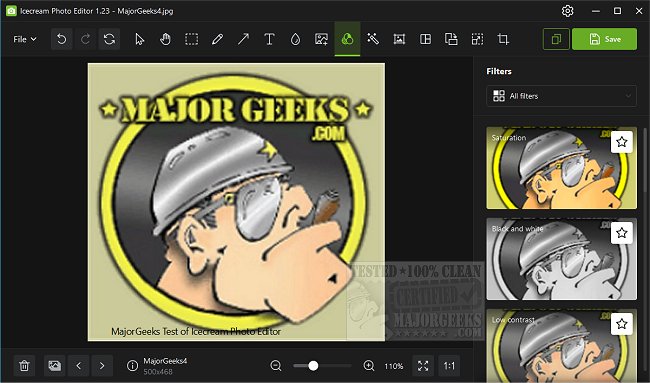
Icecream Photo Editor version 1.55 has been released, offering a versatile and user-friendly platform for photo editing. This software allows users to manipulate various aspects of their images through a simple interface, making it accessible to both beginners and experienced editors. Features include the ability to add text, images, and stickers, as well as frame options, collage creation, freehand drawing, and basic editing tools like rotating, flipping, cropping, and resizing.
The program's organized layout ensures that users can navigate easily, with hover-over details available for each feature icon to eliminate any guesswork. An automatic image enhancement feature is also included, providing a quick way to improve photos. Icecream Photo Editor supports a wide range of popular file formats, including JPG, JPEG, PNG, GIF, TIFF, and BMP.
In addition to editing capabilities, Icecream Photo Editor also helps users manage their photo collections through browsing, rotating, and deleting options. This makes it a valuable addition to any photo editing toolkit, especially since it is available for free.
Beyond just editing, the software promotes creativity with its collage maker, which offers various templates for users to explore. As photo editing continues to evolve, tools like Icecream Photo Editor remain essential for those looking to enhance their visual content effortlessly. Whether you are a casual user or a budding photographer, this software provides a robust set of features to meet your editing needs.
For users looking for solutions in related areas, such as taking screenshots in Windows or troubleshooting image opening issues in the Photos app, Icecream Photo Editor can complement those tasks effectively
The program's organized layout ensures that users can navigate easily, with hover-over details available for each feature icon to eliminate any guesswork. An automatic image enhancement feature is also included, providing a quick way to improve photos. Icecream Photo Editor supports a wide range of popular file formats, including JPG, JPEG, PNG, GIF, TIFF, and BMP.
In addition to editing capabilities, Icecream Photo Editor also helps users manage their photo collections through browsing, rotating, and deleting options. This makes it a valuable addition to any photo editing toolkit, especially since it is available for free.
Beyond just editing, the software promotes creativity with its collage maker, which offers various templates for users to explore. As photo editing continues to evolve, tools like Icecream Photo Editor remain essential for those looking to enhance their visual content effortlessly. Whether you are a casual user or a budding photographer, this software provides a robust set of features to meet your editing needs.
For users looking for solutions in related areas, such as taking screenshots in Windows or troubleshooting image opening issues in the Photos app, Icecream Photo Editor can complement those tasks effectively
Icecream Photo Editor 1.55 released
Icecream Photo Editor allows you to edit numerous aspects of your photos from a user-friendly interface.