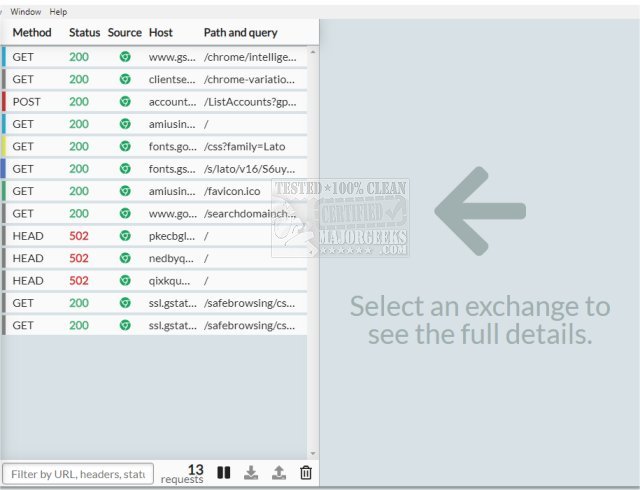
HTTP Toolkit has released version 1.27.2, enhancing its capabilities for automatically intercepting HTTP and HTTPS traffic from a wide range of clients, including popular web browsers like Chrome and Firefox, various command-line tools, and back-end programming languages such as Node.js, Python, and Ruby. The toolkit functions as an HTTP(S) proxy for platforms lacking automatic integrations and is compatible with standard HTTP requests across diverse languages and tools.
Key features of HTTP Toolkit include the ability to navigate through intercepted traffic using filters for content type, status, and source, as well as search functionalities for URLs, statuses, and headers. Users can analyze details of each request or response, including URL, status, headers, and body, with inline documentation and explanations sourced from MDN. The tool also supports enhanced examination of message bodies with features like highlighting and auto-formatting for various formats such as JSON, HTML, JavaScript, and hex, leveraging the powerful Monaco editor from Visual Studio Code.
Additionally, HTTP Toolkit allows users to pause and edit live HTTP traffic, enabling precise modifications to requests, including target URLs, methods, headers, and bodies. This capability extends to manually responding to incoming requests or editing real responses during transit. Users can effectively step through HTTP traffic requests or simulate various endpoints and errors.
The latest version offers cross-platform compatibility (Linux, Mac, and Windows) and integrates essential HTTP debugging features, manual HTTP mocking, and rewriting capabilities.
In summary, HTTP Toolkit 1.27.2 is a robust tool for developers needing to debug, inspect, and manipulate HTTP traffic efficiently, with a user-friendly interface and powerful features that streamline the debugging process.
Extension: As web applications continue to evolve, the need for effective debugging tools like HTTP Toolkit becomes increasingly critical. Developers are expected to handle complex APIs and microservices, making the ability to intercept and modify HTTP traffic vital for troubleshooting and optimizing performance. Future updates could further enhance the toolkit by incorporating features like automated testing capabilities, advanced analytics for traffic trends, and integration with popular CI/CD pipelines, allowing developers to maintain high code quality and efficiency throughout the development lifecycle
Key features of HTTP Toolkit include the ability to navigate through intercepted traffic using filters for content type, status, and source, as well as search functionalities for URLs, statuses, and headers. Users can analyze details of each request or response, including URL, status, headers, and body, with inline documentation and explanations sourced from MDN. The tool also supports enhanced examination of message bodies with features like highlighting and auto-formatting for various formats such as JSON, HTML, JavaScript, and hex, leveraging the powerful Monaco editor from Visual Studio Code.
Additionally, HTTP Toolkit allows users to pause and edit live HTTP traffic, enabling precise modifications to requests, including target URLs, methods, headers, and bodies. This capability extends to manually responding to incoming requests or editing real responses during transit. Users can effectively step through HTTP traffic requests or simulate various endpoints and errors.
The latest version offers cross-platform compatibility (Linux, Mac, and Windows) and integrates essential HTTP debugging features, manual HTTP mocking, and rewriting capabilities.
In summary, HTTP Toolkit 1.27.2 is a robust tool for developers needing to debug, inspect, and manipulate HTTP traffic efficiently, with a user-friendly interface and powerful features that streamline the debugging process.
Extension: As web applications continue to evolve, the need for effective debugging tools like HTTP Toolkit becomes increasingly critical. Developers are expected to handle complex APIs and microservices, making the ability to intercept and modify HTTP traffic vital for troubleshooting and optimizing performance. Future updates could further enhance the toolkit by incorporating features like automated testing capabilities, advanced analytics for traffic trends, and integration with popular CI/CD pipelines, allowing developers to maintain high code quality and efficiency throughout the development lifecycle
HTTP Toolkit 1.27.2 released
HTTP Toolkit offers automatic interception of HTTP and HTTPS traffic from most clients, including web browsers like Chrome and Firefox, almost all CLI tools, and back-end languages (Node.js, Python, Ruby, and more).