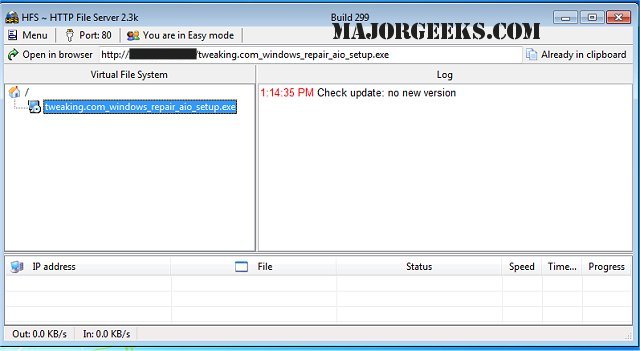
HFS - Http File Server has released version 3.4.0, offering a streamlined solution for file transfers. This software transforms your computer into an HTTP server, allowing users to easily connect and download files via a simple webpage. One of its standout features is the automatic copying of file URLs to the clipboard, facilitating quick sharing through chat applications.
HFS also provides robust functionalities, including the ability to set preferred IP addresses, manage bandwidth, and create user accounts, ensuring comprehensive control over all connections. Its user-friendly interface simplifies remote file access, catering to both novice and expert users with its Easy/Expert mode options.
Key features of HFS include:
- File download and upload capabilities
- A virtual file system
- Extensive customization options
- HTML template support
- Bandwidth management
- Logging features
- Complete connection control
- User account management
- Dynamic DNS updater for seamless connectivity
In summary, HFS - Http File Server 3.4.0 is an effective tool for anyone looking to facilitate file sharing and management over a network. Its blend of simplicity and powerful features makes it suitable for both casual users and professionals. For those interested in similar functionalities, a guide on setting up an FTP server on Windows 10 could also be beneficial.
As technology continues to evolve, staying updated with the latest software versions and features is essential for optimizing file transfer processes and ensuring secure and efficient data management
HFS also provides robust functionalities, including the ability to set preferred IP addresses, manage bandwidth, and create user accounts, ensuring comprehensive control over all connections. Its user-friendly interface simplifies remote file access, catering to both novice and expert users with its Easy/Expert mode options.
Key features of HFS include:
- File download and upload capabilities
- A virtual file system
- Extensive customization options
- HTML template support
- Bandwidth management
- Logging features
- Complete connection control
- User account management
- Dynamic DNS updater for seamless connectivity
In summary, HFS - Http File Server 3.4.0 is an effective tool for anyone looking to facilitate file sharing and management over a network. Its blend of simplicity and powerful features makes it suitable for both casual users and professionals. For those interested in similar functionalities, a guide on setting up an FTP server on Windows 10 could also be beneficial.
As technology continues to evolve, staying updated with the latest software versions and features is essential for optimizing file transfer processes and ensuring secure and efficient data management
HFS - Http File Server 3.4.0 released
HFS - Http File Server is a fast and convenient way for you to transfer files.