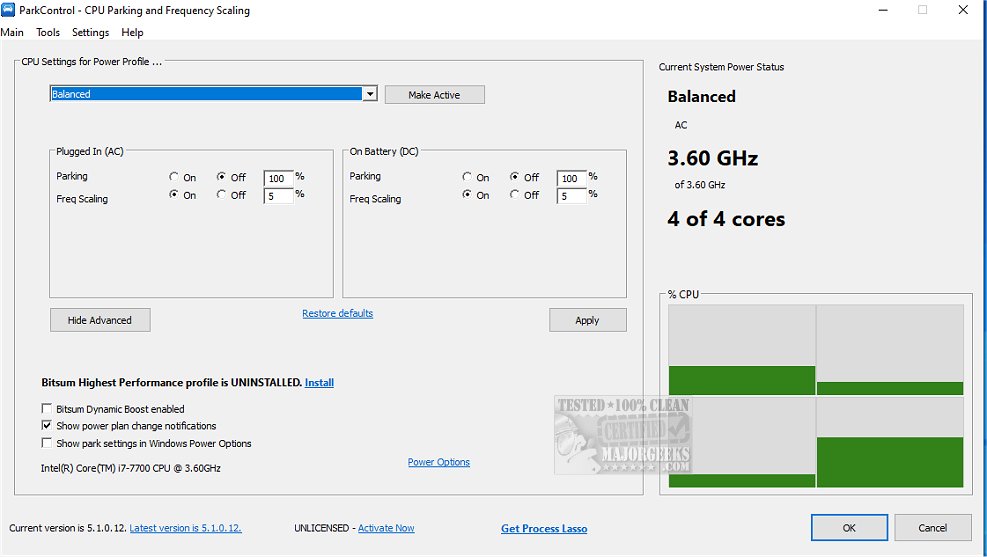
ParkControl version 6.0.2.18 has been released, offering users a lightweight, free utility to adjust core parking and CPU frequency scaling settings within Windows power plans. Developed by Bitsum, ParkControl operates without the need for installation, running directly as an executable file.
Core parking is a power-saving feature found in most modern x86 processors and later Windows editions. It allows the system to disable unused CPU cores to save energy while reactivating them as necessary when CPU demands increase. However, the default power settings in Windows tend to favor energy conservation over performance, often leading to overly aggressive core parking that can hinder performance, particularly during CPU-intensive tasks.
ParkControl enables users to fine-tune these settings, allowing them to disable core parking specifically for high-performance power plans while keeping it enabled for less demanding profiles. This flexibility is crucial for users who require maximum performance from their systems.
For those interested in optimizing their computer's performance, ParkControl provides an easy solution to manage power settings effectively. Users can also explore various related topics, such as changing power plan settings, identifying active power plans, enabling the Ultimate Performance Power Plan, and understanding power throttling in Windows 10 and 11.
In addition to its current functionalities, future versions of ParkControl could potentially include more user-friendly interfaces, preset configurations for different types of workloads, or automatic optimization based on system usage patterns. Enhanced documentation and support for more diverse hardware setups may also be beneficial, ensuring users can maximize their systems' performance while maintaining energy efficiency
Core parking is a power-saving feature found in most modern x86 processors and later Windows editions. It allows the system to disable unused CPU cores to save energy while reactivating them as necessary when CPU demands increase. However, the default power settings in Windows tend to favor energy conservation over performance, often leading to overly aggressive core parking that can hinder performance, particularly during CPU-intensive tasks.
ParkControl enables users to fine-tune these settings, allowing them to disable core parking specifically for high-performance power plans while keeping it enabled for less demanding profiles. This flexibility is crucial for users who require maximum performance from their systems.
For those interested in optimizing their computer's performance, ParkControl provides an easy solution to manage power settings effectively. Users can also explore various related topics, such as changing power plan settings, identifying active power plans, enabling the Ultimate Performance Power Plan, and understanding power throttling in Windows 10 and 11.
In addition to its current functionalities, future versions of ParkControl could potentially include more user-friendly interfaces, preset configurations for different types of workloads, or automatic optimization based on system usage patterns. Enhanced documentation and support for more diverse hardware setups may also be beneficial, ensuring users can maximize their systems' performance while maintaining energy efficiency
ParkControl 6.0.2.18 released
ParkControl is a small freeware utility that facilitates the tweaking of core parking and CPU frequency scaling settings of Windows power plans.