Easy Duplicate Finder has recently released versions 8.4.0.7 and 5.29.0.1109, providing users with powerful tools to locate and remove duplicate files from their systems efficiently. This software is especially useful for individuals who want to free up hard disk space cluttered by redundant files.
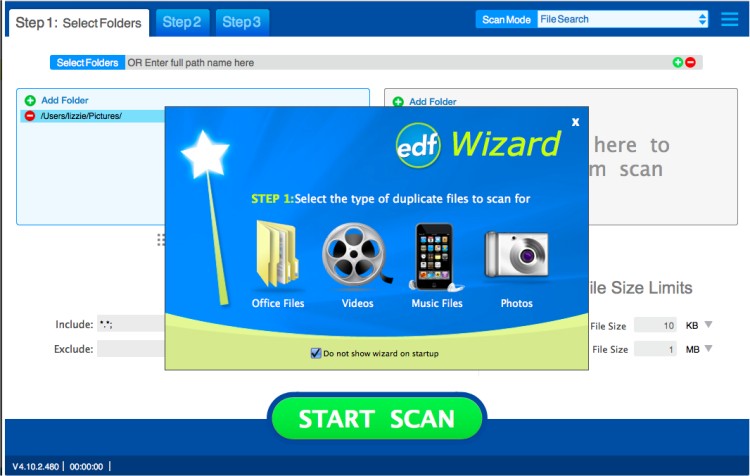
With Easy Duplicate Finder, users can perform fast searches for genuine duplicates, which are defined as files with identical contents, utilizing an advanced search engine. The software offers flexible search options, allowing users to filter results based on file size, mask conditions, and to exclude zero-length files. It also enables scanning from specific folders or drives and supports the addition of multiple locations for a comprehensive analysis.
The user interface is designed for accessibility, catering to users of all skill levels, which simplifies the process of finding and deleting unnecessary files. Key features include the ability to protect system files and folders, advanced management of duplicate files to ensure that only unneeded copies are removed, and options for both manual selection and automatic deletion of duplicates. Users can easily view file properties and navigate to the folders containing selected files.
Overall, Easy Duplicate Finder streamlines the process of managing duplicate files, making it a valuable tool for anyone looking to optimize their system's storage.
In addition to its primary functions, users may also encounter related issues such as "Access Denied" errors, problems deleting files or folders, and challenges in securely deleting files on Windows 10 and 11 using PowerShell and Cipher. Learning how to take full ownership of files and folders can also enhance the effectiveness of file management strategies
With Easy Duplicate Finder, users can perform fast searches for genuine duplicates, which are defined as files with identical contents, utilizing an advanced search engine. The software offers flexible search options, allowing users to filter results based on file size, mask conditions, and to exclude zero-length files. It also enables scanning from specific folders or drives and supports the addition of multiple locations for a comprehensive analysis.
The user interface is designed for accessibility, catering to users of all skill levels, which simplifies the process of finding and deleting unnecessary files. Key features include the ability to protect system files and folders, advanced management of duplicate files to ensure that only unneeded copies are removed, and options for both manual selection and automatic deletion of duplicates. Users can easily view file properties and navigate to the folders containing selected files.
Overall, Easy Duplicate Finder streamlines the process of managing duplicate files, making it a valuable tool for anyone looking to optimize their system's storage.
In addition to its primary functions, users may also encounter related issues such as "Access Denied" errors, problems deleting files or folders, and challenges in securely deleting files on Windows 10 and 11 using PowerShell and Cipher. Learning how to take full ownership of files and folders can also enhance the effectiveness of file management strategies
Easy Duplicate Finder 8.4.0.7 / 5.29.0.1109 released
Easy Duplicate Finder will help you to find and delete duplicate files easily.
Easy Duplicate Finder 8.4.0.7 / 5.29.0.1109 released @ MajorGeeks