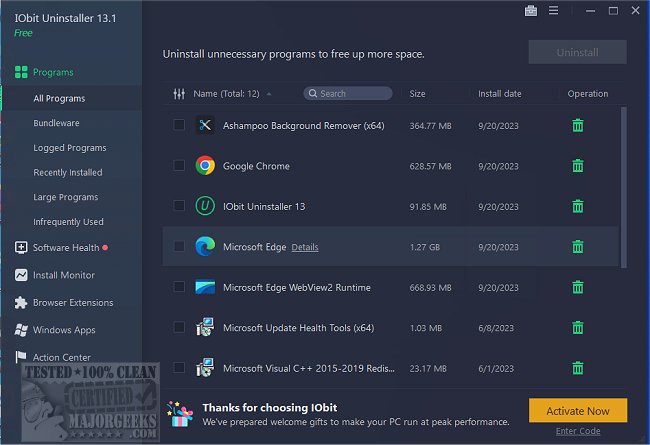
IObit Uninstaller 16.1.0.4 has been released as an advanced tool for completely removing unwanted programs, Windows apps, and browser extensions that often leave behind residual files and clutter. Unlike the standard Windows Add or Remove Programs feature, IObit Uninstaller ensures that all traces of uninstalled applications—such as associated files, registry entries, and folders—are thoroughly cleaned up, enhancing system performance.
One of the standout features of IObit Uninstaller is its capability to deal with stubborn or broken programs that do not uninstall properly. It proactively identifies and eliminates bundled software during installation, preventing unwanted toolbars and adware from becoming a nuisance. Additionally, the tool offers real-time installation monitoring, allowing users to track changes made by new software and to roll them back completely when the software is uninstalled, thus ensuring a clean slate.
IObit Uninstaller also extends its functionality to managing Windows apps and browser extensions, providing users with the ability to remove unwanted components like Edge or Cortana, which may otherwise be difficult to uninstall. Furthermore, it includes a Software Health feature that helps manage software permissions, eliminate junk files, and detect potential threats, alongside a Software Updater that automatically keeps popular applications updated without the need for manual checks.
Despite its numerous advantages, there are some drawbacks. The free version has limited features, and some legitimate software may be flagged as bundled, requiring user intervention. Additionally, the Software Updater does not cover all programs.
Overall, IObit Uninstaller is highly recommended for users seeking a robust solution for maintaining a clean and efficient PC, making it a valuable tool for both casual users and tech enthusiasts. The software’s ability to remove stubborn programs, monitor installations, and manage bloatware sets it apart from other uninstallers in the market.
- Expanded Compatibility: Enhancing compatibility with more software applications to ensure the Software Updater covers a broader range of programs would add value.
- Cloud-Based Features: Implementing cloud technology for storing user preferences and settings could provide a seamless experience across multiple devices.
- Community Feedback and Customization: Encouraging user feedback for continuous improvement and offering customization options could enhance user satisfaction and engagement with the tool.
- Educational Resources: Providing tutorials or guides on software management and best practices could empower users to make informed decisions about their system maintenance
One of the standout features of IObit Uninstaller is its capability to deal with stubborn or broken programs that do not uninstall properly. It proactively identifies and eliminates bundled software during installation, preventing unwanted toolbars and adware from becoming a nuisance. Additionally, the tool offers real-time installation monitoring, allowing users to track changes made by new software and to roll them back completely when the software is uninstalled, thus ensuring a clean slate.
IObit Uninstaller also extends its functionality to managing Windows apps and browser extensions, providing users with the ability to remove unwanted components like Edge or Cortana, which may otherwise be difficult to uninstall. Furthermore, it includes a Software Health feature that helps manage software permissions, eliminate junk files, and detect potential threats, alongside a Software Updater that automatically keeps popular applications updated without the need for manual checks.
Despite its numerous advantages, there are some drawbacks. The free version has limited features, and some legitimate software may be flagged as bundled, requiring user intervention. Additionally, the Software Updater does not cover all programs.
Overall, IObit Uninstaller is highly recommended for users seeking a robust solution for maintaining a clean and efficient PC, making it a valuable tool for both casual users and tech enthusiasts. The software’s ability to remove stubborn programs, monitor installations, and manage bloatware sets it apart from other uninstallers in the market.
Extensions:
- User Experience Enhancements: Future versions could benefit from a more user-friendly interface that simplifies navigation for less tech-savvy users.- Expanded Compatibility: Enhancing compatibility with more software applications to ensure the Software Updater covers a broader range of programs would add value.
- Cloud-Based Features: Implementing cloud technology for storing user preferences and settings could provide a seamless experience across multiple devices.
- Community Feedback and Customization: Encouraging user feedback for continuous improvement and offering customization options could enhance user satisfaction and engagement with the tool.
- Educational Resources: Providing tutorials or guides on software management and best practices could empower users to make informed decisions about their system maintenance
IObit Uninstaller 16.1.0.4 released
IObit Uninstaller helps you remove unwanted programs, Windows apps, and browser plug-ins/toolbars entirely, even when Windows Add or Remove Programs fails.