HelpEdit is a powerful, free help authoring tool designed for Windows that specializes in creating high-quality documentation, including user manuals, online help systems, and technical guides. With its recent update to version 2.4, HelpEdit enhances its offerings to support authors in delivering clear and organized information.
Key Features of HelpEdit
HelpEdit boasts a user-friendly interface and robust features that streamline the documentation process. The software allows authors to easily organize their projects into a structured topic tree, facilitating the creation of a coherent hierarchy and logical table of contents. Each topic corresponds to its own HTML content file, enabling the integration of keywords, index entries, and tailored publishing options for various formats.
The built-in editor simplifies content creation, removing the need for manual HTML coding. It supports a variety of formatting options, such as text styling, font selection, and list creation, ensuring that documentation is visually appealing and easy to read. Additionally, HelpEdit allows for the integration of images and the creation of tables, providing flexibility in documentation design.
Export Options
HelpEdit supports exporting documentation into several essential help formats, including:
- WebHelp: A browser-based help system that includes a table of contents, searchable content, and project styling.
- CHM Help: Compiled HTML Help files designed for desktop applications.
- PDF Manual: Capability to export projects as PDF manuals using headless printing via Microsoft Edge.
Consistency and Customization
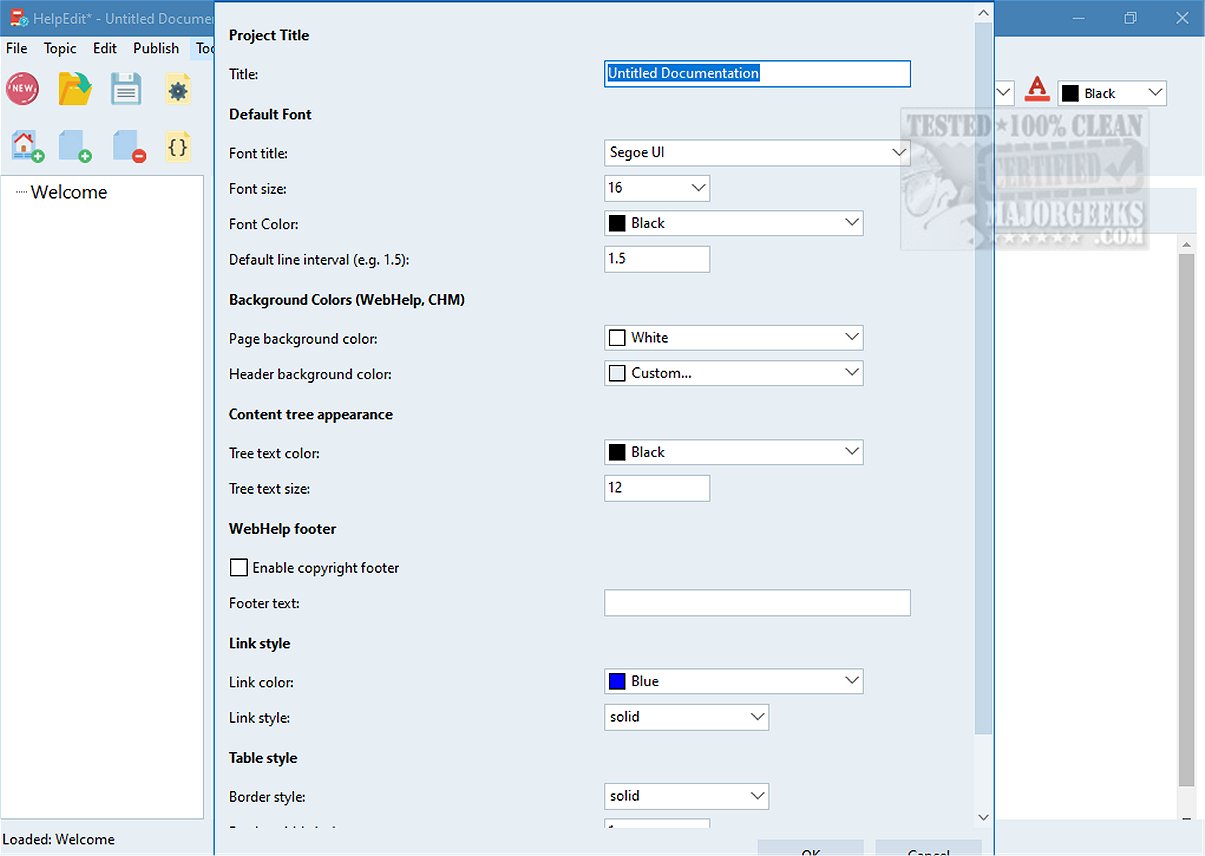
The software promotes consistency through reusable features, such as variables and snippets, that facilitate the integration of repeated elements across documentation. Project-level settings enable users to customize the overall appearance of their work, ensuring alignment with branding and enhancing user experience.
Conclusion
HelpEdit is an excellent solution for anyone looking to create effective documentation, whether for first-time users or more experienced individuals. By providing detailed explanations and resources for a wide range of users, HelpEdit empowers authors to ensure that their documentation is comprehensive and accessible.
Future Enhancements
Looking ahead, HelpEdit could consider incorporating additional features such as collaborative tools for team projects, enhanced multimedia support, and integration with other software platforms for an even more seamless documentation process. Expanding its capabilities in these areas could further solidify HelpEdit's position as a leading tool in the realm of help authoring
Key Features of HelpEdit
HelpEdit boasts a user-friendly interface and robust features that streamline the documentation process. The software allows authors to easily organize their projects into a structured topic tree, facilitating the creation of a coherent hierarchy and logical table of contents. Each topic corresponds to its own HTML content file, enabling the integration of keywords, index entries, and tailored publishing options for various formats.
The built-in editor simplifies content creation, removing the need for manual HTML coding. It supports a variety of formatting options, such as text styling, font selection, and list creation, ensuring that documentation is visually appealing and easy to read. Additionally, HelpEdit allows for the integration of images and the creation of tables, providing flexibility in documentation design.
Export Options
HelpEdit supports exporting documentation into several essential help formats, including:
- WebHelp: A browser-based help system that includes a table of contents, searchable content, and project styling.
- CHM Help: Compiled HTML Help files designed for desktop applications.
- PDF Manual: Capability to export projects as PDF manuals using headless printing via Microsoft Edge.
Consistency and Customization
The software promotes consistency through reusable features, such as variables and snippets, that facilitate the integration of repeated elements across documentation. Project-level settings enable users to customize the overall appearance of their work, ensuring alignment with branding and enhancing user experience.
Conclusion
HelpEdit is an excellent solution for anyone looking to create effective documentation, whether for first-time users or more experienced individuals. By providing detailed explanations and resources for a wide range of users, HelpEdit empowers authors to ensure that their documentation is comprehensive and accessible.
Future Enhancements
Looking ahead, HelpEdit could consider incorporating additional features such as collaborative tools for team projects, enhanced multimedia support, and integration with other software platforms for an even more seamless documentation process. Expanding its capabilities in these areas could further solidify HelpEdit's position as a leading tool in the realm of help authoring
HelpEdit 2.4 released
HelpEdit is a versatile, free Windows-based help authoring tool tailored for creating professional-quality documentation. This software is ideal for developing user manuals, comprehensive online help systems, and detailed technical guides.