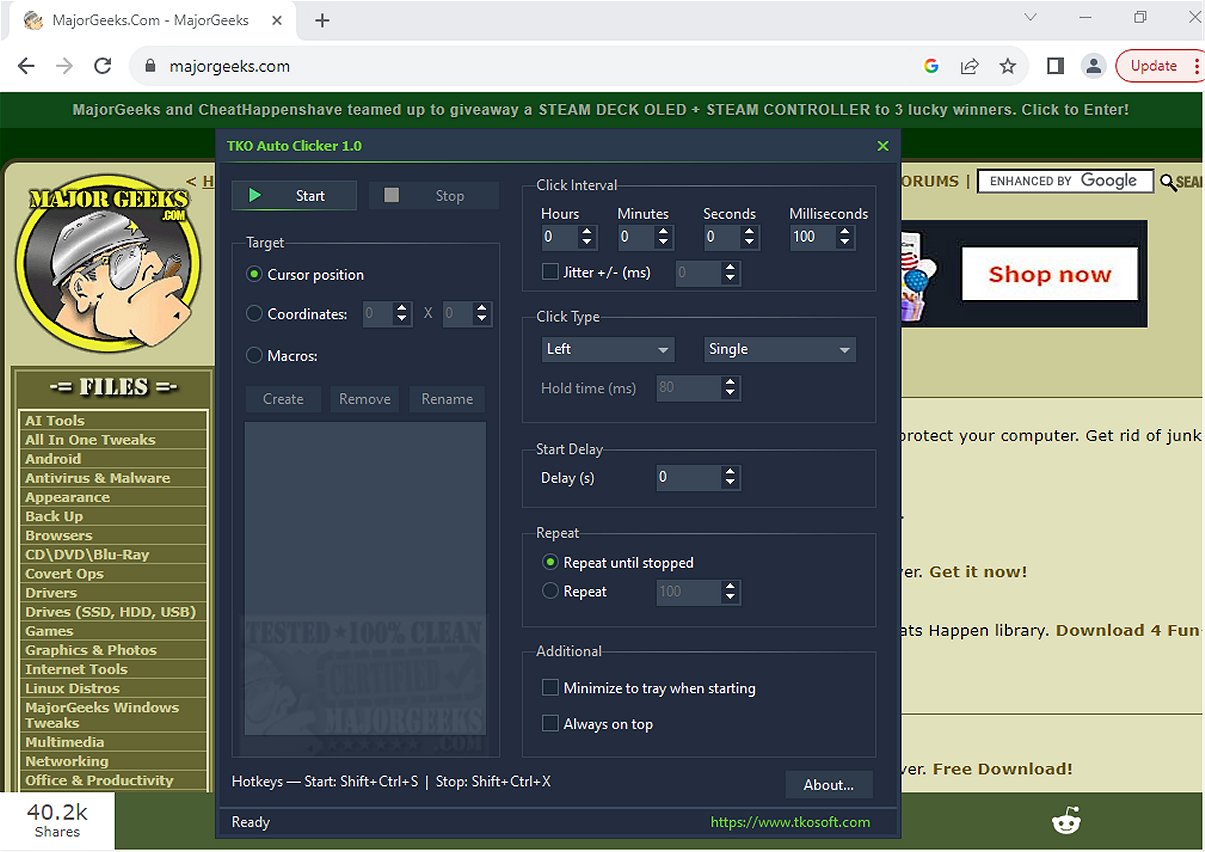
The recently launched TKO Auto Clicker 2.4 is designed to automate repetitive mouse clicks and cursor movements, making it an invaluable tool for enhancing productivity in tasks that require frequent clicking or specific actions. This straightforward application offers a range of functionalities, including the automation of left, right, and middle mouse clicks, and supports single clicks, double clicks, and hold clicks.
Key Features of TKO Auto Clicker:
- Customizable Clicking Modes: Users can replicate various click types and adjust the click intervals with millisecond precision.
- Flexible Repetition Options: You can set the tool to repeat clicks indefinitely or limit repetitions to a specific number.
- Start Delay and Jitter Settings: An optional start delay allows users to manage when the clicking begins, while a jitter feature introduces slight timing variations to mimic organic clicking.
- Cursor Positioning: Users can choose to execute clicks based either on the current cursor position or predefined screen coordinates, making it particularly useful for gaming and specific workflows.
- Mouse Macro Recorder: The built-in macro recorder captures mouse movements and button actions, enabling users to automate entire sequences of tasks, thus streamlining complex workflows.
- Global Hotkeys: Convenient keyboard shortcuts facilitate the management of the clicker without needing to switch windows, enhancing usability during immersive tasks.
Highlighted Feature: Custom Cursor Positioning
One standout feature of TKO Auto Clicker is its ability to click either at the cursor's current location or at fixed coordinates. This flexibility is particularly beneficial for gamers and professionals who require precision in their clicking tasks, ensuring that clicks happen exactly where needed.
Efficiency Boost with TKO Auto Clicker
With TKO Auto Clicker, users can say goodbye to the monotony of repetitive clicks. By automating these tasks, individuals can reclaim valuable time and focus on more important work. The tool is perfectly suited for anyone looking to streamline their workflow and increase overall efficiency.
Conclusion
In summary, TKO Auto Clicker 2.4 is a powerful automation tool that significantly eases the burden of repetitive tasks. Whether you are a gamer, a software user, or someone with intricate workflows, TKO Auto Clicker will enhance your productivity and allow you to work smarter, not harder.
Related Resources:
- Tips on changing double-click settings
- Guides on enabling mouse pointer trails
- Troubleshooting mouse performance issues
- Logitech firmware update tool and unifying software for additional device management.
By integrating TKO Auto Clicker into your routine, you'll be able to elevate your efficiency and let the software handle the routine clicking for you
Key Features of TKO Auto Clicker:
- Customizable Clicking Modes: Users can replicate various click types and adjust the click intervals with millisecond precision.
- Flexible Repetition Options: You can set the tool to repeat clicks indefinitely or limit repetitions to a specific number.
- Start Delay and Jitter Settings: An optional start delay allows users to manage when the clicking begins, while a jitter feature introduces slight timing variations to mimic organic clicking.
- Cursor Positioning: Users can choose to execute clicks based either on the current cursor position or predefined screen coordinates, making it particularly useful for gaming and specific workflows.
- Mouse Macro Recorder: The built-in macro recorder captures mouse movements and button actions, enabling users to automate entire sequences of tasks, thus streamlining complex workflows.
- Global Hotkeys: Convenient keyboard shortcuts facilitate the management of the clicker without needing to switch windows, enhancing usability during immersive tasks.
Highlighted Feature: Custom Cursor Positioning
One standout feature of TKO Auto Clicker is its ability to click either at the cursor's current location or at fixed coordinates. This flexibility is particularly beneficial for gamers and professionals who require precision in their clicking tasks, ensuring that clicks happen exactly where needed.
Efficiency Boost with TKO Auto Clicker
With TKO Auto Clicker, users can say goodbye to the monotony of repetitive clicks. By automating these tasks, individuals can reclaim valuable time and focus on more important work. The tool is perfectly suited for anyone looking to streamline their workflow and increase overall efficiency.
Conclusion
In summary, TKO Auto Clicker 2.4 is a powerful automation tool that significantly eases the burden of repetitive tasks. Whether you are a gamer, a software user, or someone with intricate workflows, TKO Auto Clicker will enhance your productivity and allow you to work smarter, not harder.
Related Resources:
- Tips on changing double-click settings
- Guides on enabling mouse pointer trails
- Troubleshooting mouse performance issues
- Logitech firmware update tool and unifying software for additional device management.
By integrating TKO Auto Clicker into your routine, you'll be able to elevate your efficiency and let the software handle the routine clicking for you
TKO Auto Clicker 2.4 released
TKO Auto Clicker automates repetitive mouse clicks, cursor movements, and recorded mouse macros. This tool can enhance productivity by streamlining tasks that require frequent clicking or specific mouse actions.