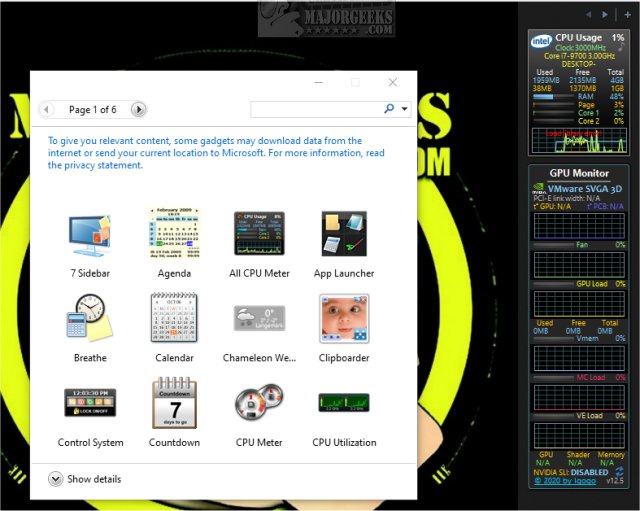
GPU Monitor 14.0 has been released, offering users a convenient Windows gadget to keep track of their NVIDIA or Radeon graphics cards. This tool allows for comprehensive monitoring of various graphics card metrics, such as GPU temperature, fan speed, load percentages, and memory usage.
It's crucial to note that Microsoft previously removed gadgets from Windows due to security concerns. To utilize GPU Monitor, users will need to install third-party tools like 8GadgetPack or Desktop Gadgets Revived, which provide a safe environment for using gadgets. While the risk associated with third-party gadgets has diminished, caution is still advised when adding new ones.
Once the GPU Monitor is installed, it delivers detailed insights into your graphics card's performance without significantly impacting system resources, utilizing only about 5% of CPU and 50MB of memory. To install the gadget, users can double-click the GPUMonitor.gadget file if they have the necessary functionality enabled, though the use of a third-party tool is typically required.
In addition to monitoring capabilities, GPU Monitor complements other utilities and resources related to graphics card management, such as downloading the latest drivers, understanding Windows DCH drivers, and managing NVIDIA control panel settings.
As technology evolves, tools like GPU Monitor will continue to play an essential role in helping users optimize their systems for gaming and graphic-intensive applications. With the ongoing advancements in graphics technology, having a reliable monitoring solution becomes increasingly important for performance enthusiasts and gamers alike
It's crucial to note that Microsoft previously removed gadgets from Windows due to security concerns. To utilize GPU Monitor, users will need to install third-party tools like 8GadgetPack or Desktop Gadgets Revived, which provide a safe environment for using gadgets. While the risk associated with third-party gadgets has diminished, caution is still advised when adding new ones.
Once the GPU Monitor is installed, it delivers detailed insights into your graphics card's performance without significantly impacting system resources, utilizing only about 5% of CPU and 50MB of memory. To install the gadget, users can double-click the GPUMonitor.gadget file if they have the necessary functionality enabled, though the use of a third-party tool is typically required.
In addition to monitoring capabilities, GPU Monitor complements other utilities and resources related to graphics card management, such as downloading the latest drivers, understanding Windows DCH drivers, and managing NVIDIA control panel settings.
As technology evolves, tools like GPU Monitor will continue to play an essential role in helping users optimize their systems for gaming and graphic-intensive applications. With the ongoing advancements in graphics technology, having a reliable monitoring solution becomes increasingly important for performance enthusiasts and gamers alike
GPU Monitor 14.0 released
GPU Monitor is a Windows gadget that monitors your NVIDIA or Radeon graphics cards.