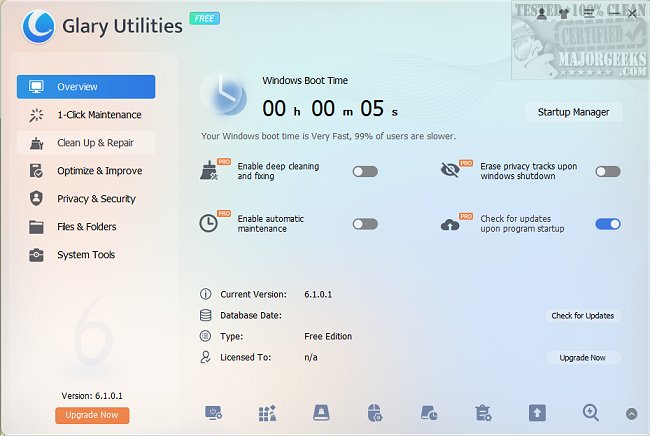
Glary Utilities has launched its latest version, 6.45.0.49, providing a powerful and user-friendly suite of system tools to help users fix, speed up, maintain, and protect their PCs. This all-in-one toolkit is available for free and can also be used as a portable app, allowing for on-the-go maintenance from a USB device.
A User-Friendly Interface for All Users
Whether your computer is running slowly, cluttered with files, or experiencing technical glitches, Glary Utilities offers an intuitive interface that makes system cleanup and advanced adjustments easy for users of all skill levels. The suite includes a variety of features aimed at thorough system maintenance. From removing junk files and invalid registry entries to erasing internet history, Glary Utilities ensures your PC runs smoothly.
Robust Maintenance and Cleanup Features
Unlike typical PC cleaners, Glary Utilities serves as a comprehensive maintenance toolkit. It identifies and removes unnecessary browser add-ons and duplicate files, enhancing your system's performance. Users can also delve deeper into disk space usage with tools designed to manage shell extensions effectively. Additional functionalities include file encryption, file splitting, and reassembly, catering to various user needs.
Enhancing Performance and Cleanup Efficiency
In terms of performance enhancements, Glary Utilities includes features such as:
- Memory Optimizer: Frees up RAM resources.
- Shortcut Fixer: Repairs or removes broken Windows shortcuts.
- Startup Manager: Controls which programs launch on startup.
- Uninstall Manager: Effectively removes unwanted applications.
For users keen on storage management, tools like the Disk Analyzer and Duplicate Files Finder help reclaim disk space, while the File Shredder guarantees sensitive files are permanently deleted.
Prioritizing Privacy and Security
Glary Utilities also addresses user privacy and security concerns. The Tracks Eraser removes cookies and browser history, while the File Encrypter keeps personal files secure. The Empty Folders Finder and Process Manager assist in monitoring and maintaining system cleanliness, alerting users to any unwanted processes.
Final Thoughts
In summary, Glary Utilities is a robust tool that effectively combines deep-cleaning capabilities with performance enhancements, making it suitable for both casual and advanced users. Its blend of user-friendly design and powerful features allows for easy system maintenance and optimization. If your PC feels sluggish, Glary Utilities is worth trying—it's free, portable, and could rejuvenate your machine.
Explore More:
- Discover which drive cleaner suits you best: CCleaner, Wise Disk Cleaner, or PrivaZer.
- Learn how to use Storage Sense to automatically delete junk files in Windows 10.
- Find out how to automate emptying the Recycle Bin in Windows 10
A User-Friendly Interface for All Users
Whether your computer is running slowly, cluttered with files, or experiencing technical glitches, Glary Utilities offers an intuitive interface that makes system cleanup and advanced adjustments easy for users of all skill levels. The suite includes a variety of features aimed at thorough system maintenance. From removing junk files and invalid registry entries to erasing internet history, Glary Utilities ensures your PC runs smoothly.
Robust Maintenance and Cleanup Features
Unlike typical PC cleaners, Glary Utilities serves as a comprehensive maintenance toolkit. It identifies and removes unnecessary browser add-ons and duplicate files, enhancing your system's performance. Users can also delve deeper into disk space usage with tools designed to manage shell extensions effectively. Additional functionalities include file encryption, file splitting, and reassembly, catering to various user needs.
Enhancing Performance and Cleanup Efficiency
In terms of performance enhancements, Glary Utilities includes features such as:
- Memory Optimizer: Frees up RAM resources.
- Shortcut Fixer: Repairs or removes broken Windows shortcuts.
- Startup Manager: Controls which programs launch on startup.
- Uninstall Manager: Effectively removes unwanted applications.
For users keen on storage management, tools like the Disk Analyzer and Duplicate Files Finder help reclaim disk space, while the File Shredder guarantees sensitive files are permanently deleted.
Prioritizing Privacy and Security
Glary Utilities also addresses user privacy and security concerns. The Tracks Eraser removes cookies and browser history, while the File Encrypter keeps personal files secure. The Empty Folders Finder and Process Manager assist in monitoring and maintaining system cleanliness, alerting users to any unwanted processes.
Final Thoughts
In summary, Glary Utilities is a robust tool that effectively combines deep-cleaning capabilities with performance enhancements, making it suitable for both casual and advanced users. Its blend of user-friendly design and powerful features allows for easy system maintenance and optimization. If your PC feels sluggish, Glary Utilities is worth trying—it's free, portable, and could rejuvenate your machine.
Explore More:
- Discover which drive cleaner suits you best: CCleaner, Wise Disk Cleaner, or PrivaZer.
- Learn how to use Storage Sense to automatically delete junk files in Windows 10.
- Find out how to automate emptying the Recycle Bin in Windows 10
Glary Utilities 6.45.0.49 released
Glary Utilities offers free, powerful, and easy-to-use system tools and utilities to help fix, speed up, maintain, and protect your PC. Video tutorial available. Available as a portable app as well.