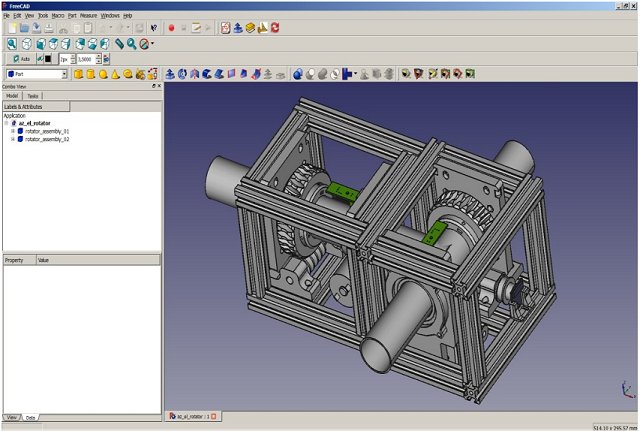
FreeCAD 1.1.4 has been released, enhancing its capabilities as a robust parametric 3D modeler designed for various engineering applications, including mechanical engineering and product design. This open-source software is not only beneficial for traditional CAD (Computer-Aided Design) tasks but also serves architects, electrical designers, and professionals in other engineering fields.
One of FreeCAD’s standout features is its parametric modeling system, which allows users to revisit and modify their design history—making it easy to adjust measurements and see real-time updates across the model. This functionality supports iterative design processes, rapid prototyping, and fine-tuning of components to meet practical requirements, appealing to both hobbyists and professionals.
FreeCAD supports a wide array of file formats—such as STEP, IGES, STL, SVG, DXF, OBJ, IFC, and DAE—facilitating seamless imports and exports with different CAD platforms and 3D printers. Its workbench system further enhances its versatility, allowing users to switch between specialized toolsets for various tasks, including part design, drafting, FEM analysis, and robotic simulation. Additionally, the inclusion of a CAM workbench provides a comprehensive solution for transitioning from design to CNC machining.
The software is cross-platform, functioning on Windows, macOS, and Linux, and is designed for performance using C++. Its extensibility is amplified through Python scripting, enabling automation and the creation of custom tools. The well-documented Python API and built-in console allow users to experiment and develop complex parametric designs dynamically.
FreeCAD is particularly suitable for students, makers, and engineers who require CAD tools without the financial burden of proprietary licenses. Its BIM (Building Information Modeling) and MEP (Mechanical, Electrical, and Plumbing) modules cater to architectural and technical design needs. While it may not boast the polished feel of some commercial software, and a learning curve exists, the benefits of complete control and zero recurring costs are significant.
Pros of FreeCAD include its completely free and open-source nature, parametric modeling capabilities, a vibrant community with numerous add-ons, built-in automation options via Python, and regular updates. However, newcomers may find the user interface less intuitive compared to commercial alternatives, and some advanced features are still being developed.
In summary, while FreeCAD may not match the sleekness of commercial packages like Fusion 360, it offers unparalleled depth and flexibility for those seeking a zero-cost entry into CAD design. It stands as an excellent choice for individuals looking to create parts or engage in 3D printing without incurring substantial software expenses
One of FreeCAD’s standout features is its parametric modeling system, which allows users to revisit and modify their design history—making it easy to adjust measurements and see real-time updates across the model. This functionality supports iterative design processes, rapid prototyping, and fine-tuning of components to meet practical requirements, appealing to both hobbyists and professionals.
FreeCAD supports a wide array of file formats—such as STEP, IGES, STL, SVG, DXF, OBJ, IFC, and DAE—facilitating seamless imports and exports with different CAD platforms and 3D printers. Its workbench system further enhances its versatility, allowing users to switch between specialized toolsets for various tasks, including part design, drafting, FEM analysis, and robotic simulation. Additionally, the inclusion of a CAM workbench provides a comprehensive solution for transitioning from design to CNC machining.
The software is cross-platform, functioning on Windows, macOS, and Linux, and is designed for performance using C++. Its extensibility is amplified through Python scripting, enabling automation and the creation of custom tools. The well-documented Python API and built-in console allow users to experiment and develop complex parametric designs dynamically.
FreeCAD is particularly suitable for students, makers, and engineers who require CAD tools without the financial burden of proprietary licenses. Its BIM (Building Information Modeling) and MEP (Mechanical, Electrical, and Plumbing) modules cater to architectural and technical design needs. While it may not boast the polished feel of some commercial software, and a learning curve exists, the benefits of complete control and zero recurring costs are significant.
Pros of FreeCAD include its completely free and open-source nature, parametric modeling capabilities, a vibrant community with numerous add-ons, built-in automation options via Python, and regular updates. However, newcomers may find the user interface less intuitive compared to commercial alternatives, and some advanced features are still being developed.
In summary, while FreeCAD may not match the sleekness of commercial packages like Fusion 360, it offers unparalleled depth and flexibility for those seeking a zero-cost entry into CAD design. It stands as an excellent choice for individuals looking to create parts or engage in 3D printing without incurring substantial software expenses
FreeCAD 1.1.4 released
FreeCAD is a parametric 3D modeler for CAD, MCAD, CAx, CAE, and PLM aimed directly at mechanical engineering and product design.