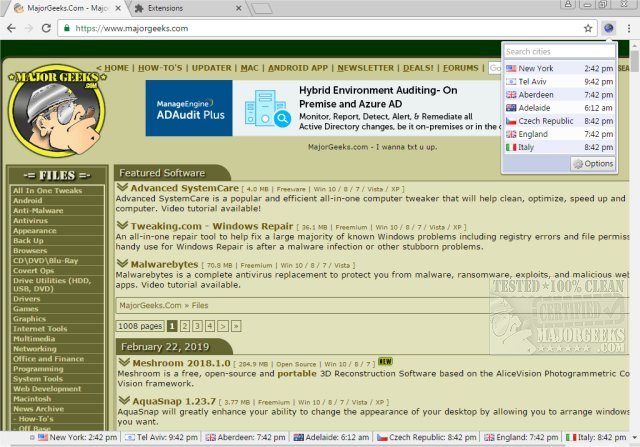
FoxClocks has released version 7.0.2 for Chrome and Firefox, an extension that allows users to view selectable global times conveniently at the bottom of their browser windows. This tool is ideal for those needing to track time across different regions or simply want to keep an eye on local time. Users can display small clocks in their status bar using various pre-set formats or create customized time formats that are flexible and user-friendly.
For quick access, users can click the FoxClocks icon located next to the address bar, which allows them to view their clocks without navigating away from the current webpage. If the status bar interferes with the display of some websites, it can be disabled in the Options menu.
The extension features a Zone Picker tree that enables users to explore the world's time zones by country, region, or city. If a specific city is hard to find, the 'Search Cities' function can help locate nearly any city globally or suggest a nearby city with the same time zone.
FoxClocks ensures accuracy by automatically updating its time zone database and adjusting for daylight savings time, relieving users from manual adjustments. It includes a Watchlist feature in the options menu, allowing users to keep track of their selected locations and their respective local times. Customization options for the Watchlist and status bar include editing location names, repositioning locations via drag-and-drop, and setting custom time formats with an accessible help guide.
In addition to these features, FoxClocks enhances user experience by providing the ability to show multiple clocks on different devices and integrating with various operating systems. Overall, FoxClocks remains a versatile tool for anyone needing to manage time across various time zones efficiently
For quick access, users can click the FoxClocks icon located next to the address bar, which allows them to view their clocks without navigating away from the current webpage. If the status bar interferes with the display of some websites, it can be disabled in the Options menu.
The extension features a Zone Picker tree that enables users to explore the world's time zones by country, region, or city. If a specific city is hard to find, the 'Search Cities' function can help locate nearly any city globally or suggest a nearby city with the same time zone.
FoxClocks ensures accuracy by automatically updating its time zone database and adjusting for daylight savings time, relieving users from manual adjustments. It includes a Watchlist feature in the options menu, allowing users to keep track of their selected locations and their respective local times. Customization options for the Watchlist and status bar include editing location names, repositioning locations via drag-and-drop, and setting custom time formats with an accessible help guide.
In addition to these features, FoxClocks enhances user experience by providing the ability to show multiple clocks on different devices and integrating with various operating systems. Overall, FoxClocks remains a versatile tool for anyone needing to manage time across various time zones efficiently
FoxClocks for Chrome and Firefox 7.0.2 released
FoxClocks for Chrome and Firefox displays selectable worldwide times at the bottom of your browser window.
FoxClocks for Chrome and Firefox 7.0.2 released @ MajorGeeks