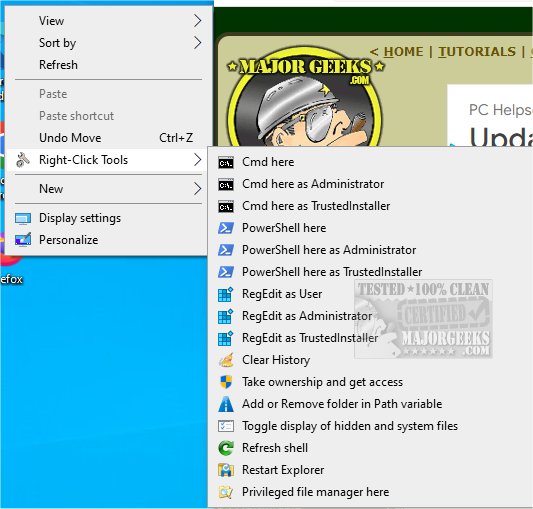
RightClickTools has launched its version 2.0.1, introducing a user-friendly right-click context menu for Windows Explorer. This tool aims to improve efficiency by providing essential utilities directly accessible through the context menu, compatible with Windows versions 7 and newer, and supporting both 32-bit and 64-bit systems. It is designed for use by both standard and administrator accounts, allowing multiple users to benefit from its features on the same device, even when managing long file paths.
Key Features and Benefits
RightClickTools significantly enhances productivity by simplifying access to frequently used tools such as launching Command Prompt or PowerShell in a specified directory, modifying the Path variable, and managing various system settings. This integration allows users to perform tasks more swiftly and efficiently, streamlining workflow and minimizing workload.
The functionality of RightClickTools is based on registry entries that establish context menu items, with commands executed only upon user selection. This design ensures that the application does not interfere with existing system performance and only adds a single item to the context menu, maintaining a clean user experience without unnecessary complexity.
User Experience and Admin Features
For administrators, RightClickTools provides an easy installation process with just one User Account Control (UAC) prompt required for optional tools needing elevated permissions. After installation, all utilities can be accessed without additional prompts, enhancing usability for power users.
Notable Tools Included:
- Cmd Here and PowerShell Here as Administrator: Open Command Prompt or PowerShell with administrative privileges in the selected directory.
- Cmd Here and PowerShell Here: Launch Command Prompt or PowerShell with standard user permissions.
- Cmd Here and PowerShell Here as TrustedInstaller: Access Command Prompt or PowerShell using the SYSTEM account for advanced operations in protected directories (use with caution).
- RegEdit as User: Access the registry editor with standard user permissions, useful for verifying user-level changes.
- Clear History: Remove associated data from selected items.
For a comprehensive overview of all available commands and further functionalities, users are encouraged to visit the developer's repository.
Related Resources:
Users interested in enhancing their context menu experience may also find the following topics beneficial:
- Managing context menu items (add, delete, edit)
- Adding Control Panel options to the context menu in Windows 10 & 11
- Customizing the classic personalize context menu
- Utilizing ShellExView to enable or disable context menu items.
Conclusion:
RightClickTools 2.0.1 is a powerful suite aimed at optimizing user efficiency on Windows systems. With its easy-to-use interface and essential tools, users can elevate their productivity and streamline their workflow, making it a valuable addition for anyone looking to enhance their computing experience. Embrace these tools and unlock your full potential today
Key Features and Benefits
RightClickTools significantly enhances productivity by simplifying access to frequently used tools such as launching Command Prompt or PowerShell in a specified directory, modifying the Path variable, and managing various system settings. This integration allows users to perform tasks more swiftly and efficiently, streamlining workflow and minimizing workload.
The functionality of RightClickTools is based on registry entries that establish context menu items, with commands executed only upon user selection. This design ensures that the application does not interfere with existing system performance and only adds a single item to the context menu, maintaining a clean user experience without unnecessary complexity.
User Experience and Admin Features
For administrators, RightClickTools provides an easy installation process with just one User Account Control (UAC) prompt required for optional tools needing elevated permissions. After installation, all utilities can be accessed without additional prompts, enhancing usability for power users.
Notable Tools Included:
- Cmd Here and PowerShell Here as Administrator: Open Command Prompt or PowerShell with administrative privileges in the selected directory.
- Cmd Here and PowerShell Here: Launch Command Prompt or PowerShell with standard user permissions.
- Cmd Here and PowerShell Here as TrustedInstaller: Access Command Prompt or PowerShell using the SYSTEM account for advanced operations in protected directories (use with caution).
- RegEdit as User: Access the registry editor with standard user permissions, useful for verifying user-level changes.
- Clear History: Remove associated data from selected items.
For a comprehensive overview of all available commands and further functionalities, users are encouraged to visit the developer's repository.
Related Resources:
Users interested in enhancing their context menu experience may also find the following topics beneficial:
- Managing context menu items (add, delete, edit)
- Adding Control Panel options to the context menu in Windows 10 & 11
- Customizing the classic personalize context menu
- Utilizing ShellExView to enable or disable context menu items.
Conclusion:
RightClickTools 2.0.1 is a powerful suite aimed at optimizing user efficiency on Windows systems. With its easy-to-use interface and essential tools, users can elevate their productivity and streamline their workflow, making it a valuable addition for anyone looking to enhance their computing experience. Embrace these tools and unlock your full potential today
RightClickTools 2.0.1 released
RightClickTools adds a right-click context menu to Windows Explorer, providing several valuable tools.