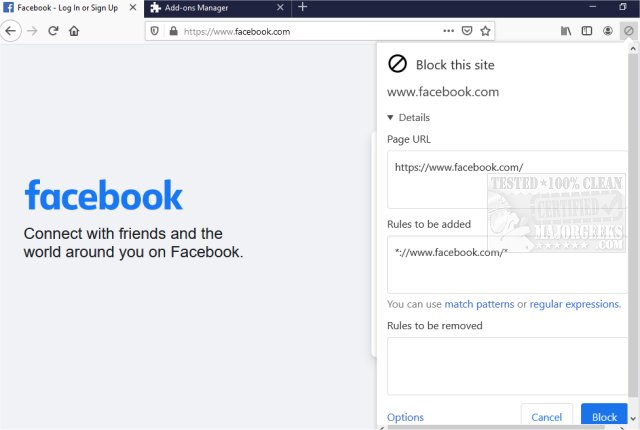
The latest release of uBlacklist, version 10.1.0, is now available for both Chrome and Firefox. This powerful browser extension empowers users to block specific websites from appearing in Google search results, enhancing the quality and relevance of their searches.
With uBlacklist, users can easily add blocking rules directly from the search result pages by clicking on the toolbar icon. The extension supports both match patterns, such as *://*.example.com/*, and regular expressions, like /example\.(net|org)/, providing flexibility in how users manage their blacklists. Adding a site is straightforward; however, users should note that the blocking is specific to the site's address, ensuring that related topics may still appear in search results.
Additionally, uBlacklist facilitates syncing blacklists across devices using Google Drive and offers the option to subscribe to public blacklists, making it a versatile tool for research and focused browsing. By filtering out unwanted results, users can concentrate on more relevant topics rather than getting sidetracked by the typical top search results.
In summary, uBlacklist is an invaluable resource for anyone looking to optimize their online research experience and minimize distractions from irrelevant or low-quality content.
To further enhance your browsing experience, consider exploring other tools and features, such as Google Chrome flags, methods to prevent Chrome from storing your browser history, or tips to rejuvenate the performance of Chrome and Firefox
With uBlacklist, users can easily add blocking rules directly from the search result pages by clicking on the toolbar icon. The extension supports both match patterns, such as *://*.example.com/*, and regular expressions, like /example\.(net|org)/, providing flexibility in how users manage their blacklists. Adding a site is straightforward; however, users should note that the blocking is specific to the site's address, ensuring that related topics may still appear in search results.
Additionally, uBlacklist facilitates syncing blacklists across devices using Google Drive and offers the option to subscribe to public blacklists, making it a versatile tool for research and focused browsing. By filtering out unwanted results, users can concentrate on more relevant topics rather than getting sidetracked by the typical top search results.
In summary, uBlacklist is an invaluable resource for anyone looking to optimize their online research experience and minimize distractions from irrelevant or low-quality content.
To further enhance your browsing experience, consider exploring other tools and features, such as Google Chrome flags, methods to prevent Chrome from storing your browser history, or tips to rejuvenate the performance of Chrome and Firefox
uBlacklist for Chrome and Firefox 10.1.0 released
uBlacklist for Chrome and Firefox removes specific sites from showing up in Google search.
uBlacklist for Chrome and Firefox 10.1.0 released @ MajorGeeks