FindInside is an advanced, free desktop search application tailored for users who need to uncover detailed information across various document types, moving beyond the limitations of traditional file name searches.
What Does FindInside Do?
FindInside allows users to search for specific words or phrases within a multitude of folders and subfolders. It accommodates an extensive array of file formats, including PDFs, Microsoft Office documents (like Word and Excel), plain text files, source code, logs, and configuration files, ensuring that no critical information remains hidden. A standout feature is its capability to search within mixed document collections, which is often a challenge for standard Windows search functionalities.
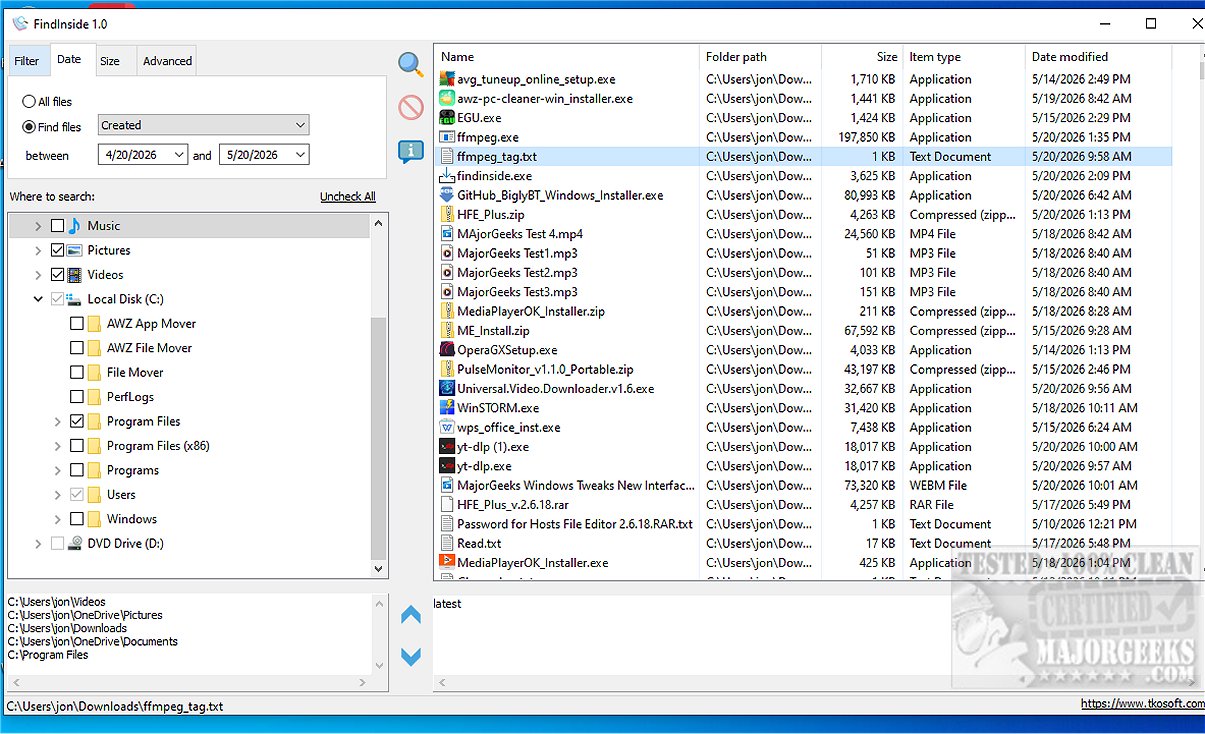
When a match is found, FindInside enhances usability with a built-in text preview area that displays the relevant document content, highlighting the searched phrase for quick reference. Users can navigate easily through multiple occurrences of the search term using previous and next match buttons.
Key Features of FindInside:
- Free software for Windows that searches file content.
- Supports a wide range of formats including PDFs, DOCX, text files, and source code.
- Finds documents based on actual content rather than just file names.
- Built-in text preview that highlights search terms.
- Navigation tools for previous and next matches.
- Search capabilities across selected folders and subfolders.
- Wildcard file name masks for targeted searches.
- Filters for date, file size, and optional hidden file searches.
- Recursive searching through nested directories.
FindInside also features practical filters to refine the search process, such as file name masks, date range filters, and size limitations. This functionality, combined with its recursive folder searching option, allows users to efficiently navigate complex directory structures and include hidden files in their results.
User-Friendly Interface:
The intuitive tree-view interface enables users to select multiple folders for searching and offers the flexibility to pause or stop the search as needed. Once the search concludes, results are displayed in a well-organized list, facilitating quick identification and access to relevant documents.
Geek Verdict:
FindInside excels in locating text within various document types like PDFs and Office files, offering a straightforward user experience. Its efficient search capabilities, paired with an interface that highlights search results, make it an essential tool for anyone aiming to manage and locate content within their digital document collections.
Explore FindInside Today!
Experience the efficiency and simplicity of FindInside, a powerful tool designed to streamline your document searches, making it easier than ever to find the information you need.
Related Resources:
- How to Show or Hide Hidden Files, Folders, or Drives
- How to Reset Folder View Settings in Windows 10 & 11
- How to Show or Hide the Search Box or Search Icon in Windows 10 & 11
- How to Change Folder View Template for All Folders in Windows 10 & 11
Extension:
As the demand for efficient document management continues to grow, tools like FindInside become increasingly vital for professionals across various fields. In addition to its existing features, future updates could focus on enhancing AI capabilities for smarter search suggestions, integrating cloud storage support for broader accessibility, and improving collaboration features that allow users to share search results with colleagues. With evolving technology, FindInside could also develop mobile applications, enabling users to search their documents on the go, making information retrieval even more convenient
What Does FindInside Do?
FindInside allows users to search for specific words or phrases within a multitude of folders and subfolders. It accommodates an extensive array of file formats, including PDFs, Microsoft Office documents (like Word and Excel), plain text files, source code, logs, and configuration files, ensuring that no critical information remains hidden. A standout feature is its capability to search within mixed document collections, which is often a challenge for standard Windows search functionalities.
When a match is found, FindInside enhances usability with a built-in text preview area that displays the relevant document content, highlighting the searched phrase for quick reference. Users can navigate easily through multiple occurrences of the search term using previous and next match buttons.
Key Features of FindInside:
- Free software for Windows that searches file content.
- Supports a wide range of formats including PDFs, DOCX, text files, and source code.
- Finds documents based on actual content rather than just file names.
- Built-in text preview that highlights search terms.
- Navigation tools for previous and next matches.
- Search capabilities across selected folders and subfolders.
- Wildcard file name masks for targeted searches.
- Filters for date, file size, and optional hidden file searches.
- Recursive searching through nested directories.
FindInside also features practical filters to refine the search process, such as file name masks, date range filters, and size limitations. This functionality, combined with its recursive folder searching option, allows users to efficiently navigate complex directory structures and include hidden files in their results.
User-Friendly Interface:
The intuitive tree-view interface enables users to select multiple folders for searching and offers the flexibility to pause or stop the search as needed. Once the search concludes, results are displayed in a well-organized list, facilitating quick identification and access to relevant documents.
Geek Verdict:
FindInside excels in locating text within various document types like PDFs and Office files, offering a straightforward user experience. Its efficient search capabilities, paired with an interface that highlights search results, make it an essential tool for anyone aiming to manage and locate content within their digital document collections.
Explore FindInside Today!
Experience the efficiency and simplicity of FindInside, a powerful tool designed to streamline your document searches, making it easier than ever to find the information you need.
Related Resources:
- How to Show or Hide Hidden Files, Folders, or Drives
- How to Reset Folder View Settings in Windows 10 & 11
- How to Show or Hide the Search Box or Search Icon in Windows 10 & 11
- How to Change Folder View Template for All Folders in Windows 10 & 11
Extension:
As the demand for efficient document management continues to grow, tools like FindInside become increasingly vital for professionals across various fields. In addition to its existing features, future updates could focus on enhancing AI capabilities for smarter search suggestions, integrating cloud storage support for broader accessibility, and improving collaboration features that allow users to share search results with colleagues. With evolving technology, FindInside could also develop mobile applications, enabling users to search their documents on the go, making information retrieval even more convenient
FindInside 2.1 released
FindInside is a powerful free desktop search utility designed for users who need to locate detailed information across various document types, rather than relying solely on file names.