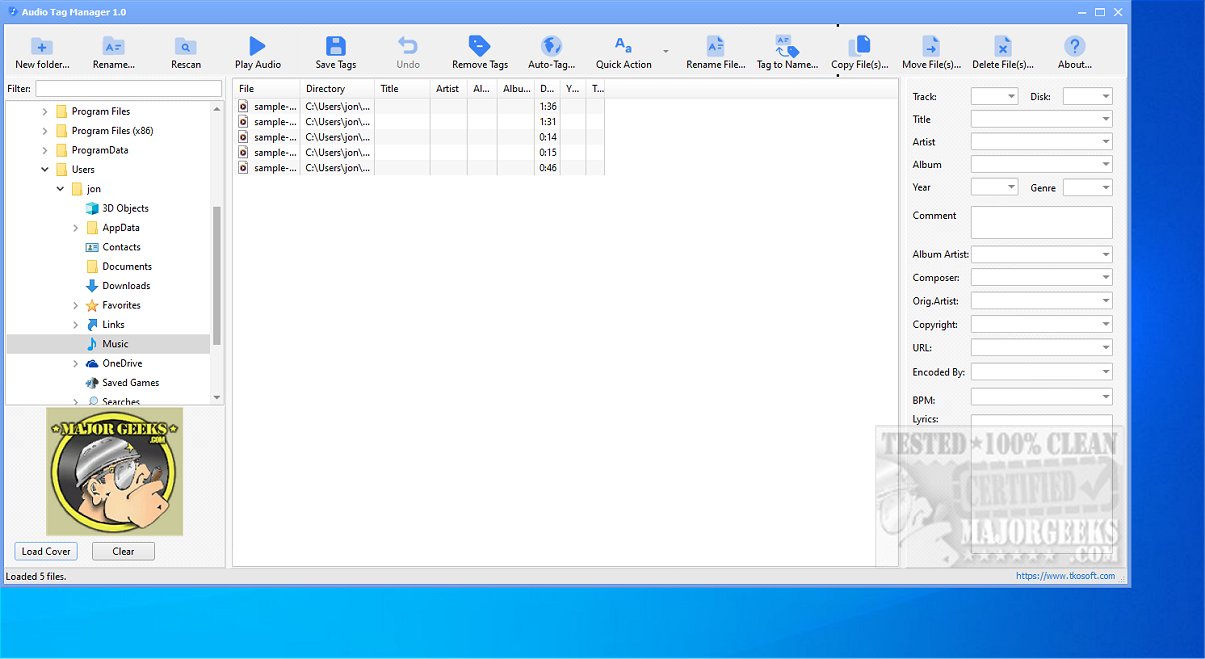
Audio Tag Manager is a free software tool designed to facilitate the editing, organizing, cleaning, and renaming of music files. It supports a wide array of audio formats such as MP3, FLAC, OGG, APE, M4A, WMA, and WAV, making it a comprehensive solution for music collection management.
1. Metadata Editing: The software allows users to edit crucial metadata fields like Title, Artist, Album, Year, Track Number, Genre, Composer, and more. Users can customize metadata for individual files or apply changes to multiple files simultaneously, enhancing efficiency in music library management.
2. File Renaming: Users can rename audio files based on tag-based patterns, utilizing various metadata elements such as artist names, song titles, and album titles. This capability is particularly useful for organizing files with inconsistent naming conventions.
3. Auto-Tag Feature: A standout feature of Audio Tag Manager is its Auto-Tag capability, which enables users to fetch accurate metadata online through MusicBrainz, a community-driven music database. This feature assists in identifying and correcting incomplete or poorly tagged audio files.
4. Batch Editing: Users can perform batch edits on multiple audio files, facilitating quick updates across a large music library.
5. Cover Art Management: The software supports the loading, replacing, and clearing of album cover art, ensuring the visual representation of the music collection is also maintained.
- Built-in Presets: The application includes flexible presets for common tag-cleaning tasks, such as trimming excess spaces and correcting case issues. Users can also create custom presets tailored to their needs.
- User-Friendly Interface: Audio Tag Manager is designed for simplicity and efficiency, making it suitable for users of all technical levels. The intuitive interface allows for quick adjustments to audio track properties.
Audio Tag Manager 2.1 stands out as a powerful and user-friendly audio editing solution, ideal for anyone looking to optimize their music collection. Its extensive features, including Auto-Tag functionality, batch editing, and cover art management, make it a valuable tool for maintaining an accurate and organized music library. Whether you’re a casual listener or a dedicated audiophile, Audio Tag Manager streamlines the process of managing your music files, ensuring that your collection remains polished and easily accessible.
To further improve Audio Tag Manager, future updates could consider integrating additional online music databases for even broader metadata sourcing, enhancing user support for various operating systems, and introducing advanced algorithms for automatic tagging that could better understand user preferences and file contexts. Additionally, incorporating a mobile version could expand accessibility for users managing their music collections on the go
Key Functionalities of Audio Tag Manager
1. Metadata Editing: The software allows users to edit crucial metadata fields like Title, Artist, Album, Year, Track Number, Genre, Composer, and more. Users can customize metadata for individual files or apply changes to multiple files simultaneously, enhancing efficiency in music library management.
2. File Renaming: Users can rename audio files based on tag-based patterns, utilizing various metadata elements such as artist names, song titles, and album titles. This capability is particularly useful for organizing files with inconsistent naming conventions.
3. Auto-Tag Feature: A standout feature of Audio Tag Manager is its Auto-Tag capability, which enables users to fetch accurate metadata online through MusicBrainz, a community-driven music database. This feature assists in identifying and correcting incomplete or poorly tagged audio files.
4. Batch Editing: Users can perform batch edits on multiple audio files, facilitating quick updates across a large music library.
5. Cover Art Management: The software supports the loading, replacing, and clearing of album cover art, ensuring the visual representation of the music collection is also maintained.
Advanced Features
- Built-in Presets: The application includes flexible presets for common tag-cleaning tasks, such as trimming excess spaces and correcting case issues. Users can also create custom presets tailored to their needs.
- User-Friendly Interface: Audio Tag Manager is designed for simplicity and efficiency, making it suitable for users of all technical levels. The intuitive interface allows for quick adjustments to audio track properties.
Conclusion
Audio Tag Manager 2.1 stands out as a powerful and user-friendly audio editing solution, ideal for anyone looking to optimize their music collection. Its extensive features, including Auto-Tag functionality, batch editing, and cover art management, make it a valuable tool for maintaining an accurate and organized music library. Whether you’re a casual listener or a dedicated audiophile, Audio Tag Manager streamlines the process of managing your music files, ensuring that your collection remains polished and easily accessible.
Future Enhancements
To further improve Audio Tag Manager, future updates could consider integrating additional online music databases for even broader metadata sourcing, enhancing user support for various operating systems, and introducing advanced algorithms for automatic tagging that could better understand user preferences and file contexts. Additionally, incorporating a mobile version could expand accessibility for users managing their music collections on the go
Audio Tag Manager 2.1 released
Audio Tag Manager is a free audio tag editor that lets you efficiently edit, organize, clean, and rename your music files. This versatile tool supports a variety of audio formats, including MP3, FLAC, OGG, APE, M4A, WMA, and WAV, making it a comprehensive solution for managing your music collection.