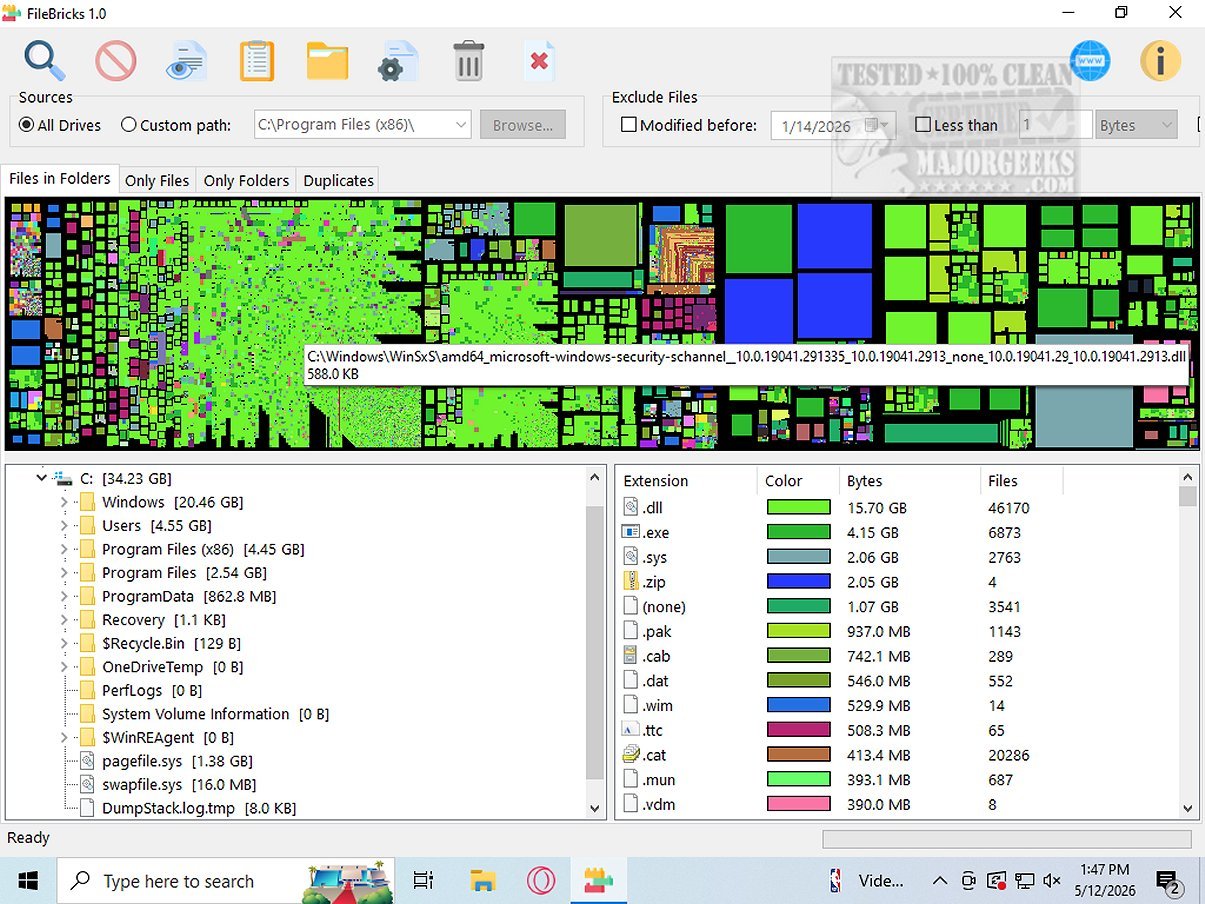
FileBricks is an innovative visual disk space analyzer designed to help users gain a detailed understanding of how storage is allocated across their drives. The program presents files, folders, and duplicate items visually through colorful, easily identifiable blocks. This unique representation allows users to swiftly identify large files, overcrowded folders, and duplicate items, all while highlighting the most prevalent file types taking up space.
Key Features of FileBricks
1. Customizable Scanning Options: Users can select to scan all available drives or focus on a specific folder. Additionally, robust filtering options enable exclusions based on modified dates, minimum file sizes, or specific filename patterns, allowing for a tailored analysis that meets individual needs.
2. In-Depth Analysis Capabilities: Beyond traditional file listing tools, FileBricks offers dedicated views for in-depth disk analysis. Users can explore the contents of individual folders, get an overview of files sorted by size, and visually compare files across different folders. The tool also groups duplicate files, offering a clear overview of redundancy for easier management.
3. Organized Color-Coded Results: Files with the same extension are color-coded in the display, allowing users to quickly recognize categories such as videos, images, archives, executables, and documents. This feature streamlines the process of assessing which file types consume the most space.
The Geek Verdict:
FileBricks is not just a simple disk visualization tool; it revolutionizes storage management. By generating a visual map of your drives, it allows users to see the distribution of storage among files and folders clearly. This insightful representation aids in optimizing storage space effectively, leading to better utilization of available resources. For users who prefer a visual overview rather than raw data, FileBricks is an ideal solution.
Future Enhancements:
Looking forward, potential updates could include enhanced integration with cloud storage solutions, improved machine learning algorithms for smarter file categorization, and more customizable visualizations to cater to diverse user preferences. Additionally, expanding support for various operating systems and mobile platforms could broaden accessibility, making FileBricks an essential tool for anyone serious about effective disk space management.
Overall, FileBricks 2.2 stands out as a powerful ally in the quest for organized and efficient data storage
Key Features of FileBricks
1. Customizable Scanning Options: Users can select to scan all available drives or focus on a specific folder. Additionally, robust filtering options enable exclusions based on modified dates, minimum file sizes, or specific filename patterns, allowing for a tailored analysis that meets individual needs.
2. In-Depth Analysis Capabilities: Beyond traditional file listing tools, FileBricks offers dedicated views for in-depth disk analysis. Users can explore the contents of individual folders, get an overview of files sorted by size, and visually compare files across different folders. The tool also groups duplicate files, offering a clear overview of redundancy for easier management.
3. Organized Color-Coded Results: Files with the same extension are color-coded in the display, allowing users to quickly recognize categories such as videos, images, archives, executables, and documents. This feature streamlines the process of assessing which file types consume the most space.
The Geek Verdict:
FileBricks is not just a simple disk visualization tool; it revolutionizes storage management. By generating a visual map of your drives, it allows users to see the distribution of storage among files and folders clearly. This insightful representation aids in optimizing storage space effectively, leading to better utilization of available resources. For users who prefer a visual overview rather than raw data, FileBricks is an ideal solution.
Future Enhancements:
Looking forward, potential updates could include enhanced integration with cloud storage solutions, improved machine learning algorithms for smarter file categorization, and more customizable visualizations to cater to diverse user preferences. Additionally, expanding support for various operating systems and mobile platforms could broaden accessibility, making FileBricks an essential tool for anyone serious about effective disk space management.
Overall, FileBricks 2.2 stands out as a powerful ally in the quest for organized and efficient data storage
FileBricks 2.2 released
FileBricks is an innovative visual disk space analyzer designed for users who want a comprehensive understanding of how storage is allocated across their drives. This intuitive program presents files, folders, and duplicate items in the form of colorful, easily identifiable blocks.