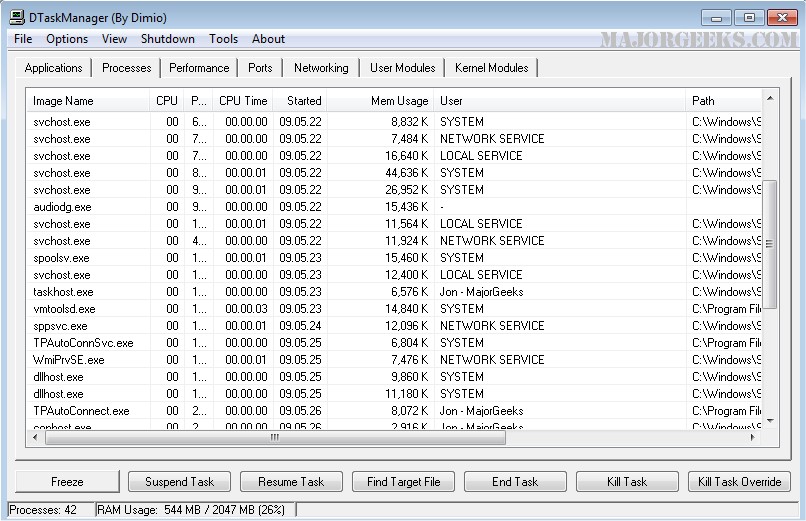
DTaskManager version 1.57.33 has been released, offering enhanced features not found in the standard Windows Task Manager or other third-party alternatives. This specialized Task Manager provides users with advanced options for managing processes. It includes three distinct methods for closing processes: a standard termination request, a forced termination with dialogue tolerance, and a powerful forced termination that bypasses all permissions, allowing the termination of even running system processes.
In addition to process termination, DTaskManager enables users to suspend and reactivate processes, similar to functionalities found in Linux. This feature is particularly useful for temporarily halting resource-intensive tasks, such as a DivX encoding process, without fully terminating them. The software allows users to select and terminate multiple processes simultaneously, streamlining the management of running applications. Notably, DTaskManager does not require unnecessary confirmation prompts, enhancing user experience and efficiency.
Overall, DTaskManager stands out as a robust alternative to the default Windows Task Manager, catering to users seeking more control over their system processes.
As technology continues to evolve, DTaskManager may further enhance its capabilities by integrating features such as real-time system monitoring, resource usage analytics, or user-defined automation scripts for process management. Future versions could also focus on improving the user interface for a more intuitive experience or incorporating machine learning algorithms to optimize process handling based on user behavior
In addition to process termination, DTaskManager enables users to suspend and reactivate processes, similar to functionalities found in Linux. This feature is particularly useful for temporarily halting resource-intensive tasks, such as a DivX encoding process, without fully terminating them. The software allows users to select and terminate multiple processes simultaneously, streamlining the management of running applications. Notably, DTaskManager does not require unnecessary confirmation prompts, enhancing user experience and efficiency.
Overall, DTaskManager stands out as a robust alternative to the default Windows Task Manager, catering to users seeking more control over their system processes.
As technology continues to evolve, DTaskManager may further enhance its capabilities by integrating features such as real-time system monitoring, resource usage analytics, or user-defined automation scripts for process management. Future versions could also focus on improving the user interface for a more intuitive experience or incorporating machine learning algorithms to optimize process handling based on user behavior
DTaskManager 1.57.33 released
DTaskManager is specifically engineered to give additional functionality that the Windows bundled Task Manager (and other third-party products) do not have.