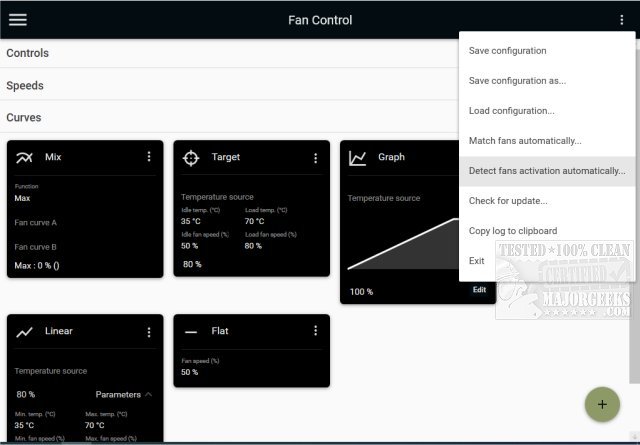
FanControl V272 has been released as an advanced, customizable, and open-source utility for managing GPU and CPU fan speeds. This portable application is primarily designed for Windows users, enabling them to have granular control over their system's cooling mechanisms. FanControl allows users to adjust various aspects of their fans through a user-friendly interface that makes it easy to monitor and optimize fan performance.
Key features of FanControl include the ability to save, edit, and load multiple profiles, utilize various temperature sources such as CPU, GPU, motherboard, and hard drives, and create custom fan curves tailored to specific cooling needs. Users can finely tune fan control responses through parameters like activation percentage, response time, and hysteresis. The application supports mixing different curves and sensors, providing a flexible approach to fan management. Its modern dashboard-style UI enhances usability, and it can operate as a background application with a customizable tray icon. Additionally, users have the option to create custom external temperature sensors using *.sensor files.
FanControl offers several fan curve types, including linear, graph, target, mix, sync, and flat, giving users a range of options to optimize their cooling strategies. The graph fan curve editor allows for precise adjustments, enabling users to add, remove, and rearrange data points to achieve desired fan behaviors.
This innovative tool is particularly beneficial for gamers and PC enthusiasts who want to maintain optimal operating temperatures during intensive tasks while minimizing noise levels. By providing real-time monitoring and personalized fan control, FanControl stands out as an essential utility for anyone looking to enhance their system's performance.
As technology continues to evolve, the demand for efficient cooling solutions is likely to grow, making tools like FanControl increasingly relevant. Future updates may include additional features such as machine learning algorithms for predictive cooling adjustments, enhanced compatibility with a broader range of hardware, and even more intuitive user interfaces to cater to both novice and expert users
Key features of FanControl include the ability to save, edit, and load multiple profiles, utilize various temperature sources such as CPU, GPU, motherboard, and hard drives, and create custom fan curves tailored to specific cooling needs. Users can finely tune fan control responses through parameters like activation percentage, response time, and hysteresis. The application supports mixing different curves and sensors, providing a flexible approach to fan management. Its modern dashboard-style UI enhances usability, and it can operate as a background application with a customizable tray icon. Additionally, users have the option to create custom external temperature sensors using *.sensor files.
FanControl offers several fan curve types, including linear, graph, target, mix, sync, and flat, giving users a range of options to optimize their cooling strategies. The graph fan curve editor allows for precise adjustments, enabling users to add, remove, and rearrange data points to achieve desired fan behaviors.
This innovative tool is particularly beneficial for gamers and PC enthusiasts who want to maintain optimal operating temperatures during intensive tasks while minimizing noise levels. By providing real-time monitoring and personalized fan control, FanControl stands out as an essential utility for anyone looking to enhance their system's performance.
As technology continues to evolve, the demand for efficient cooling solutions is likely to grow, making tools like FanControl increasingly relevant. Future updates may include additional features such as machine learning algorithms for predictive cooling adjustments, enhanced compatibility with a broader range of hardware, and even more intuitive user interfaces to cater to both novice and expert users
FanControl V272 released
FanControl is a highly customizable portable Open Source GPU and CPU fan management utility.