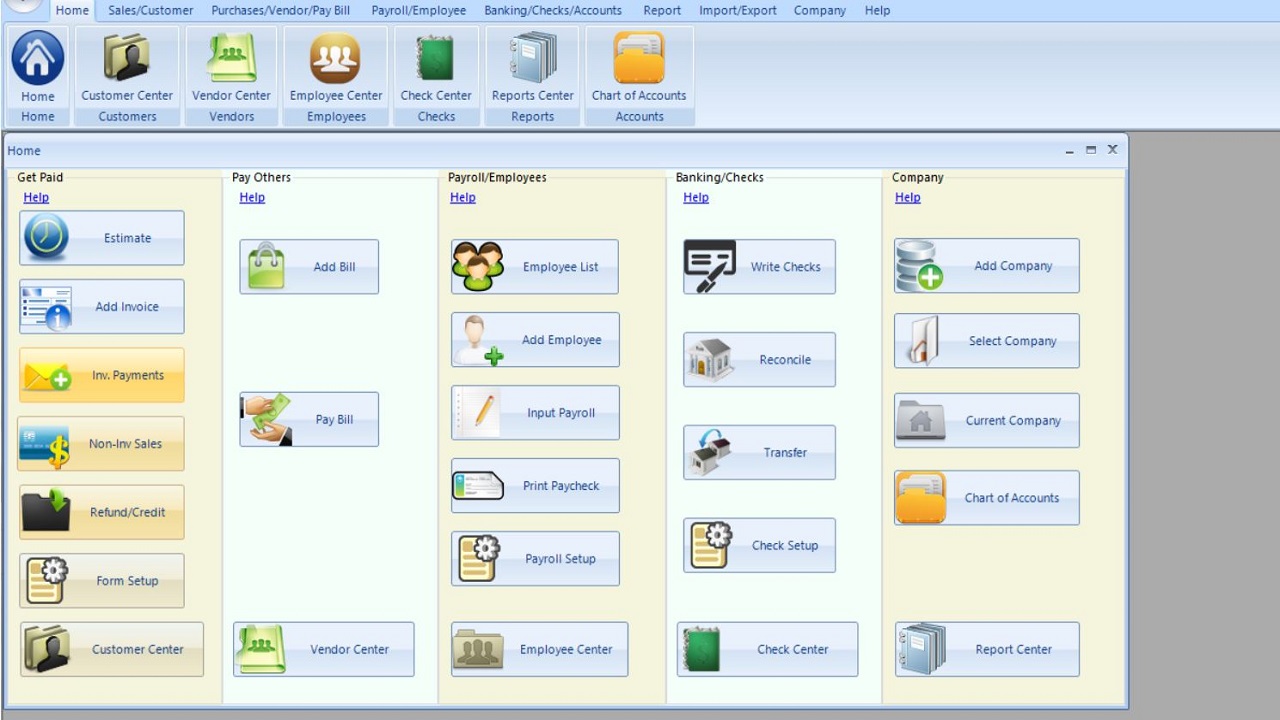
ezAccounting, developed by Halfpricesoft, is a budget-friendly accounting and payroll software designed specifically for small businesses using Windows operating systems. With its recent release of version 3.16.11, ezAccounting continues to provide tools for tracking income and expenses, managing invoicing and payments, processing payroll, printing checks, and generating essential tax forms. Users can take advantage of a 30-day free trial to explore its capabilities without any commitment.
Key Features and Usability
This software stands out for its simplicity and user-friendly interface, which features button-style navigation that encompasses various functions like income tracking, expenses management, invoicing, payroll processing, check printing, and tax form generation. While the layout may take some time to familiarize oneself with, many users find it intuitive once they adapt. Notably, ezAccounting is a local desktop program, which means there is no reliance on cloud services or ongoing subscription fees, distinguishing it from competitors like QuickBooks that impose monthly costs and mandatory upgrades.
Users purchase the software outright, and any future updates are optional and paid separately, ensuring that the program remains operational without unexpected fees. This model is particularly appealing for small businesses that want to avoid the financial burden of recurring subscription costs.
Strengths of ezAccounting
ezAccounting excels in several areas, especially in payroll management, which is one of its core strengths. It allows businesses to manage payroll in-house, print checks efficiently, and support common tax forms such as 941, 940, W-2, and W-3. The software includes solid tax tables and simplifies the process of generating essential reports like profit and loss statements, balance sheets, and payroll summaries. Job tracking is also integrated, allowing businesses to link labor and costs to specific projects.
Moreover, the software comes preloaded with a chart of accounts for new users, and importing vendor and payroll information works effectively, although it does not support full QuickBooks financial data imports. Businesses planning to transition from QuickBooks should consider starting fresh at the beginning of a financial month.
Limitations and Considerations
While ezAccounting is ideal for those seeking local control, built-in payroll, and predictable costs, it does have limitations. Its Windows-only compatibility restricts its accessibility, and there are limited integration options with other software tools. Additionally, some tax forms may require preprinted paper, and users migrating from QuickBooks might find the import options insufficient.
For companies with robust job costing and payroll needs, ezAccounting can be a valuable asset. However, businesses like MajorGeeks, which do not focus heavily on payroll, may find it less suitable. Those looking for alternatives might consider GnuCash for a more traditional accounting approach.
Conclusion
In summary, ezAccounting is a niche yet practical solution for small businesses that prioritize payroll management, job tracking, and straightforward reporting without the burden of subscription fees. Its flat pricing structure, local data control, and payroll tools are significant advantages. However, its Windows-only design and limited options for importing QuickBooks data may deter some users.
For those frustrated by subscription-based accounting software, or if payroll and job costing are central to their operations, trying out the free trial could prove beneficial. There is no financial commitment to explore its features, and it may ultimately lead to substantial savings. For additional guidance or alternative recommendations, users can engage with the MajorGeeks forums for support
Key Features and Usability
This software stands out for its simplicity and user-friendly interface, which features button-style navigation that encompasses various functions like income tracking, expenses management, invoicing, payroll processing, check printing, and tax form generation. While the layout may take some time to familiarize oneself with, many users find it intuitive once they adapt. Notably, ezAccounting is a local desktop program, which means there is no reliance on cloud services or ongoing subscription fees, distinguishing it from competitors like QuickBooks that impose monthly costs and mandatory upgrades.
Users purchase the software outright, and any future updates are optional and paid separately, ensuring that the program remains operational without unexpected fees. This model is particularly appealing for small businesses that want to avoid the financial burden of recurring subscription costs.
Strengths of ezAccounting
ezAccounting excels in several areas, especially in payroll management, which is one of its core strengths. It allows businesses to manage payroll in-house, print checks efficiently, and support common tax forms such as 941, 940, W-2, and W-3. The software includes solid tax tables and simplifies the process of generating essential reports like profit and loss statements, balance sheets, and payroll summaries. Job tracking is also integrated, allowing businesses to link labor and costs to specific projects.
Moreover, the software comes preloaded with a chart of accounts for new users, and importing vendor and payroll information works effectively, although it does not support full QuickBooks financial data imports. Businesses planning to transition from QuickBooks should consider starting fresh at the beginning of a financial month.
Limitations and Considerations
While ezAccounting is ideal for those seeking local control, built-in payroll, and predictable costs, it does have limitations. Its Windows-only compatibility restricts its accessibility, and there are limited integration options with other software tools. Additionally, some tax forms may require preprinted paper, and users migrating from QuickBooks might find the import options insufficient.
For companies with robust job costing and payroll needs, ezAccounting can be a valuable asset. However, businesses like MajorGeeks, which do not focus heavily on payroll, may find it less suitable. Those looking for alternatives might consider GnuCash for a more traditional accounting approach.
Conclusion
In summary, ezAccounting is a niche yet practical solution for small businesses that prioritize payroll management, job tracking, and straightforward reporting without the burden of subscription fees. Its flat pricing structure, local data control, and payroll tools are significant advantages. However, its Windows-only design and limited options for importing QuickBooks data may deter some users.
For those frustrated by subscription-based accounting software, or if payroll and job costing are central to their operations, trying out the free trial could prove beneficial. There is no financial commitment to explore its features, and it may ultimately lead to substantial savings. For additional guidance or alternative recommendations, users can engage with the MajorGeeks forums for support
ezAccounting 3.16.11 released
ezAccounting is affordable small-business accounting and payroll software for Windows that helps you track income and expenses, manage invoicing and payments, process payroll, print checks, and generate essential tax forms, with a 30-day free trial.