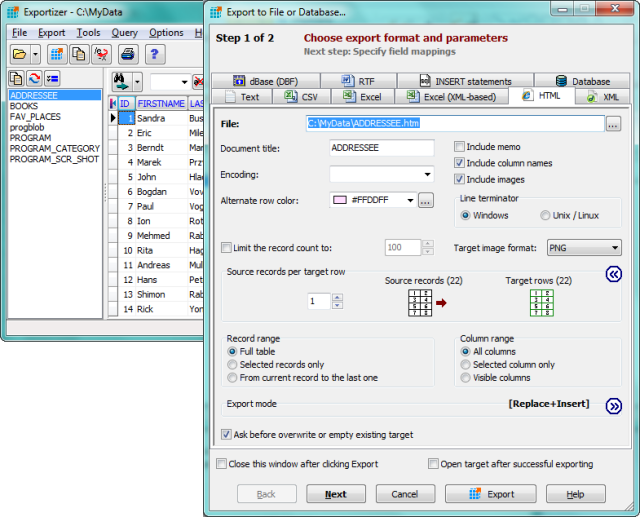
Exportizer version 10.3.4.822 has been released, enhancing its functionality as a free database export tool. This software enables users to export data seamlessly to various outputs, including files, clipboard, or printers, and supports connections through BDE or ADO.
The tool is capable of converting various database formats such as DB, DBF, and text files into multiple output formats including text, CSV, XLS, RTF, XML, HTML, DBF, and INSERT statements. Users can customize their export process extensively, as Exportizer provides numerous options for output control, including the ability to specify field mappings from source to target.
Export operations can be conducted through the user-friendly interface or via the Command Line, where users can generate commands directly from the GUI. Other features include copying data to the clipboard, printing, and several utility functions for data manipulation and bookmarking.
Key features of Exportizer include:
- Support for multi-table database files like XLS, XLSX, MDB, and more.
- The capability to export data from all files in a folder or all tables from a multi-table data source simultaneously.
- Custom increment numbers for fields during export.
- Exporting data to Excel and other database formats.
- Additional Command Line options such as /Silent, /LogFile, and /CloseOnError.
- Extra export modes including Append and Empty+Insert.
In summary, Exportizer 10.3.4.822 is a powerful and versatile tool for users needing efficient database export solutions, with a range of features designed to streamline the data handling process. With ongoing updates, it continues to adapt to user needs and emerging technologies in data management
The tool is capable of converting various database formats such as DB, DBF, and text files into multiple output formats including text, CSV, XLS, RTF, XML, HTML, DBF, and INSERT statements. Users can customize their export process extensively, as Exportizer provides numerous options for output control, including the ability to specify field mappings from source to target.
Export operations can be conducted through the user-friendly interface or via the Command Line, where users can generate commands directly from the GUI. Other features include copying data to the clipboard, printing, and several utility functions for data manipulation and bookmarking.
Key features of Exportizer include:
- Support for multi-table database files like XLS, XLSX, MDB, and more.
- The capability to export data from all files in a folder or all tables from a multi-table data source simultaneously.
- Custom increment numbers for fields during export.
- Exporting data to Excel and other database formats.
- Additional Command Line options such as /Silent, /LogFile, and /CloseOnError.
- Extra export modes including Append and Empty+Insert.
In summary, Exportizer 10.3.4.822 is a powerful and versatile tool for users needing efficient database export solutions, with a range of features designed to streamline the data handling process. With ongoing updates, it continues to adapt to user needs and emerging technologies in data management
Exportizer 10.3.4.822 released
Exportizer is a free database export tool that allows you to export data to a file, clipboard, or printer.