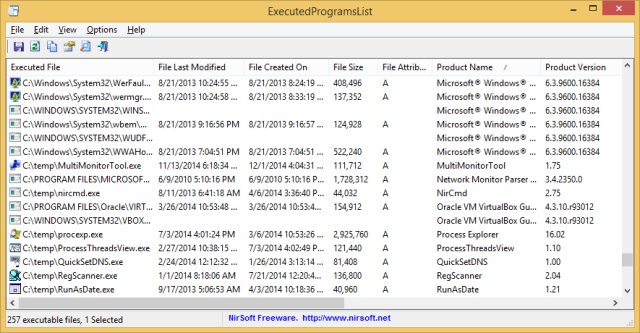
ExecutedProgramsList is a lightweight and portable utility designed to display a comprehensive list of programs and batch files that have been executed on a Windows system. The latest version, v1.15, allows users to gather execution traces directly from the Windows registry and the Prefetch folder without modifying any system files, making it an essential tool for incident response and forensic analysis.
Key Features and Functionality
The tool presents the execution data in a sortable table format, which includes essential details like the filename, full path, file timestamps, product version information, and the last execution time when logged by Windows. As a portable executable, it requires no installation or background services—simply double-click to access your data. Even after a system wipe, traces can remain in the registry, revealing a significant amount of historical execution data that users may overlook.
Value for Forensic Teams
Forensic teams favor ExecutedProgramsList because traditional cleanup tools often fail to address registry keys that log execution history. Users can delete applications and empty their Recycle Bin, yet this tool can still reveal what was executed recently. Analysts frequently use it to identify hidden USB tools or suspicious executables, especially when paired with hash checkers or antivirus tools like Defender SmartScreen.
Data Sources and Aggregation
ExecutedProgramsList pulls data from multiple sources, including:
- MuiCache: Tracks recently executed programs per user.
- Shell\NoRoam\MUICache: Similar tracking for older systems, often ignored in newer Windows versions.
- AppCompat Flags: Displays apps that triggered compatibility flags.
- Prefetch: Contains .pf files with execution hashes and timestamps, providing system-wide data.
By combining these sources, the tool provides a more comprehensive overview than relying on a single registry dump.
Export Options
The tool offers several command-line export options for users looking to build timelines or integrate data into other tools. Users can export data in formats such as CSV, plain text, or XML, allowing for structured documentation without manual copying.
Limitations to Consider
While ExecutedProgramsList is powerful, it does have limitations. Some AppCompat keys lack timestamps, and MUICache entries may be rotated out over time. The tool defaults to reading the HKCU registry hive, so access to other users' histories requires elevated permissions. Additionally, users may encounter irrelevant entries like Windows updates, necessitating some sorting.
Conclusion
ExecutedProgramsList excels at its primary function—providing a detailed look at program execution history without unnecessary complexity or bloat. It is a valuable addition to any forensic toolkit and is particularly useful for offline analysis without raising security alarms. However, the effectiveness of the tool can be hindered if users have attempted to clean the Prefetch or MUICache data. With minimal setup time and no resource overhead, it is a recommended utility alongside tools like Autoruns and Process Explorer.
For assistance or script sharing related to Prefetch timestamps or CSV parsing, users are encouraged to visit the MajorGeeks forums, where the community regularly collaborates on automation and troubleshooting.
Extended Applications
As the digital landscape evolves, tools like ExecutedProgramsList may expand their features to include more sophisticated analytics, machine learning capabilities for pattern recognition, and enhanced compatibility with various operating systems. Future iterations could also integrate cloud storage options for data preservation and cross-device access, enhancing their utility for enterprise-level incident response teams and cybersecurity professionals
Key Features and Functionality
The tool presents the execution data in a sortable table format, which includes essential details like the filename, full path, file timestamps, product version information, and the last execution time when logged by Windows. As a portable executable, it requires no installation or background services—simply double-click to access your data. Even after a system wipe, traces can remain in the registry, revealing a significant amount of historical execution data that users may overlook.
Value for Forensic Teams
Forensic teams favor ExecutedProgramsList because traditional cleanup tools often fail to address registry keys that log execution history. Users can delete applications and empty their Recycle Bin, yet this tool can still reveal what was executed recently. Analysts frequently use it to identify hidden USB tools or suspicious executables, especially when paired with hash checkers or antivirus tools like Defender SmartScreen.
Data Sources and Aggregation
ExecutedProgramsList pulls data from multiple sources, including:
- MuiCache: Tracks recently executed programs per user.
- Shell\NoRoam\MUICache: Similar tracking for older systems, often ignored in newer Windows versions.
- AppCompat Flags: Displays apps that triggered compatibility flags.
- Prefetch: Contains .pf files with execution hashes and timestamps, providing system-wide data.
By combining these sources, the tool provides a more comprehensive overview than relying on a single registry dump.
Export Options
The tool offers several command-line export options for users looking to build timelines or integrate data into other tools. Users can export data in formats such as CSV, plain text, or XML, allowing for structured documentation without manual copying.
Limitations to Consider
While ExecutedProgramsList is powerful, it does have limitations. Some AppCompat keys lack timestamps, and MUICache entries may be rotated out over time. The tool defaults to reading the HKCU registry hive, so access to other users' histories requires elevated permissions. Additionally, users may encounter irrelevant entries like Windows updates, necessitating some sorting.
Conclusion
ExecutedProgramsList excels at its primary function—providing a detailed look at program execution history without unnecessary complexity or bloat. It is a valuable addition to any forensic toolkit and is particularly useful for offline analysis without raising security alarms. However, the effectiveness of the tool can be hindered if users have attempted to clean the Prefetch or MUICache data. With minimal setup time and no resource overhead, it is a recommended utility alongside tools like Autoruns and Process Explorer.
For assistance or script sharing related to Prefetch timestamps or CSV parsing, users are encouraged to visit the MajorGeeks forums, where the community regularly collaborates on automation and troubleshooting.
Extended Applications
As the digital landscape evolves, tools like ExecutedProgramsList may expand their features to include more sophisticated analytics, machine learning capabilities for pattern recognition, and enhanced compatibility with various operating systems. Future iterations could also integrate cloud storage options for data preservation and cross-device access, enhancing their utility for enterprise-level incident response teams and cybersecurity professionals
ExecutedProgramsList 1.15 released
ExecutedProgramsList is a simple tool that displays a list of programs and batch files that you previously executed on your system.