The release of Everything Toolbar version 3.5.0 brings enhanced integration with the Windows taskbar, enabling users to quickly search for files, folders, and more by name. This tool simplifies the process of indexing and searching files, as well as sharing them with others.
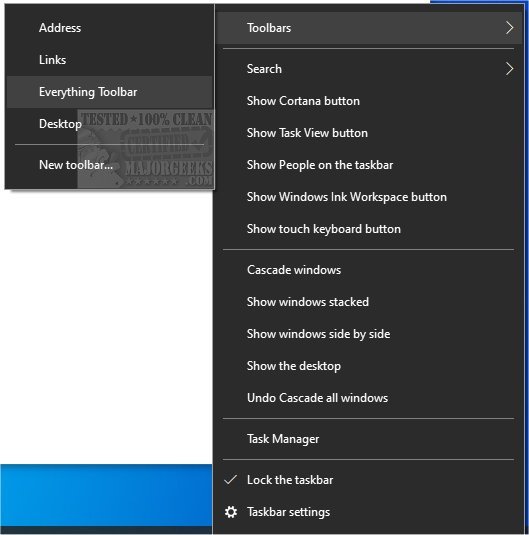
To install Everything Toolbar, users need to extract the contents of the downloaded file, run the install.cmd script with administrative privileges, and enable the toolbar via the taskbar's context menu. It's important to note that users may need to access the context menu more than once to see the option, as it may not appear on the first attempt.
In addition, users looking for tips on optimizing their Windows search experience can refer to related guides, such as how to manage the search box in Windows 10 and 11, rebuild the Windows search index, enable enhanced search modes, or disable Bing search in the Start menu.
This latest version is a step forward in making file management more efficient for Windows users, providing a seamless way to access and share files directly from the taskbar, thus saving time and enhancing productivity. As technology continues to evolve, tools like Everything Toolbar will likely incorporate even more features, such as advanced filters or integration with cloud services, to further streamline the file search process
To install Everything Toolbar, users need to extract the contents of the downloaded file, run the install.cmd script with administrative privileges, and enable the toolbar via the taskbar's context menu. It's important to note that users may need to access the context menu more than once to see the option, as it may not appear on the first attempt.
In addition, users looking for tips on optimizing their Windows search experience can refer to related guides, such as how to manage the search box in Windows 10 and 11, rebuild the Windows search index, enable enhanced search modes, or disable Bing search in the Start menu.
This latest version is a step forward in making file management more efficient for Windows users, providing a seamless way to access and share files directly from the taskbar, thus saving time and enhancing productivity. As technology continues to evolve, tools like Everything Toolbar will likely incorporate even more features, such as advanced filters or integration with cloud services, to further streamline the file search process
Everything Toolbar 3.5.0 released
Everything Toolbar provides you with an easy-to-utilize Everything integration for the Windows toolbar.