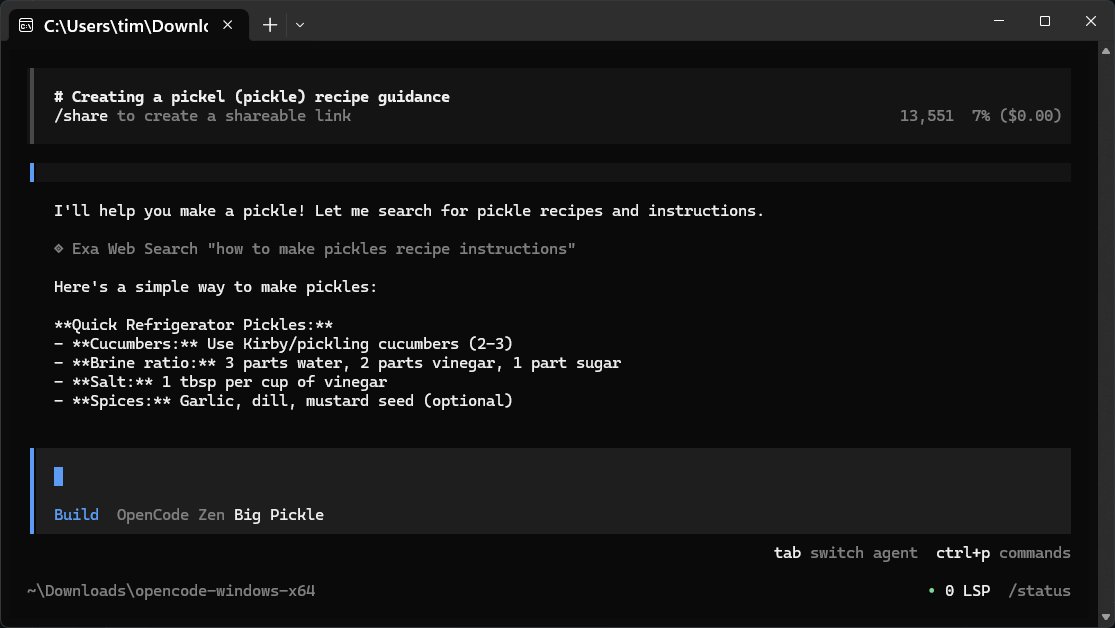
OpenCode is a powerful, free, and open-source AI assistant designed for developers. It operates locally on your computer, making it an ideal tool for writing code, debugging, and understanding project files without the complexities of cloud-based systems. The latest version, 1.18.33, continues to emphasize simplicity and efficiency, providing a command-line interface that allows users to interact with their projects in natural language. This approach makes it accessible for various programming languages while ensuring that sensitive project data remains secure.
Key Features:
- Local Functionality: OpenCode runs on your computer, utilizing your own API keys, which enhances security by avoiding data sharing with external servers.
- Lightweight Design: With no bulky GUI, OpenCode loads quickly and operates efficiently, appealing to users who prefer terminal-based interactions.
- Versatile Usage: Aside from coding tasks, OpenCode can answer general questions and provide explanations or even recipes, leveraging web search capabilities for broader inquiries.
- Flexible Integration: It supports over 75 different large language models (LLMs), allowing users to select a model that best fits their needs, whether for casual inquiries or more complex coding tasks.
How It Works:
OpenCode does not include a built-in knowledge base; instead, it interfaces with online repositories and various LLMs. Users must maintain an internet connection to access these features. Configuration is straightforward, allowing developers to set up their preferred models with ease.
Pro Tips:
1. Keep your API keys secure and private.
2. Utilize multiple providers, switching between them based on the task at hand.
3. Export sessions for future reference, as OpenCode doesn't save them automatically.
4. Use the dedicated export function for quick content transfer instead of traditional copy-paste methods.
Local Model Compatibility:
OpenCode can seamlessly integrate with local models running on systems like LM Studio or Ollama, allowing developers to maintain control over their coding environment without relying on external servers.
Conclusion:
OpenCode stands out as a clean, efficient, and flexible coding assistant, making it a valuable tool for those comfortable with command-line interfaces. While it may not cater to users seeking a polished graphical user interface, its strengths lie in its speed, adaptability, and privacy. For developers looking for a straightforward, no-frills AI coding assistant, OpenCode is an excellent choice. Users can seek assistance on forums like MajorGeeks for any issues they encounter, fostering a supportive community around this open-source project. In future updates, the introduction of optional GUI features or enhanced offline capabilities could broaden its appeal even further
Key Features:
- Local Functionality: OpenCode runs on your computer, utilizing your own API keys, which enhances security by avoiding data sharing with external servers.
- Lightweight Design: With no bulky GUI, OpenCode loads quickly and operates efficiently, appealing to users who prefer terminal-based interactions.
- Versatile Usage: Aside from coding tasks, OpenCode can answer general questions and provide explanations or even recipes, leveraging web search capabilities for broader inquiries.
- Flexible Integration: It supports over 75 different large language models (LLMs), allowing users to select a model that best fits their needs, whether for casual inquiries or more complex coding tasks.
How It Works:
OpenCode does not include a built-in knowledge base; instead, it interfaces with online repositories and various LLMs. Users must maintain an internet connection to access these features. Configuration is straightforward, allowing developers to set up their preferred models with ease.
Pro Tips:
1. Keep your API keys secure and private.
2. Utilize multiple providers, switching between them based on the task at hand.
3. Export sessions for future reference, as OpenCode doesn't save them automatically.
4. Use the dedicated export function for quick content transfer instead of traditional copy-paste methods.
Local Model Compatibility:
OpenCode can seamlessly integrate with local models running on systems like LM Studio or Ollama, allowing developers to maintain control over their coding environment without relying on external servers.
Conclusion:
OpenCode stands out as a clean, efficient, and flexible coding assistant, making it a valuable tool for those comfortable with command-line interfaces. While it may not cater to users seeking a polished graphical user interface, its strengths lie in its speed, adaptability, and privacy. For developers looking for a straightforward, no-frills AI coding assistant, OpenCode is an excellent choice. Users can seek assistance on forums like MajorGeeks for any issues they encounter, fostering a supportive community around this open-source project. In future updates, the introduction of optional GUI features or enhanced offline capabilities could broaden its appeal even further
OpenCode 1.18.33 released
OpenCode is a free, Open Source AI assistant that runs on your computer and helps you write code, fix bugs, and understand what your files are doing.