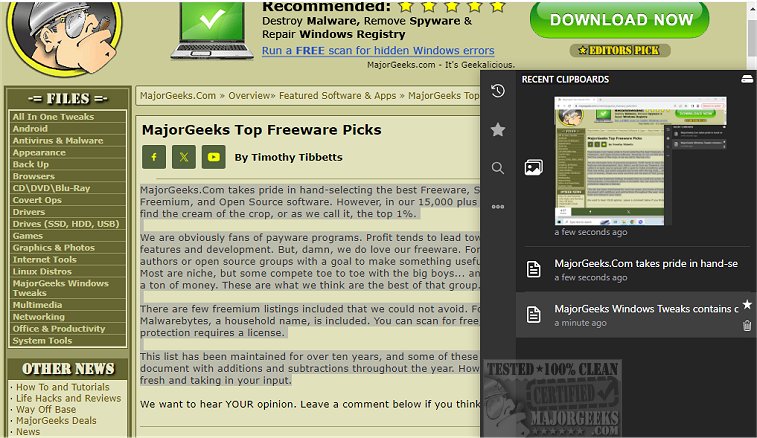
Clippy 1.7.5 has been officially released, offering users a dedicated clipboard manager that serves as a robust alternative to the default Windows clipboard manager. This application is meticulously designed to keep track of all copied text and images, allowing users to effortlessly search through their clipboard history to find important items when needed.
Clippy's functionality is user-friendly, activated with a simple hotkey that brings up the manager near the system tray, providing quick access to stored clipboard entries. The application records every copy event and securely stores the information locally, thereby ensuring user privacy. Additionally, users can mark essential clipboard entries as favorites, facilitating easier access to frequently used items.
Customization is a key feature of Clippy, as it allows users to tailor hotkeys according to their preferences for quick access to both Recent and Starred Clipboards. The app also offers the option to back up data to a cloud service and synchronize clipboard history with a cloud provider directly from within the application.
In summary, Clippy stands out as a straightforward yet feature-rich tool that is invaluable for anyone looking to efficiently manage their clipboard.
Clippy Features:
- Display/hide clipboard history with customizable shortcuts (e.g., ctrl+y or ctrl+d)
- Type out clipboard contents using ctrl+b, even in applications where pasting is restricted
- Support for both images and text
- Fully customizable keybindings for all actions
- Option to add favorite clipboard entries
- Smart search capabilities for links, colors, images, and hex codes
- Instant search functionality
- Ability to change database location and keyboard bindings
- Dark and light mode options
Additionally, Clippy's functionality is complemented by helpful resources such as guides on copying file paths, clearing clipboard history using shortcuts, and managing clipboard history settings in Windows 10 and 11.
As Clippy continues to evolve, future updates may introduce even more features and improvements, solidifying its role as an essential tool for productivity and efficient clipboard management
Clippy's functionality is user-friendly, activated with a simple hotkey that brings up the manager near the system tray, providing quick access to stored clipboard entries. The application records every copy event and securely stores the information locally, thereby ensuring user privacy. Additionally, users can mark essential clipboard entries as favorites, facilitating easier access to frequently used items.
Customization is a key feature of Clippy, as it allows users to tailor hotkeys according to their preferences for quick access to both Recent and Starred Clipboards. The app also offers the option to back up data to a cloud service and synchronize clipboard history with a cloud provider directly from within the application.
In summary, Clippy stands out as a straightforward yet feature-rich tool that is invaluable for anyone looking to efficiently manage their clipboard.
Clippy Features:
- Display/hide clipboard history with customizable shortcuts (e.g., ctrl+y or ctrl+d)
- Type out clipboard contents using ctrl+b, even in applications where pasting is restricted
- Support for both images and text
- Fully customizable keybindings for all actions
- Option to add favorite clipboard entries
- Smart search capabilities for links, colors, images, and hex codes
- Instant search functionality
- Ability to change database location and keyboard bindings
- Dark and light mode options
Additionally, Clippy's functionality is complemented by helpful resources such as guides on copying file paths, clearing clipboard history using shortcuts, and managing clipboard history settings in Windows 10 and 11.
As Clippy continues to evolve, future updates may introduce even more features and improvements, solidifying its role as an essential tool for productivity and efficient clipboard management
clippy 1.7.5 released
clippy provides a dedicated clipboard manager, a solid alternative to the default Windows manager.