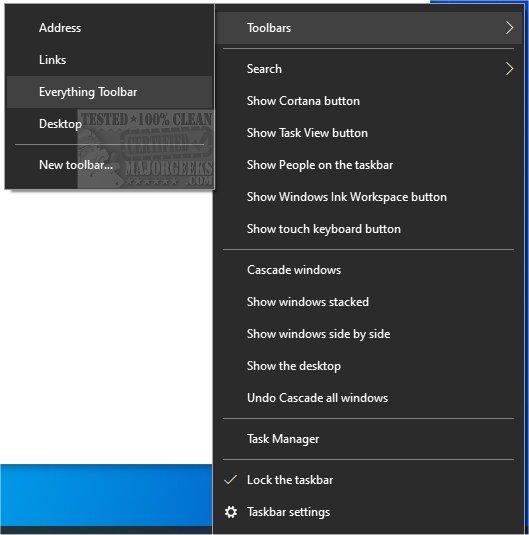
The Everything Toolbar 2.4.0 has been released, offering enhanced integration of the Everything search engine directly within the Windows taskbar. This tool allows users to quickly find files, folders, and other items by name, streamlining the process of indexing and searching for documents on their devices. Additionally, Everything Toolbar facilitates easy file sharing among users.
To set up Everything Toolbar, users need to follow these steps:
1. Extract the contents of the downloaded package.
2. Run the install.cmd file with administrative privileges.
3. Enable the Everything Toolbar by accessing the taskbar's context menu. Note that it may require opening the context menu twice, as it can be unresponsive on the first attempt.
For users looking to optimize their Windows search experience, similar guides are available on topics such as managing the search box or icon visibility in Windows 10 and 11, deleting and rebuilding the Windows search index, enabling or disabling enhanced search modes, and disabling Bing search in the Start menu.
In summary, Everything Toolbar 2.4.0 offers an efficient way to enhance file management on Windows, making it easier to locate and share files seamlessly. This release is particularly beneficial for users who frequently search for files and wish to improve their productivity through quick access to essential tools directly from the taskbar
To set up Everything Toolbar, users need to follow these steps:
1. Extract the contents of the downloaded package.
2. Run the install.cmd file with administrative privileges.
3. Enable the Everything Toolbar by accessing the taskbar's context menu. Note that it may require opening the context menu twice, as it can be unresponsive on the first attempt.
For users looking to optimize their Windows search experience, similar guides are available on topics such as managing the search box or icon visibility in Windows 10 and 11, deleting and rebuilding the Windows search index, enabling or disabling enhanced search modes, and disabling Bing search in the Start menu.
In summary, Everything Toolbar 2.4.0 offers an efficient way to enhance file management on Windows, making it easier to locate and share files seamlessly. This release is particularly beneficial for users who frequently search for files and wish to improve their productivity through quick access to essential tools directly from the taskbar
Everything Toolbar 2.4.0 released
Everything Toolbar provides you with an easy-to-utilize Everything integration for the Windows toolbar.