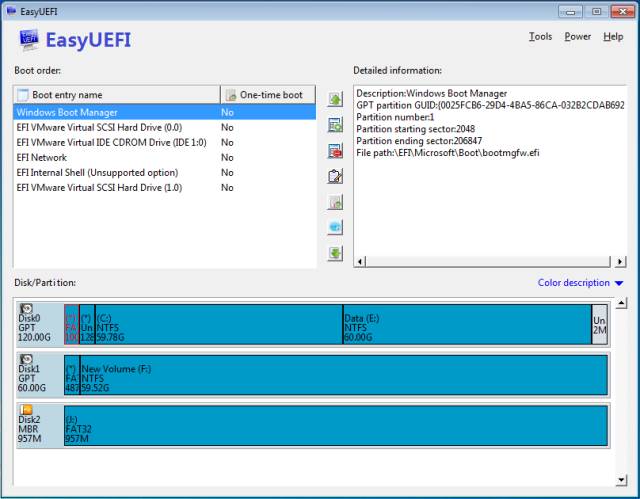
EasyUEFI 6.4.0 has been released, enhancing the management of EFI/UEFI boot options. This versatile tool allows users to create, delete, edit, clean, back up, and restore EFI/UEFI boot entries. Additionally, it enables the specification of a one-time boot entry for the next restart and facilitates changing the boot order without needing to access the BIOS setup.
One of the standout features of EasyUEFI is its capability to build a bootable Windows PE image. Users can create an image file to generate a bootable USB flash drive or burn it to a CD/DVD using third-party software. This function proves particularly beneficial for troubleshooting boot issues, as the bootable media can be utilized to rectify problems related to missing or corrupt EFI/UEFI boot options.
Alongside EasyUEFI, users may find additional resources helpful, such as guides on resetting BIOS settings, checking BIOS versions, and resolving boot device errors.
Extension:
With the release of EasyUEFI 6.4.0, users are empowered with more robust options for boot management, making it an essential tool for both novice and advanced users dealing with UEFI systems. As technology continues to advance, the importance of having a reliable way to manage boot options and resolve boot-related issues becomes increasingly critical. Future updates could potentially include enhanced user interfaces, additional troubleshooting tools, or compatibility with a broader range of operating systems and hardware configurations. Users should consider exploring all features, including the bootable media creation, to ensure they are fully equipped to handle any boot challenges that may arise
One of the standout features of EasyUEFI is its capability to build a bootable Windows PE image. Users can create an image file to generate a bootable USB flash drive or burn it to a CD/DVD using third-party software. This function proves particularly beneficial for troubleshooting boot issues, as the bootable media can be utilized to rectify problems related to missing or corrupt EFI/UEFI boot options.
Alongside EasyUEFI, users may find additional resources helpful, such as guides on resetting BIOS settings, checking BIOS versions, and resolving boot device errors.
Extension:
With the release of EasyUEFI 6.4.0, users are empowered with more robust options for boot management, making it an essential tool for both novice and advanced users dealing with UEFI systems. As technology continues to advance, the importance of having a reliable way to manage boot options and resolve boot-related issues becomes increasingly critical. Future updates could potentially include enhanced user interfaces, additional troubleshooting tools, or compatibility with a broader range of operating systems and hardware configurations. Users should consider exploring all features, including the bootable media creation, to ensure they are fully equipped to handle any boot challenges that may arise
EasyUEFI 6.4.0 released
EasyUEFI is a useful tool to manage your EFI/UEFI boot options.