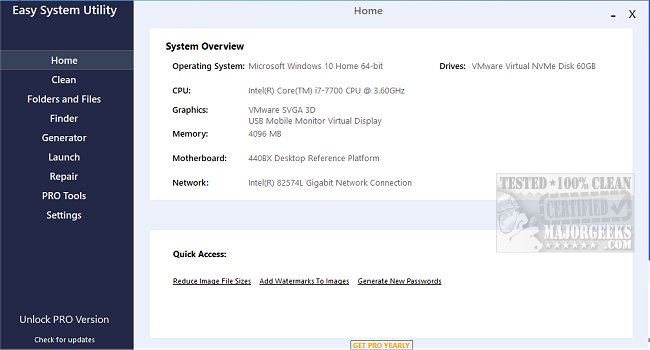
The newly launched Easy System Utility offers a user-friendly interface designed to optimize your computer's performance by removing unnecessary files, unlocking folders, compressing images, and more. This versatile tool allows users to easily access their system specifications, including details about the operating system, CPU, GPU, memory, motherboard, network, and drivers, all from one centralized dashboard—streamlining the process of managing your PC.
The application is organized into a tabbed menu, facilitating easy navigation among its various features. The Clean tab is particularly valuable, enabling users to analyze and eliminate redundant Windows software and junk files, such as DirectX Shader Cache, Prefetch Files, Recycle Bin contents, temporary files, Thumbnail Cache, and Windows Log Files. This functionality not only helps free up disk space but also enhances overall system performance.
In the Folders/Files tab, users can unlock files and folders facing permission issues, efficiently resize images, add watermarks to images, rename folders, and delete large folders that consume significant storage space. The utility also includes a Password Generator tab, allowing users to create secure, random passwords with customizable lengths and character types, enhancing data security.
Additionally, the Launch tab provides quick access to frequently used programs, files, and folders directly from the Easy System Utility system tray icon, eliminating the need to search for them each time. To ensure that all features operate seamlessly, it is essential to run Easy System Utility with administrator rights.
Key Features of Easy System Utility:
- View system specifications
- Analyze and clean Windows junk files
- Unlock files and folders
- Reduce image file sizes
- Add watermarks to images
- Rename and delete files/folders
- Generate secure passwords
- Quick launch of files and programs
For those seeking alternatives, comparisons can be made with popular drive cleaning software, including CCleaner, Wise Disk Cleaner, and PrivaZer. Furthermore, users can explore methods for utilizing Storage Sense to automatically delete junk files, as well as tips for backing up or restoring the Windows Registry.
In summary, the Easy System Utility 1.1.71.0 is a robust tool designed for Windows users aiming to enhance their system's efficiency and organization. With its comprehensive features, it simplifies many routine tasks related to file management and system maintenance
The application is organized into a tabbed menu, facilitating easy navigation among its various features. The Clean tab is particularly valuable, enabling users to analyze and eliminate redundant Windows software and junk files, such as DirectX Shader Cache, Prefetch Files, Recycle Bin contents, temporary files, Thumbnail Cache, and Windows Log Files. This functionality not only helps free up disk space but also enhances overall system performance.
In the Folders/Files tab, users can unlock files and folders facing permission issues, efficiently resize images, add watermarks to images, rename folders, and delete large folders that consume significant storage space. The utility also includes a Password Generator tab, allowing users to create secure, random passwords with customizable lengths and character types, enhancing data security.
Additionally, the Launch tab provides quick access to frequently used programs, files, and folders directly from the Easy System Utility system tray icon, eliminating the need to search for them each time. To ensure that all features operate seamlessly, it is essential to run Easy System Utility with administrator rights.
Key Features of Easy System Utility:
- View system specifications
- Analyze and clean Windows junk files
- Unlock files and folders
- Reduce image file sizes
- Add watermarks to images
- Rename and delete files/folders
- Generate secure passwords
- Quick launch of files and programs
For those seeking alternatives, comparisons can be made with popular drive cleaning software, including CCleaner, Wise Disk Cleaner, and PrivaZer. Furthermore, users can explore methods for utilizing Storage Sense to automatically delete junk files, as well as tips for backing up or restoring the Windows Registry.
In summary, the Easy System Utility 1.1.71.0 is a robust tool designed for Windows users aiming to enhance their system's efficiency and organization. With its comprehensive features, it simplifies many routine tasks related to file management and system maintenance
Easy System Utility 1.1.71.0 released
Easy System Utility provides an intuitive interface for removing unnecessary files, unlocking folders, compressing images, adding watermarks, launching files and folders from the system tray, and more.