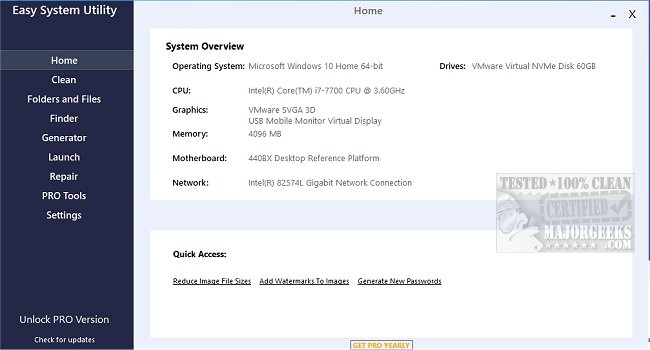
Easy System Utility has recently been updated to version 1.1.64.0, offering a user-friendly interface designed to optimize computer performance by removing unnecessary files and managing folders efficiently. This utility is ideal for users looking to streamline their system maintenance tasks, as it provides a comprehensive system overview that includes details on the operating system, CPU, GPU, memory, motherboard, network, and drivers—all accessible from a single interface.
The application features a tabbed menu system that categorizes its functions for easy navigation. The Clean tab allows users to analyze and eliminate unwanted Windows software and junk files, including options for clearing DirectX Shader Cache, Prefetch Files, Recycle Bin content, Temporary files, Thumbnail Cache, and Windows Log Files. This functionality is vital for recovering disk space and enhancing system performance.
In the Folders/Files tab, users can unlock files and folders that may be restricted due to permission issues, resize images for quicker loading times, and add watermarks for copyright protection. The ability to rename folders and delete large folders further aids in effective space management.
Additionally, the Password Generator tab enables users to create strong, random passwords tailored to their specifications, including options to customize length and character types. The Launch tab facilitates quick access to frequently used applications, files, and folders directly from the system tray, enhancing productivity by minimizing search time.
To fully utilize all the features of Easy System Utility, it is necessary to run the program with administrator rights.
Key Features of Easy System Utility:
- View detailed system specifications
- Analyze and clean Windows junk files
- Unlock restricted files and folders
- Reduce image file sizes and add watermarks
- Rename and delete large folders
- Generate secure, random passwords
- Quick launch of applications and files
For users interested in similar tools, comparisons are available among drive cleaners such as CCleaner, Wise Disk Cleaner, and PrivaZer. Additional resources on managing storage, backing up the Windows Registry, and optimizing startup applications in Windows 10 and 11 are also provided.
In conclusion, Easy System Utility 1.1.64.0 is a versatile tool aimed at enhancing user experience by simplifying system management and cleaning processes, making it a valuable asset for both casual and advanced users looking to maintain optimal performance on their computers
The application features a tabbed menu system that categorizes its functions for easy navigation. The Clean tab allows users to analyze and eliminate unwanted Windows software and junk files, including options for clearing DirectX Shader Cache, Prefetch Files, Recycle Bin content, Temporary files, Thumbnail Cache, and Windows Log Files. This functionality is vital for recovering disk space and enhancing system performance.
In the Folders/Files tab, users can unlock files and folders that may be restricted due to permission issues, resize images for quicker loading times, and add watermarks for copyright protection. The ability to rename folders and delete large folders further aids in effective space management.
Additionally, the Password Generator tab enables users to create strong, random passwords tailored to their specifications, including options to customize length and character types. The Launch tab facilitates quick access to frequently used applications, files, and folders directly from the system tray, enhancing productivity by minimizing search time.
To fully utilize all the features of Easy System Utility, it is necessary to run the program with administrator rights.
Key Features of Easy System Utility:
- View detailed system specifications
- Analyze and clean Windows junk files
- Unlock restricted files and folders
- Reduce image file sizes and add watermarks
- Rename and delete large folders
- Generate secure, random passwords
- Quick launch of applications and files
For users interested in similar tools, comparisons are available among drive cleaners such as CCleaner, Wise Disk Cleaner, and PrivaZer. Additional resources on managing storage, backing up the Windows Registry, and optimizing startup applications in Windows 10 and 11 are also provided.
In conclusion, Easy System Utility 1.1.64.0 is a versatile tool aimed at enhancing user experience by simplifying system management and cleaning processes, making it a valuable asset for both casual and advanced users looking to maintain optimal performance on their computers
Easy System Utility 1.1.64.0 released
Easy System Utility provides an intuitive interface for removing unnecessary files, unlocking folders, compressing images, adding watermarks, launching files and folders from the system tray, and more.