Easy System Utility 1.1.59.0 has been released, offering users a user-friendly interface designed for optimizing system performance. This versatile tool enables users to remove unnecessary files, unlock restricted folders, compress images, add watermarks, and launch files and folders quickly from the system tray, among other features.
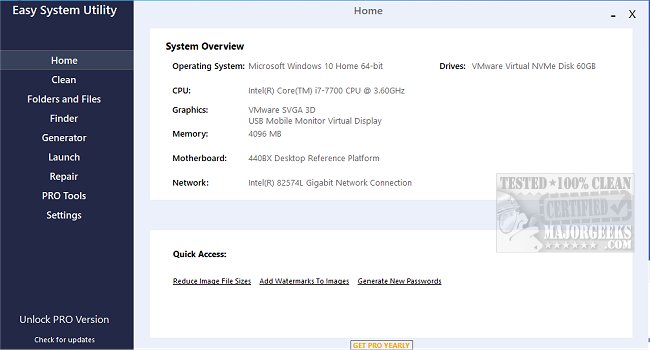
One of the standout capabilities of Easy System Utility is its system overview function, which allows users to easily view their computer's hardware specifications, including the operating system, CPU model, GPU, memory, motherboard, network details, and drivers. This centralized information helps save time and enhances user experience.
The interface is organized into tabs for easy navigation. The "Clean" tab focuses on identifying and removing unwanted Windows software and junk files. Users can analyze specific file types, such as DirectX Shader Cache, Prefetch Files, Recycle Bin contents, temporary files, thumbnail caches, and Windows log files, to free up valuable disk space on their machines.
The "Folders/Files" tab offers tools for managing files and folders efficiently. Users can unlock files and folders that they do not have permission to access, reduce image sizes for easier sharing, and add watermarks to protect their images. Additionally, the tool allows for renaming folders and deleting large folders that take up unnecessary space.
For security, the utility features a "Password Generator" tab, which allows users to create secure, random passwords with customizable options for length and character types, including numbers, symbols, uppercase, and lowercase letters. The "Launch" tab provides quick access to frequently used programs, files, and folders directly from the Easy System Utility system tray icon, streamlining workflows.
To ensure all features function correctly, users are required to run Easy System Utility with administrator rights.
Key Features of Easy System Utility:
- View System Specifications
- Analyze and Clean Windows Junk Files
- Unlock Files and Folders
- Reduce Image File Sizes and Add Watermarks
- Rename Files and Folders
- Delete Large Folders
- Retrieve Windows and WiFi Passwords
- Generate Secure Passwords
- Quick Launch for Files and Programs
In addition to its core functionalities, Easy System Utility stands out among other similar tools, such as CCleaner, Wise Disk Cleaner, and PrivaZer. Users looking for automated solutions can also explore features like Storage Sense in Windows 10 for automatic junk file deletion, as well as backup and restore options for the Windows Registry. Overall, Easy System Utility is a comprehensive tool for maintaining and optimizing computer performance
One of the standout capabilities of Easy System Utility is its system overview function, which allows users to easily view their computer's hardware specifications, including the operating system, CPU model, GPU, memory, motherboard, network details, and drivers. This centralized information helps save time and enhances user experience.
The interface is organized into tabs for easy navigation. The "Clean" tab focuses on identifying and removing unwanted Windows software and junk files. Users can analyze specific file types, such as DirectX Shader Cache, Prefetch Files, Recycle Bin contents, temporary files, thumbnail caches, and Windows log files, to free up valuable disk space on their machines.
The "Folders/Files" tab offers tools for managing files and folders efficiently. Users can unlock files and folders that they do not have permission to access, reduce image sizes for easier sharing, and add watermarks to protect their images. Additionally, the tool allows for renaming folders and deleting large folders that take up unnecessary space.
For security, the utility features a "Password Generator" tab, which allows users to create secure, random passwords with customizable options for length and character types, including numbers, symbols, uppercase, and lowercase letters. The "Launch" tab provides quick access to frequently used programs, files, and folders directly from the Easy System Utility system tray icon, streamlining workflows.
To ensure all features function correctly, users are required to run Easy System Utility with administrator rights.
Key Features of Easy System Utility:
- View System Specifications
- Analyze and Clean Windows Junk Files
- Unlock Files and Folders
- Reduce Image File Sizes and Add Watermarks
- Rename Files and Folders
- Delete Large Folders
- Retrieve Windows and WiFi Passwords
- Generate Secure Passwords
- Quick Launch for Files and Programs
In addition to its core functionalities, Easy System Utility stands out among other similar tools, such as CCleaner, Wise Disk Cleaner, and PrivaZer. Users looking for automated solutions can also explore features like Storage Sense in Windows 10 for automatic junk file deletion, as well as backup and restore options for the Windows Registry. Overall, Easy System Utility is a comprehensive tool for maintaining and optimizing computer performance
Easy System Utility 1.1.59.0 released
Easy System Utility provides an intuitive interface for removing unnecessary files, unlocking folders, compressing images, adding watermarks, launching files and folders from the system tray, and more.