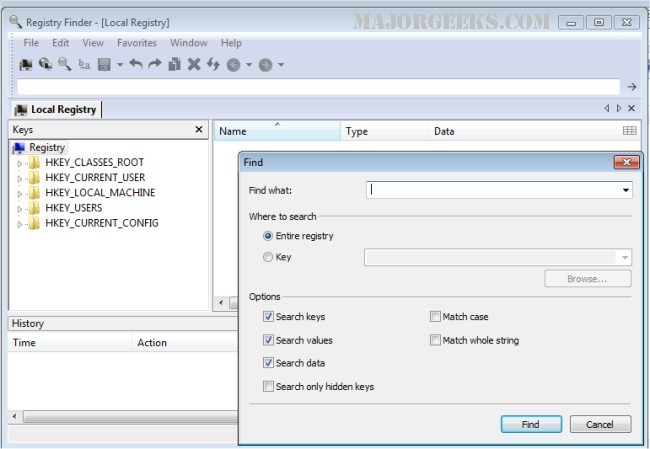
Registry Finder version 2.63 has been released, enhancing its capabilities as a freeware application that allows users to navigate the local registry effectively. This tool enables users to create, delete, or rename registry keys and values, while also supporting modifications in their original data types, such as strings, multi-strings, DWORD, or binary data.
One notable feature of Registry Finder is the ability to open multiple registry windows simultaneously. Upon the next launch, these windows will reopen at the previously accessed keys, enhancing user convenience. The application's search function is designed to be fast and efficient, displaying all found items in a separate window. Each match is represented as a line in a list, with an accompanying icon indicating where the match occurred—be it in the key name, value name, or value data. Matched text is highlighted in red for easy identification.
Users can easily navigate to any found item in the registry window or edit and delete entries directly from the Find Results window. Additionally, the results can be exported to a file in either comma-separated values (CSV) or registry file format. The application also includes an "undo" and "redo" feature for any operations that modify the registry, providing an extra layer of safety for users.
It is important to remember that before making any changes to the registry, including deletions or modifications, users should back up the registry to prevent potential data loss.
For further assistance with registry management, users can refer to helpful resources on how to back up or restore the Windows Registry, automate backups on Windows 10 and 11, and various methods to open the Registry Editor. Additionally, there are guides on how to disable the Registry Editor if needed.
In conclusion, Registry Finder 2.63 continues to be a valuable tool for users who need to manage the Windows registry effectively, offering a user-friendly interface and robust features for registry navigation and modification
One notable feature of Registry Finder is the ability to open multiple registry windows simultaneously. Upon the next launch, these windows will reopen at the previously accessed keys, enhancing user convenience. The application's search function is designed to be fast and efficient, displaying all found items in a separate window. Each match is represented as a line in a list, with an accompanying icon indicating where the match occurred—be it in the key name, value name, or value data. Matched text is highlighted in red for easy identification.
Users can easily navigate to any found item in the registry window or edit and delete entries directly from the Find Results window. Additionally, the results can be exported to a file in either comma-separated values (CSV) or registry file format. The application also includes an "undo" and "redo" feature for any operations that modify the registry, providing an extra layer of safety for users.
It is important to remember that before making any changes to the registry, including deletions or modifications, users should back up the registry to prevent potential data loss.
For further assistance with registry management, users can refer to helpful resources on how to back up or restore the Windows Registry, automate backups on Windows 10 and 11, and various methods to open the Registry Editor. Additionally, there are guides on how to disable the Registry Editor if needed.
In conclusion, Registry Finder 2.63 continues to be a valuable tool for users who need to manage the Windows registry effectively, offering a user-friendly interface and robust features for registry navigation and modification
Registry Finder 2.63 released
Registry Finder is a freeware app that lets you browse the local registry and create, delete, or rename keys/values modifying the values as their original data type (string, multi-string, DWORD) or as binary data.