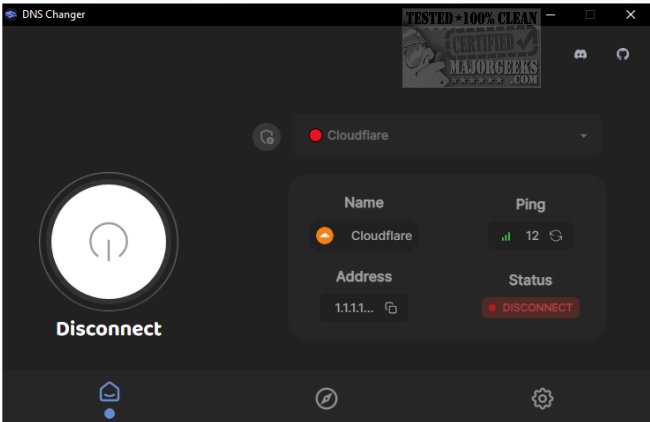
DNS Changer, currently at version 2.3.11 in pre-release and 2.3.10 officially released, offers users a convenient way to access a variety of DNS servers from a centralized platform. This open-source application is compatible with Windows, Mac, and Linux operating systems. While most users rely on the DNS address provided by their Internet Service Provider (ISP), there are alternative DNS servers that may offer improved speed and security.
For those who prefer to change their DNS settings manually, the process involves navigating through the settings on their device, which can be cumbersome for some. DNS Changer streamlines this process by providing an intuitive user interface where users can easily select from a list of DNS servers or add their own custom servers. The application displays helpful information such as the server address, ping, and connection status, allowing for quick and informed decisions.
In addition to its core functionality, DNS Changer is equipped with features that enhance user experience, making it a valuable tool for anyone looking to optimize their internet connection. The application is designed for simplicity, ensuring that both tech-savvy individuals and those less familiar with DNS configurations can use it effectively.
Beyond the capabilities of DNS Changer, users interested in managing their network settings may find additional resources helpful, such as guides on viewing DNS cache contents, flushing the DNS cache, resetting Winsock, and reconfiguring TCP/IP settings on various Windows versions.
As the importance of internet privacy and performance continues to grow, tools like DNS Changer become increasingly relevant, enabling users to take control over their online experience and explore more efficient DNS options. Future developments may include enhanced features, broader server options, and further optimizations to improve user experience and security
For those who prefer to change their DNS settings manually, the process involves navigating through the settings on their device, which can be cumbersome for some. DNS Changer streamlines this process by providing an intuitive user interface where users can easily select from a list of DNS servers or add their own custom servers. The application displays helpful information such as the server address, ping, and connection status, allowing for quick and informed decisions.
In addition to its core functionality, DNS Changer is equipped with features that enhance user experience, making it a valuable tool for anyone looking to optimize their internet connection. The application is designed for simplicity, ensuring that both tech-savvy individuals and those less familiar with DNS configurations can use it effectively.
Beyond the capabilities of DNS Changer, users interested in managing their network settings may find additional resources helpful, such as guides on viewing DNS cache contents, flushing the DNS cache, resetting Winsock, and reconfiguring TCP/IP settings on various Windows versions.
As the importance of internet privacy and performance continues to grow, tools like DNS Changer become increasingly relevant, enabling users to take control over their online experience and explore more efficient DNS options. Future developments may include enhanced features, broader server options, and further optimizations to improve user experience and security
DNS Changer 2.3.11 Pre-Release / 2.3.10 released
DNS Changer gives you access to some of the best DNS servers, all from a central location.
DNS Changer 2.3.11 Pre-Release / 2.3.10 released @ MajorGeeks