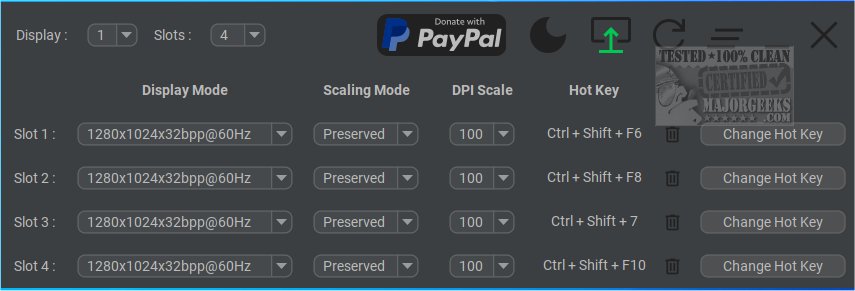
The newly released version 4.1.1 of Display Hot Keys offers users an efficient way to switch between various display settings through customizable hotkeys. This software is designed to enhance user experience by allowing quick adjustments to display modes, catering to specific content needs such as gaming, video playback, or professional tasks.
- Quick Switching: Users can rapidly toggle between different display modes without the hassle of navigating through complex menus. This feature is especially beneficial for individuals who frequently change settings based on their current activity.
- User-Friendly Customization: Display Hot Keys allows up to 12 customizable hotkey slots for each monitor. Users can personalize these slots to modify key display attributes like resolution, bit depth, refresh rate, scaling mode, and DPI. This level of customization makes it adaptable for various use cases.
- Multi-Monitor Support: The software is compatible with multi-monitor setups, enabling users to manage and switch display modes seamlessly across multiple screens. This functionality is particularly advantageous for those who utilize multiple monitors for different tasks.
- Accessibility: Display Hot Keys is designed to be intuitive, making it easy for users of all skill levels to leverage its features. A detailed usage guide is available at the developer's repository, ensuring that users can maximize the software's potential.
Display Hot Keys 4.1.1 is a significant tool for anyone looking to simplify their display management process. Its combination of rapid access, extensive customization options, and multi-monitor compatibility positions it as an essential utility for both casual users and professionals alike. Whether you’re switching modes for gaming, content creation, or multitasking, Display Hot Keys streamlines the experience, making it more efficient and enjoyable.
For further reading, users might also explore related topics such as managing taskbar visibility on multiple monitors or remembering window locations in Windows 10/11
Key Features
- Quick Switching: Users can rapidly toggle between different display modes without the hassle of navigating through complex menus. This feature is especially beneficial for individuals who frequently change settings based on their current activity.
- User-Friendly Customization: Display Hot Keys allows up to 12 customizable hotkey slots for each monitor. Users can personalize these slots to modify key display attributes like resolution, bit depth, refresh rate, scaling mode, and DPI. This level of customization makes it adaptable for various use cases.
- Multi-Monitor Support: The software is compatible with multi-monitor setups, enabling users to manage and switch display modes seamlessly across multiple screens. This functionality is particularly advantageous for those who utilize multiple monitors for different tasks.
- Accessibility: Display Hot Keys is designed to be intuitive, making it easy for users of all skill levels to leverage its features. A detailed usage guide is available at the developer's repository, ensuring that users can maximize the software's potential.
Conclusion
Display Hot Keys 4.1.1 is a significant tool for anyone looking to simplify their display management process. Its combination of rapid access, extensive customization options, and multi-monitor compatibility positions it as an essential utility for both casual users and professionals alike. Whether you’re switching modes for gaming, content creation, or multitasking, Display Hot Keys streamlines the experience, making it more efficient and enjoyable.
For further reading, users might also explore related topics such as managing taskbar visibility on multiple monitors or remembering window locations in Windows 10/11
Display Hot Keys 4.1.1 released
Display Hot Keys enables quick switching between display settings using custom hotkeys.