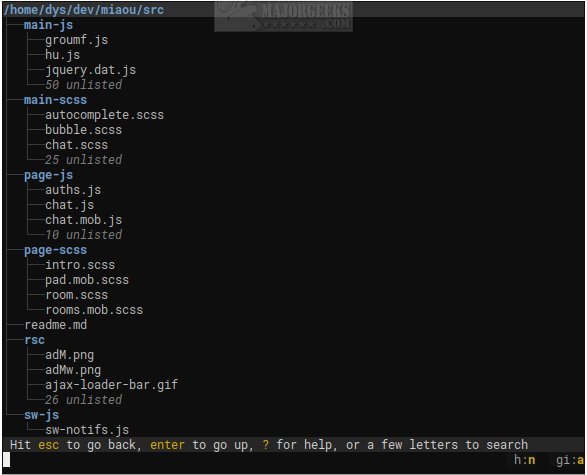
Broot 1.59.0 has been released, enhancing its capabilities as an open-source command-line file manager designed for efficiently navigating directory trees. It transforms terminal navigation into a more user-friendly experience by providing a live, searchable tree view that dynamically updates as the user types. This allows for quicker file searches and access without the cumbersome process of using multiple commands like `ls`, `cd`, and `find`.
Broot is intentionally designed to be minimal and fast, avoiding the complexity often associated with traditional terminal user interfaces (TUIs) that can overwhelm users with numerous panels and intricate key combinations. Instead, it presents a straightforward view of the entire folder structure, enabling users to jump directly to their desired files or directories with minimal keystrokes, even if their exact location is forgotten.
In addition to basic navigation, Broot allows users to search for files, create custom shortcuts, and manipulate files without disrupting the directory hierarchy. Notably, it operates efficiently even on slower disks, as it is capable of interrupting ongoing searches to accommodate new keystrokes.
To fully utilize Broot, users need to set up a shell function named `br` for launching the application, which may require administrative permissions. For optimal use, it is advisable to visit the author's website for a comprehensive usage guide.
In summary, Broot 1.59.0 stands out as a powerful tool for terminal users, simplifying file navigation and management while maintaining speed and efficiency. As the demand for streamlined command-line tools grows, Broot's innovative approach may set a new standard for terminal file management.
For further insights on command-line usage, users may explore resources like "The Ultimate List of Every Known Command Prompt and PowerShell Commands" or guides on adjusting folder view settings in Windows 10 and 11
Broot is intentionally designed to be minimal and fast, avoiding the complexity often associated with traditional terminal user interfaces (TUIs) that can overwhelm users with numerous panels and intricate key combinations. Instead, it presents a straightforward view of the entire folder structure, enabling users to jump directly to their desired files or directories with minimal keystrokes, even if their exact location is forgotten.
In addition to basic navigation, Broot allows users to search for files, create custom shortcuts, and manipulate files without disrupting the directory hierarchy. Notably, it operates efficiently even on slower disks, as it is capable of interrupting ongoing searches to accommodate new keystrokes.
To fully utilize Broot, users need to set up a shell function named `br` for launching the application, which may require administrative permissions. For optimal use, it is advisable to visit the author's website for a comprehensive usage guide.
In summary, Broot 1.59.0 stands out as a powerful tool for terminal users, simplifying file navigation and management while maintaining speed and efficiency. As the demand for streamlined command-line tools grows, Broot's innovative approach may set a new standard for terminal file management.
For further insights on command-line usage, users may explore resources like "The Ultimate List of Every Known Command Prompt and PowerShell Commands" or guides on adjusting folder view settings in Windows 10 and 11
Broot 1.59.0 released
Broot is an Open Source way to view and navigate any size directory trees through the command line.