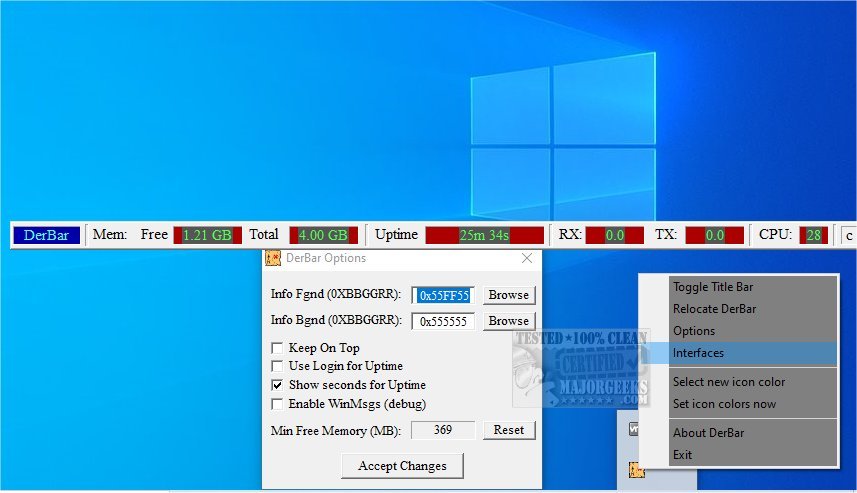
DerBar 1.29 has been released, introducing a user-friendly and customizable status bar designed for real-time monitoring of essential system and network parameters. This tool enables users to effortlessly track crucial statistics such as CPU usage, memory consumption, and network activity through its intuitive interface. The slight configurability allows users to personalize the displayed information according to their specific needs, ensuring quick access to the data that is most pertinent to system performance and network health.
One of DerBar's defining features is its compact design and compatibility, which prioritize simplicity over extensive configuration options. Unlike traditional monitoring programs, DerBar focuses on ease of use, making it accessible to both casual users and IT professionals. Users can easily customize their experience by clicking on the icon in the system tray to access the few available configuration options, eliminating any overwhelming complexity.
Additionally, users can reposition DerBar on their screens by simply dragging it to their desired location, and the program will remember its last position for future launches. This thoughtful design enhances user experience, making DerBar a practical choice for those seeking efficient system monitoring without unnecessary features.
DerBar is an essential tool for users at all levels, offering powerful monitoring capabilities that allow for effortless tracking of a system's operational status. Its intuitive interface, combined with robust features, enables users to quickly access vital performance metrics, identify potential issues, and maintain optimal system operation. Whether diagnosing problems or ensuring general system health, DerBar provides crucial insights that enhance management and oversight capabilities.
Investing in DerBar allows users to take control of their system's performance, ensuring it runs smoothly and efficiently.
To extend the functionalities of DerBar, future updates could include enhanced data visualization options, such as graphs or charts, to provide a more comprehensive view of system performance over time. Additionally, incorporating alert systems to notify users of critical thresholds being crossed (like high CPU usage or low memory availability) could further empower users to maintain system health proactively. Integrating support for additional operating systems or mobile applications could also widen its user base, making DerBar an even more versatile tool for system monitoring
One of DerBar's defining features is its compact design and compatibility, which prioritize simplicity over extensive configuration options. Unlike traditional monitoring programs, DerBar focuses on ease of use, making it accessible to both casual users and IT professionals. Users can easily customize their experience by clicking on the icon in the system tray to access the few available configuration options, eliminating any overwhelming complexity.
Additionally, users can reposition DerBar on their screens by simply dragging it to their desired location, and the program will remember its last position for future launches. This thoughtful design enhances user experience, making DerBar a practical choice for those seeking efficient system monitoring without unnecessary features.
DerBar is an essential tool for users at all levels, offering powerful monitoring capabilities that allow for effortless tracking of a system's operational status. Its intuitive interface, combined with robust features, enables users to quickly access vital performance metrics, identify potential issues, and maintain optimal system operation. Whether diagnosing problems or ensuring general system health, DerBar provides crucial insights that enhance management and oversight capabilities.
Investing in DerBar allows users to take control of their system's performance, ensuring it runs smoothly and efficiently.
To extend the functionalities of DerBar, future updates could include enhanced data visualization options, such as graphs or charts, to provide a more comprehensive view of system performance over time. Additionally, incorporating alert systems to notify users of critical thresholds being crossed (like high CPU usage or low memory availability) could further empower users to maintain system health proactively. Integrating support for additional operating systems or mobile applications could also widen its user base, making DerBar an even more versatile tool for system monitoring
DerBar 1.29 released
DerBar is a user-friendly and customizable status bar that provides real-time monitoring of essential system and network parameters.